How to make Google put preferred sources up top when you search

 BBC
BBCA new feature lets you choose which publishers – including the BBC – appear at the top of your search results. Here's how to use it.
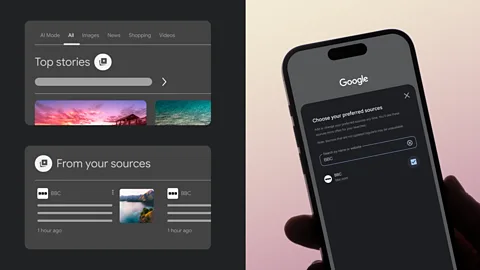
Whether seeking the day's headlines or a healthy recipe, turning to Google search inevitably yields almost too much information – and with the recent rollout of AI summaries, trusted sources can sometimes seem lost down the page. With their new Preferred Sources tool, Google has put some control back in users' hands.
You can now personalise your Google settings to select the BBC and any other publication or news source you'd most want to see when you visit Google websites and apps. These are your Preferred Sources. Find out more, below.
What is 'Preferred Sources'?
Preferred Sources are websites you select in your Google settings that Google will prioritise when showing news and content. When you add a site as a Preferred Source, Google is more likely to show you articles, videos and other updates from that site.
Where will my Preferred Sources appear?
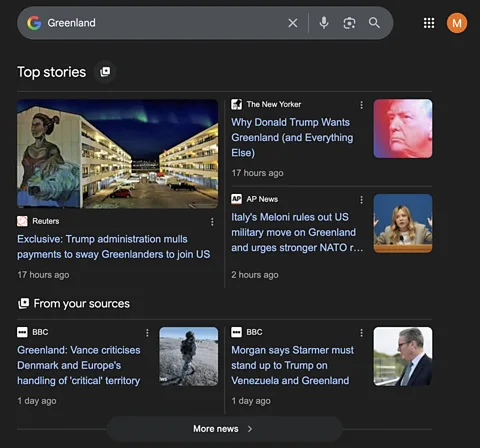
Preferred Sources may appear in the Google Top Stories results on Google search. The most likely place you'll see your Preferred Sources will be in the "from your sources" section nested within Top Stories results, both in the desktop and mobile versions of Google search.
What are the benefits of personalising my Preferred Sources?
When you personalise your Preferred Sources settings, you're making Google work smarter for you. Choosing the BBC as a Preferred Source means that you see news from your trusted source more frequently.
How do I add the BBC as a Google Preferred Source?
The fastest way to add the BBC as a Preferred Source is to use this direct link and tick the box next to BBC.com. (If you're not logged in or you don't have a Google account, the link will first ask you to sign in or create an account before bringing you to the selection screen.)
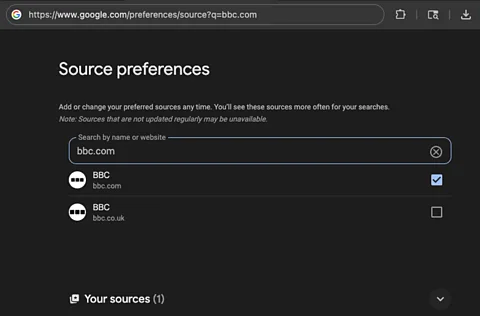
You can also set your Preferred Sources while searching: After you search for something on Google, you'll see "Top Stories" next to a starred card icon. Click that icon to add BBC.com as a Preferred Source, then reload the search to see new BBC results. This preference will now be applied to all future Google searches.
--
For timely, trusted tech news from global correspondents to your inbox, sign up to the Tech Decoded newsletter, while The Essential List delivers a handpicked selection of features and insights twice a week.
