NARRATION:It’s easy to take the internet for granted. It’s part of our daily lives, in ways we often don’t even notice. It’s just ‘there’.
Yet if you ask people what the internet is made of, or how it works, most people would scratch their heads and struggle to find an answer. So let’s find out more, starting with the word - internet.
It’s actually shortened from the word internetwork - which was first used back in 1974 when the internet was just getting started.
Inter means between, and network means a group of things connected together. I’m glad they shortened it, internetwork is a bit of a tongue twister!
Let’s look at networks. People can be part of a network where they all know each other and can communicate and share things. Everyone in the network is connected. It might be a small network like a family, or a class in school, or it might be much bigger - like a social media group.
Computers and other electronic devices can also connect together to create networks that can share information and send messages. Network connections between devices are made with wires and cables, and sometimes they can use wireless connections if they are close together. A network can be small - only two computers - or huge, with hundreds of devices connected together.
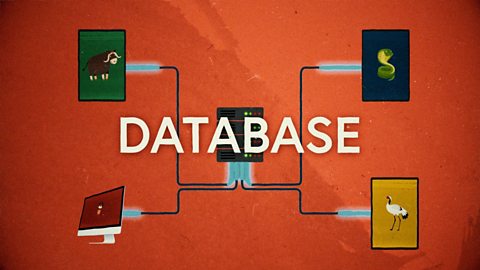
Most schools have a computer network that allows staff and pupils to share and access work and resources. The network has one central computer called a server with a large memory drive where all the files and resources are stored. The server is connected to a device called a switch which has lots of connection ports for other devices to plug their cables into so they can communicate with the server.
All the other computers and devices connected to the server via the switch are called clients. The way I remember this is by thinking about someone serving someone else in a restaurant. The server has all the food and delivers it to the client - the person who is being served.
Let’s say someone needs to open a photo stored on the server. Using their client device they click on the file name, which sends a message across the network connections and through the switch to the server saying, “serve me that tasty document please, I’m hungry”, or something similar! The file information has to be digitized, or converted, into numbers before it can travel around the network. Once digitized, the information is then split up into packets. These packets are small enough to whizz around the network and avoid network traffic jams which might slow things down. Each packet has all the information it needs to make sure it gets safely to its destination and join up with all the other packets that make up the complete message or files, and in this case the photo that we then see on screen. Sending packets to the right address - it’s just like a super-fast postal system for computers!
There are millions of small computer networks like this all over the world, with servers working away to deliver tasty content to their hungry clients. But what about if you want to send a message or share a file with someone in a different network? One that is in a different country, or uses a different type of device? We need a way to make connections between different networks. You guessed it - this is where the internet makes an appearance!
This world network developed into the giant network of networks that we call the internetwork, or internet for short. The internet works because all the computers connected to it follow the same rules, or protocols. All the devices and computers on the internet also have a special address called an internet protocol address, IP address for short.
The internet allows us to download files from other networks around the world in a few seconds. But how do those web pages and messages and files get to us so quickly from so far away? You know how everyone talks about the internet being in the cloud, so we imagine it floating around in the sky. Well most of the internet is actually connected by cables and wires. In fact, 99% of internet traffic travels through cables. Some of the cables are buried in the ground and some are carried above our heads, through telephone wires on telegraph poles.
But hang on a minute, how do we send an email across the sea? Well, there are over one million kilometres - yes, one million - of undersea internet cables, protected from damage in special tubes. Cable ships travel across the oceans all over the world laying down and fixing these undersea cables to keep the internet connected.
The internet is expanding all the time, as we find new ways to connect and grow. Mobile phone signals to connect to the internet wirelessly, and new developments in space technology mean we might soon be using space satellites more often to get connected too. Now that truly would be a network in the clouds, above the clouds even!
All of this explains how you are watching this online video right now. You sent a request to watch the video by clicking on a link to the web page. The request for the web page was sent to the BBC server where the web page information is stored. OK - deep breath… The request was read by the BBC server and the web page information was converted into packets and sent across the internet, around the country under and over roads and towns and fields and rivers to your local exchange and then finally to your device, where all the packets were reassembled into the web page and the video that you are still hopefully watching! It’s incredible that it only takes the video a second or so to travel all those miles and through all those devices to get to your screen. Meaning you get more time to watch more videos with me! #winning
Video summary
This short film explains computer networks. It looks at different types of computer network and the elements that make up a basic network including clients, servers, switches and hubs.
The film uses a restaurant analogy to further explore the role of clients and servers, and how a photo travels around a network using packet technology.
The film then looks at how networks are combined to form the internet, using agreed rules or protocols.
It explores the physical structures that make up the internet including underground cables, overhead wires, undersea cables and WiFi connections.
Finally it looks at the journey of the film we are watching itself from the server it is stored on to the viewer’s computer screen, via the internet.
This short film is from the BBC Teach series, Cracking Computing.
Teacher Notes
A good place to start when learning about computer networks is to explore the school's network, following trunking and cables from wall sockets around the school to where they connect to the router and / or switch, and where the internet cables come in to the school via junction boxes and telephone sockets, etc.
Pupils could use paper and pencil or software to create diagrams showing how the different elements are connected.
Another good way to explore networks is through role play, where pupils take on the roles of the different network elements. Packets of information (paper messages) can be passed around the network of children (connected by string, or by holding hands, etc.), torn up and reassembled, and different network arrangements can be tested for speed and efficiency.
Other subjects
Design & technology and history: The invention and development of the internet is an important technological milestone in human history and is a good topic for research and presentation.Geography: The location and distribution of the undersea cable network that connects the internet across the world is a great way to consolidate knowledge of different continents and oceans.
This short film is suitable for teaching:
- KS2 computing curriculum in England
- Technologies curriculum area at 2nd Level in Scotland
- KS2 digital competence framework in Wales
- KS2 using ICT cross-curricular skill in Northern Ireland
Algorithms. video
This short film for primary schools outlines how algorithms are sets of instructions to make something happen, before explaining further using a recipe analogy.
Creating with computing. video
This short film explores the many creative computing tools we have access to, with a focus on how they are used to create new creative content and media.

Debugging. video
This short film uses computer games to explain debugging, which is the process of finding and correcting errors in computer programs.
Decomposition. video
This short film explains how decomposition involves breaking one big problem down into smaller, more manageable problems that can be tackled step by step.
Input and output. video
This short film gives a brief history of input and output methods with examples, and brings us up to date with examples of familiar input and output devices that we use every day.
Logical reasoning. video
This short film outlines logical reasoning as ‘sensible thinking’ when following rules, and explains how a problem with a computer program can be solved using logical reasoning.
Repetition. video
This short film for primary schools explains how repetition within computing allows a command to be repeated to make a computer program more efficient.
Search technologies. video
This short film gives a brief history of the development of the internet and the invention of the world wide web by Sir Tim Berners-Lee, and explains the role of a search engine.
Selection. video
This short film covers the use of selection in simple computer programs, and shows how this idea of yes/no questions can allow computers to respond to external conditions and select different paths.
Sequencing. video
This short film covers the concept of sequencing, or making sure things are in the right order, and explores what might happen if things are done in the wrong order, or sequence.
Variables. video
This short film explores how computers use variables to store things that change, like names, numbers and scores.
Working with data. video
This short film explores how data is collected using digital devices in response to questions, and how it is organised into tables, records and fields on a computer system.