Apple’s iOS 9: Tweaks not revolution for video, photos and audio

Marc Settle
specialises in smartphone reporting for the BBC Academy
Doesn’t time fly. It’s already a year since my now-traditional blog post examining what’s in the latest version of iOS, the operating system on iPhones and iPads. It’s also therefore a year since the equally traditional complaint of ‘preferential treatment’ to Apple over Android, the operating system that runs on around 80% of smartphones globally.
However, it remains the case that iPhones are the device of choice for many leading news organisations around the world - not just the BBC - for their employees to gather and send broadcast-quality footage at a far lower cost than traditional methods.
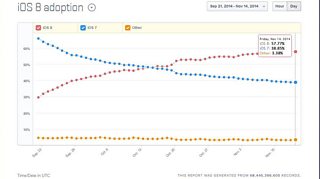
It’s also the case that this review of iOS 9 will be far more relevant, far more quickly, to iPhone owners if the pattern of previous releases is repeated. iOS 8 came out on 17 September 2014; a week later it was running on more than a third of compatible devices (as shown on the graph above).
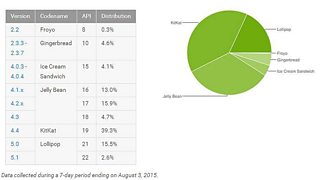
In stark contrast, the latest version of Android, called Lollipop, was released in November 2014 but nine months later it’s still barely on 20% of devices (below).
Much of the following is aimed at journalists using iPhones in their job, although I hope non-journalists will find it informative. There’s no strict dividing line that defines feature X as onlyof interest to journalists.
Finally, my beta testing was done on a somewhat weather-beaten iPhone 4s, so if you’re on a newer device you may see a few differences. As an iPhone 4s also can’t access all of the features in iOS 9, on occasions the information below has come from reliable third-parties who’ve tried it out.
Video
The three pillars of mobile journalism - video, photos and audio - remain relatively similar in iOS 9. This is in sharp contrast to the big changes that arrived with iOS 8.
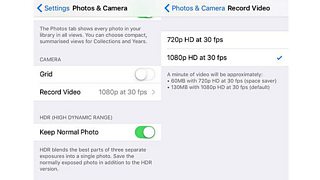
There have been a number of small tweaks, though, mainly with video. Dig down into the settings and in ‘Photos and Camera’ you’ll find an option to toggle the recording resolution of video, either full HD 1,080 pixels at 30 frames per second or down to 720 pixels HD, also at 30 fps.
The latter will result in recordings that are roughly half the size of the former - much to the relief of journalists with small-capacity devices which will now be able to record twice as much footage with very little noticeable drop in quality. (Those with iPhones that can record slo-mo video also have the option to film at 720 pixels.)
This is nowhere near as innovative as it may sound, however. It is in fact yet another example of Apple taking the best of third-party apps and incorporating that into iOS. Video recording apps such as FilmicPro and MoviePro have long given users the chance to adjust settings such as the frame rate, and much more besides.
While these changes are to be welcomed, they still don’t address a major problem facing journalists who film on iPhones for transmission in the UK, EU, most of Asia and Africa: there’s no option to change the frame rate to 25 frames per second. This means that footage recorded using the native iPhone camera is not suitable for broadcast on TV in the areas mentioned above. Plenty of third-party apps give the 25fps option, but not the native iOS camera. If you happen to be reading this, Tim Cook, can we have it in iOS 10?
When watching back a recording, you can now zoom into it in more detail by putting two fingers on the screen and spreading them out, as has long been the case with photos. This feature may be useful to help you see in more detail what you’ve recorded, but there’s no way I can find to actually capture this zoomed-in view. As soon as you try to edit it the footage reverts to normal.
Staying with editing, the look and layout of the in-built editor has changed, and not really for the better. Until now, the editing ‘window’ at the top of the screen covered the full width of your device. It’s now down at the bottom, crammed in between ‘cancel’ and ‘done’, making editing video a bit more fiddly.
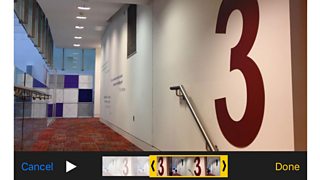
Those prone to ‘fat-finger syndrome’ had better watch out.
When it comes to recording video, the light can now be turned on and off during a recording; previously it was either on when you began or it wasn’t. While this seems a cute tweak, I’d recommend deciding beforehand if the light is needed, as turning it on half-way through will lead to a dramatic change in how the video looks - unless that’s what you’re aiming for.
Photos
While there don’t appear to be any changes to taking photos (unlike iOS 8 which brought in filters and lots more besides), new options abound once the image has been captured.
When viewing a single photo, small thumbnails of the rest of the images you’ve taken will be visible underneath, meaning you can whizz along to find exactly the right shot. ‘Selfies’ (photos taken with the front camera) and ‘screenshots’ (a grab of what’s on your screen) get their own folder, making them easier to find.
The cap on the number of photos that can be attached to an email has been lifted from the previous limit of five. But it’s worth checking the file-size limit of the recipient. For example, BBC emails are capped at 10MB, so even if you can send files that are larger than that they won’t arrive.
Audio
As for audio recording, so often the poor cousin of video and photos, Apple seems to have left the Voice Memo app exactly as it was in iOS 8.
On the face of it, then, it’s a lot of tinkering around the edges rather than anything revolutionary. That’s certainly true about what iOS 9 can do for the range of devices currently out there - the big unknown is how these changes will work with the new iPhones also due to be unveiled very shortly.
I’ll write another piece once the iPhone 6plus S or iPhone 7, or the iPhone Tim (unlikely, I admit), or whatever it’s called, is officially confirmed. The mass of leaks and speculation point to a vastly improved camera on both the front and back of the device, with the rear one able to record in 4K.
In part two of this blog tomorrow, Marc Settle assesses other changes in iOS 9 for mobile journalists, including battery life and keyboard display.
What does Apple’s iOS 8 offer journalists? 1: Camera and editing
What does Apple’s iOS 8 offer journalists? 2: Messaging and location features
Our other mobile journalism blogs by Marc Settle
Our section on smartphone training for journalists
Our mobile journalism blogs by Nick Garnett
Focus iPhone, record and send – instant video hit from storm-lashed Sardinia
