Apple’s iOS 9: An extra hour of power… but let’s wait for the new iPhone

Marc Settle
specialises in smartphone reporting for the BBC Academy
Beyond photos, video and audio (discussed in part one of this blog), what else is notable in iOS 9 that might benefit journalists?
Of particular relevance to those using smaller capacity iOS devices is that iOS 9 is itself smaller. An iPhone that's sold as being 16gb only actually has 12gb or so usable as the balance is taken up by the operating system. In contrast, iOS 9 uses just 1.3gb, freeing up a chunky bit of extra storage for more videos and the like. Devices short of space will automatically remove and later reinstall apps when the update is done. (As ever, it'd be wise to back your device up before taking the update.)
More power, low power
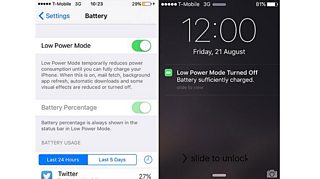
One regular complaint about iPhones is that the batteries don’t last long enough. Apple insists iOS 9 includes “system-wide enhancements” that are designed to squeeze an extra hour of power from a full charge. There’s also a new low power mode (LPM). Many Android users will at this point note that they’ve had this option for some time.
Turning LPM on automatically dims the screen appreciably, while the battery icon turns yellow. The feature turns off a number of activities known to drain power: fetching email; refreshing apps in the background; automatic downloads.
LPM can be activated at any point, even when the phone is at 100%, although prompts come when you’re down to 20% and then 10%. Once plugged in, the phone will eventually turn off LMP itself when it assesses it has taken in enough extra charge.
Devices with AirDrop available (not on an iPhone 4s) won’t even be able to use it while in LPM. My testing of LMP on an iPhone 4s showed a noticeable difference to how long I could get out of the phone on a single charge. But the phone was also slower at doing the tasks asked of it because the internal processes were being actively slowed down to conserve power.
Overall, it’s a handy tweak in iOS 9, but journalists wanting more power out of their device would be better off carrying a large reserve battery rather than relying on LPM to keep their phone going.
And it’s not just LPM which Apple hopes will save wasting battery: notifications sent to an iPhone detected to be face-down will no longer cause the screen to turn on. And a new setting called ‘battery’ will show which apps are draining power disproportionately to how much they’ve been used.
Key change
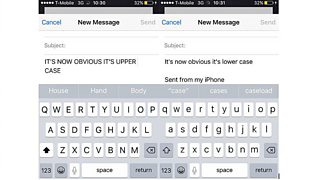
Another innovation which will also have Android owners gloating ‘I’ve had that for a while, actually’ involves the keyboard. Letters at last display when they’re lower case or upper case, rather than remaining upper all the time and forcing the user into a tedious game of trial and error, guessing are-they-upper-or-are-they-lower.
Take note
The Notes app gets a raft of enhancements, with Apple wanting it to be less of a to-do list and more a competitor to apps like Evernote, given that Notes can now store as well as share photos, links, maps, and even audio.
Apps you didn’t ask for…
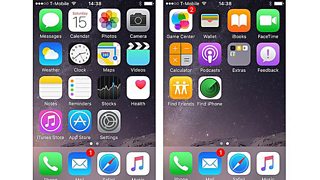
There’s more ‘bloatware’ in iOS 9 - apps on the device that can’t be removed by the user. Restoring an iPhone 4s to new presented me with no fewer than 31 pre-installed apps (pedants will count 32 separate icons below, but ‘feedback’ is a temporary app that only exists on beta versions of iOS, so won’t be included when it rolls out fully to all).
…and some you might like
One of these newly added apps is undeniably beneficial: FindMyiPhone has been successfully used by many journalists to recover a missing device. FindMyFriends - which can show the location of users who’ve opted in to the service - may not seem that useful for journalists, but it might be useful in tracking down the location of colleagues working on a story.
And iOS 9 brings with it two innovations which while not of immediate practical application to those using their devices tocreate content are nevertheless very interesting in terms of journalism more broadly.
The first relates to advertisements on mobile websites: iOS 9 will allow users to install apps that will prevent content such as ads appearing when they use Safari, the iOS web browser. For users, this will mean pages load quicker, use less data and are easier to read, stripped of space-hogging ads.
It's unclear how this will play out for publishers, for whom ads are obviously a huge source of revenue. Critics of Apple's move have been quick to point out that the firm is not blocking ads within its own closed apps system.
iOS 9 also brings with it - for users with a US-based iTunes account at least - a new app called News. It will be where news stories, curated to the user's preferences, can be found in a format displayed in an iOS-friendly layout.
More to share
Sharing media and documents gets a bit easier with the end of the restriction which meant only photos and videos could be added as attachments to emails. Now documents such as PDFs can be shared via iCloud Drive, Google Drive or Dropbox.
Apple claims to have made the phone “more intelligent” (as ever the user’s input may have some say in that) through a concept known as “proactive”. Your device will monitor when you use certain apps and make relevant suggestions accordingly.
A call from an unknown number will prompt a scan of your emails to see if that number can be linked to a contact, and then the name will be displayed. Type an email with a subject line you’ve used before and you’ll see suggestions of people who’ve received the email with that title in the past.
Finally, it’s worth running through some of the changes which aren’t specifically useful for journalists:
- All users will notice their phone looks rather different, as there’s a new system-wide font called San Francisco
- The app-switcher display, shown when you press the home button twice, has changed too. Gone is a wide preview of each app - replaced by a swipeable carousel of screens
- Security is beefed up too, with the minimum number of digits for the passcode raised from four to six. A longer password than six digits is still possible and will clearly be harder to break that just six.
Without dismissing this version of iOS as insignificant, it’s hard to argue that it’ll have anywhere near as much impact on what journalists can do with an iPhone as iOS 8 had this time last year. What promises to be more interesting, based on the leaks alluded to previously, will be what the new iPhones are able to do.
In part one of this blog on what iOS means for mobile journalists, Marc Settle reviewed some marginal changes for shooting video and handling photos.
What does Apple’s iOS 8 offer journalists? 1: Camera and editing
What does Apple’s iOS 8 offer journalists? 2: Messaging and location features
Our other mobile journalism blogs by Marc Settle
Our section on smartphone training for journalists
Our mobile journalism blogs by Nick Garnett
Focus iPhone, record and send – instant video hit from storm-lashed Sardinia
