What does iOS 8 offer journalists? 2: Messaging and location features

Marc Settle
specialises in smartphone reporting for the BBC Academy
Away from photos, video and audio, it’s notable how Apple has opened up iOS more than ever before.
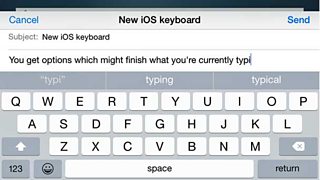
Just look at the keyboard: in the past you had no choice but to use the installed one for email, notes, text messages etc. Now third-party keyboards can be added - something many Android users may well note pointedly that they’ve been able to do for some time thanks to apps like Swiftkey and Swype.
Even if you stick with Apple’s keyboard, you’ll see an improved predictive aspect: your device will suggest words which might logically follow from what you’re typing and to whom. So, if a colleague messages you to ask you how a meeting went, it might suggest words like ‘cancelled’ or ‘rescheduled’. But if a friend asks about the same meeting it might suggest ‘it was a right old snooze-fest’.
Apple’s messaging option - unsurprisingly called iMessage - sees a big change: audio and video messaging. Audio could be sent as a message before now, but only by opening Voice Memos, recording and then sending as a message; it was a similar process for video.
It’s now built into iMessage and is clearly Apple’s attempt to capture some of the burgeoning messaging market currently dominated by WhatsApp.
Apple is also trying to take a bite out of Snapchat’s market share, because in iOS 8 messages can be timed to self-destruct after a certain length of time.
One further tweak is that your location can be shared via iMessage - ideal for the journalist running behind schedule or who needs to let others know where they are.
While all these changes to iMessage look impressive, the fact remains that it only works between iOS devices. It might see journalists communicate better with colleagues, and they might even have the odd contact send them a sound bite via audio message. But if colleagues or contacts are on another operating system then cross-platform apps like WhatsApp will continue to have a distinct advantage.
If you also have a Mac, iOS 8 brings in ‘continuity’ whereby, for example, you can start to write an iMessage on your iPhone and continue to write it on a Mac. Similarly, phone calls can be answered on a Mac too. AirDrop is also enabled between iOS and Macs. No configuration is needed - the iPhone will just know when your Mac needs the connection.
Naming no names, but several colleagues have in the past contacted me in something of a fluster, saying ‘I can’t find my iPhone - now what?!’ There could be hope for them in the future, as another new measure is ‘send last location’. When your iPhone is almost out of power, it sends its last known location to Apple - information you could then use to help find it. This data is stored indefinitely after the battery dies, so even if the phone is no longer turned on you at least have some idea of where it was when it was last active. Whether it’s still there when you go to that location is another matter entirely.
Talking of battery drain: poor battery life has long been the bane of many an iPhone owner, and again it’s an area where owners of most Androids can gleefully point out how easily they can replace their battery with a spare. A new function called ‘battery usage by app’ might help battery problems, as it shows which apps are taking up the most power. As a result, you might change some settings or even uninstall the apps in question to reduce the power drain.
There’ve been complaints about how an iOS device can track where the user has been. iOS 8 will let users grant location access to apps only when they’re in use and not permanently.
If you want to look at the desktop version of a website, that’s a new option in Safari, rather than only being able to see the iPhone-friendly or responsive version.
Finally, less relevant to journalism but also big in iOS 8:
- More aspects around health and fitness
- Homekit - Apple’s move into home automation, so you can use an iOS device to control things like your thermostat, alarm, garage door and lights
- An app icon can appear on the lock screen when you’re near a location that has a corresponding app in the App Store - if you’re outside Tesco and have its app, it’ll appear on your lock screen
- Interactive notifications - you can reply without switching apps. For example, if you’re looking at Maps and trying to get to a friend’s house, you could reply to their message asking how far away you are while still looking at the map
- TouchID (on the iPhone 5s and newer) will be able to unlock apps and not just the phone itself
- Family sharing: up to six members of your household can share digital purchases from Apple without sharing accounts.
iOS 8 will come pre-installed in the new iPhone 6 and will be available for owners of other devices to download soon. Bear in mind, though, that even Apple’s powerful computer servers struggle to cope when millions of users all try to download the new iOS the moment it comes out. Rather than doing it on day-one, you might be better off waiting a few days or even a week for the rush to pass.
You might also benefit from the misfortune of others: when a new iOS has been released in the past, very early adopters have flagged up hitherto unknown problems which Apple then rushes to fix. If you have the patience to wait you should be able to download the fixed version.
Part 1 of Marc Settle's blog on the iOS 8 operating system
Other blogs about smartphones by Marc Settle
Filing and recording: Smartphone journalism
