Votes
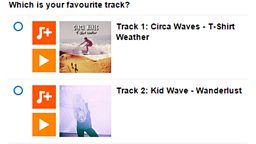
The Telescope vote block allows you embed a Telescope vote into your article page. You will need to read and understand the Telescope CMS documentation before trying to use this block.
Only 1 vote box per page will work.
iSite2
Article pages are made up of different content blocks. A vote box is used to pull in a vote from Telescope to an article page with an optional title.
You Will Need
- Vote Form Name - This is to help you find your page in iSite2, it will not be displayed.
- Vote ID – As displayed after the voting application is published in Telescope (for more information on creating a vote (BBC Cert required))
Before You Start
Go to iSite2 and select the project you want to work on. If you do not have access to the correct group, please contact R&M.Support@bbc.co.uk.
Quick Guide
Create A Telescope Vote Block - You can create a vote box by either clicking create new in the primary or secondary content fields on the article page and selecting Content – Votebox or select Content – Telescope Vote Box from the Create new dropdown.
Add Metadata - enter a form title into the Content block name field.
Add Vote ID - Enter the Vote ID in the Vote ID field.
- Publish - Click save and then click publish.
Download the Step-by-Step Vote box Guide
Optional Functions
Add Title
- You can give your Vote an optional Title to be displayed at the top of the content block.
Step-by-Step Guide

Related Tasks
![]()
Article Pages
Creating article pages in iSite2.
![]()
Prose
Adding text to a page in iSite2