Seven tips to get your smartphone pictures on the news

David Waddell
is a senior producer in BBC Newswire
This article is intended for any member of the public who might find themselves at the scene of a breaking news story with a camera smartphone in their pocket, so potentially anyone, anywhere in the world. You can’t predict when that might be, but you can be prepared to shoot decent photographs or video if you ever find yourself in the wrong place at the right time. I focus on video but some of the principles apply equally to stills:
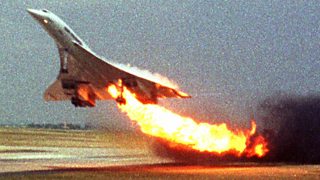
Your video of the unfolding tragedy was broadcast on TV networks around the world that evening. It was unique - no-one else captured the crash on camera. As you were already tweeting about something else, your smartphone was conveniently in hand and ready for action. Your video made a difference; it even helped crash investigators get to the bottom of what went wrong.
As you watched the BBC News report containing your video, you realised that following a few simple tips made a big difference to your video. It was a terrible news story but your video did it justice.
User-generated content (UGC) video is making a big impact on BBC News programmes. More and more people around the world have access to smartphones with ever greater video capability. News crews can’t be everywhere, so inevitably there are times when your video is the best - or only - material we have to illustrate an important story.
Historic, I know, but when that aircraft in trouble was the Air France Concorde that crashed on take-off in Paris in 2000 the event was dramatically captured on video by the passenger of a nearby lorry.
Much more recently:
- Shoppers’ UGC video helped us tell the story of the Kenyan hostage crisis in September 2013
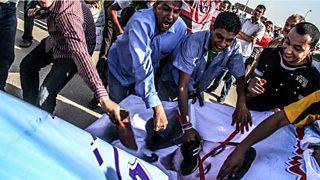
- Various elements of the Arab uprisings have been captured in amazing detail by the people who live in the affected countries
- And there were many examples of amateur video to illustrate the 2011 riots in London and elsewhere.
News producers and editors really welcome UGC video, especially when it brings something unique to our coverage. We understand our audiences are not necessarily professional photographers, but sometimes what we receive is difficult or unattractive to use. So we’ve come up with a few easy-to-follow tips that could make a big difference to your UGC video. Follow them and you will have captured a significant news moment in a way that will help millions of people to see and understand the story better.
While filming please do not endanger yourself or others, take unnecessary risks or break any laws.
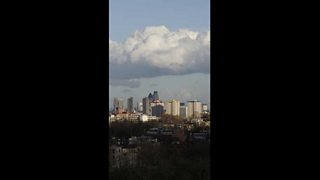
2. Steady as she goes. Hold your camera steady, with both hands. It may help if you rest your body or hands against something solid. Maintain each shot for at least 12 seconds. And shoot longer - perhaps up to a minute - if there is only one shot available to you (eg if you’re far away) or if there is a lot of movement or activity in the shot.
3. Variety is the spice of life. Capture a few different shots from the same scene to help us edit your material. If you simply send your rushes with a mix of six wide shots and close-ups it will help us build a good sequence.
4. No pans, tilts or zooms. Don’t turn the camera left and right or up and down. It’s especially difficult to make them work well with smartphone cameras. Zooms should also be avoided. Digital zooms cause the video resolution to deteriorate. And your video will be steadier if you simply keep the zoom on its widest setting and stand closer to your subject if it’s safe to do so.
5. Hear no evil. A few words of your own commentary helps explain what you see, but then stay silent while you film each shot. We want to see and hear what you can see and hear. If you film someone talking get close to capture the clearest sound.
6. Verification. The BBC works hard to ensure the videos we broadcast are genuine. Do the images show what they purport to show? Our audiences rely on the BBC to be trustworthy and accurate. My colleague Alex Murray explains more about this process in this blog.
7. Time and place. You can help us verify your material by including a shot of today’s newspaper (proving the date), or panning to a shot of a street sign or familiar landmark (proving the location). And please write a detailed description when you send your video in. Verification shots are helpful but the priority is the main event, crash scene etc.
Following these tips won’t make you an instant professional, but it will make your material at least a little stronger than most of the UGC we receive from the UK and around the world. There is no guarantee we will use your video, but it helps to stand out from the crowd.
Alternatively:
- Email yourpics@bbc.co.uk
- MMS from the UK: 61124
- International MMS: +44 7725 100100
If you send your material to us, you are granting the BBC a non-exclusive licence, or permission, to use your work, but you still own the work. We do not normally pay for material; only in exceptional cases will BBC News pay for UGC material. We will endeavour to credit any UGC material we use, but for operational or technical reasons this is not always possible.
These BBC UGC frequently asked questions may help. Please read our terms and conditions for the full terms of our rights.
Egyptian protest photo is by Mosaab Elshamy, who began documenting the turmoil in Egypt in 2011, as a citizen journalist.
Concorde photo is courtesy of Toshihiko Sato.
