
Increasing numbers of people are now using BBC iPlayer for content discovery - browsing through available shows rather than searching for a specific programme. Al Boley is Product Manager for BBC iPlayer, looking after personalisation features such as personalised recommendations and My Programmes, and describes a new update created in response to this change in audience behaviour.
From today you’ll notice that we’re replacing 'Favourites' with 'Added' on the iPlayer website and our Android, iOS and Windows 10 Mobile apps. Added is a quick and simple way to put programmes aside and come back to later.
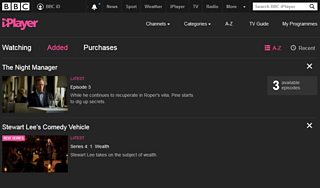
The BBC iPlayer "Added" option online
We know that more and more of you are coming to BBC iPlayer to browse and find something to watch, rather than with a specific programme in mind. The range of content to choose from has also expanded over time with BBC iPlayer Exclusives, a range of specially picked content from the archives and 30 day availability for most programmes.
In this context, when you stumble across something new that looks interesting or sounds like you might enjoy it, adding that to your 'Favourite' TV programmes can feel like quite a commitment. After all, you probably haven’t watched it yet. 'Adding' is a more casual activity; just a way to make a quick note of a show you fancy but maybe don’t have time to watch right now.
When you 'Add' a programme, we’ll pop it in your Added list in My Programmes with details of the latest episode and a quick link to all the available episodes. You can still Add shows you know and love (your Favourites) if you want so that you have them to hand; but you also can use it to flag new things you might want to try.
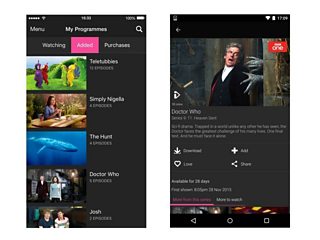
The BBC iPlayer "Added" option on the IOS and Android apps
More people than ever have smartphones and tablets, so you’re watching iPlayer in more and more ways. To help with this we’ll be storing your list of Added programmes in the cloud, linked to your BBC iD. This means you’ll now need to be signed in to 'Add' shows or see your Added list in My Programmes, but when you do you get a single, synchronised list of programmes you’ve 'Added' across any computer, mobile and tablet.
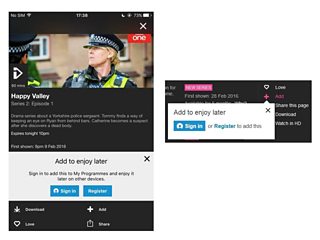
BBC iD sign in or register pop-up on the webpage and Android app.
Storing your Added list in the cloud against your BBC iD also allows us to simplify our codebases. Maintaining two ways of storing the data (locally in the web browser/app and against your BBC iD) meant we had two completely different mechanisms for adding, removing and listing favourites across code for web, iOS and Android - now we only have one per platform.
We’ve had a Favourites feature in BBC iPlayer since mid-2010 but it has always remained a niche area of the product with only 3% of weekly app users and under 0.5% of weekly web browsers visiting the Favourites page. And most users don’t have many favourites in their list: even including programmes no longer available, half of all the times the Favourites page is loaded there are 20 programmes or fewer in the users’ list.
We think the changes outlined above make it more useful for more people. But if you were one of our Favourites users before don’t worry – all your Favourites will still be there in your Added list. And if you’ve been using Favourites without a BBC iD account, just register (it only takes a moment) and we’ll migrate all your Favourites across to your account. And with other personalised features including the Watching list and personalised recommendations there are more reasons than ever to sign in to BBC iD.
Please try the new Added list and let me know how you find it in the comments below.
