When you’re broadcasting with a smartphone connection is king

Nick Garnett
is North of England reporter for BBC Radio 5 live. Twitter: @nicholasgarnett
Mobile reporting pioneer Nick Garnett recently revealed that he now does 90% of his broadcasting on his iPhone. The first rule of the game, he says, is staying connected:
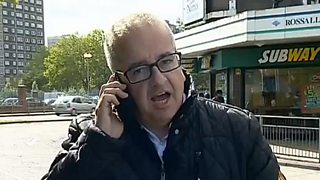
Cheap: a satellite can cost around £3 a minute to broadcast on - or 4p per minute if you’re using 3G. Think about the number of hours of live broadcasting the BBC does and you’ll understand just one of the compelling arguments for broadcasting via smartphone.
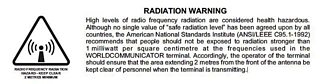
Safe: satellites transmit radiation. This is what the manual for one of the most popular satellite dishes, the Nera M4, states:
Public wi-fi networks are no better than 3G. They’ll very often be fine to download data on (which is of little interest to me as I try to broadcast) but have useless upload speeds with huge amounts of latency (which just means more delay).
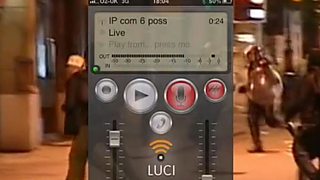
Scores of radio reporters are using Luci Live on a daily basis to broadcast. If you listen to any number of stations you’ll hear the Max Headroom-style stutter as the live audio feed struggles to be encoded and decoded. You’ll hear countless presenters leaping in to explain that “we seem to be having a few technical problems at the moment with our reporter…” And if you are standing next to the reporter in question you’ll hear them cursing and threatening to stuff their iPhone somewhere where the sun doesn’t shine (and in all probability doesn’t have a very good data connection).
So if 3G is useless and public wi-fi is worse, how come I’ve only fallen off the air once in the past year? The answer lies with the good folk of BBC Radio Sheffield. In April 2013, on the day of Margaret Thatcher’s funeral, I was camped out with reporter James Vincent who pulled a 4G ‘mi-fi’ device out of his pocket. The station had been fed up of live reports dropping off air so had bought a device from the first mobile phone network to bring 4G to market.
Luckily for BBC Radio Sheffield, the company had invested in a lot of new masts in South Yorkshire. We tested the data rate. On 3G you can normally expect a download speed of around 3mbps, and an upload rate, if you’re lucky, of around 1.5mbps. The 4G results were staggering: 24mbps download and 4mbps upload. I ran off to the nearest mobile phone shop and bought one. I’m not suggesting we ALL do that. But when you do almost all of your broadcasting by smartphone - as I now do - it makes life so much easier.
In the following 12 months I’ve only had one live that didn’t work on 4G and that was because I was in an area with no mobile phone signal (GPRS, 3G or 4G) at all. Despite all the networks having now launched 4G networks, public take up hasn’t been at the rate these companies might have hoped for. People are still on existing 3G contracts and it’ll be some time until we see the 4G network grind to a halt in the same way 3G has. It will probably be another two years until we start to see the same congestion on 4G. And thankfully there’s already talk of 5G coming to market.
So, for all those Luci Live users who want to know the top five tips for making sure your connection works and your live broadcast goes as planned, here they are:
1. Connection is king
2. Connection is king
3. Connection is king
4. Connection is king
5. Make sure you’ve got a spare battery pack with you.
The fact is that our live broadcasts only fail to make it to air because of the connection. It’s nothing to do with the phone; it’s nothing to do with the app. The only thing that matters is getting a good, fast connection. As I have had to point out on more than one occasion: don’t stand on the touchline at half-time at Old Trafford and expect to get a fast enough connection to broadcast on.
There is a danger when using Luci that you'll think you can turn up at the last minute, press two buttons and talk. If you were using a satellite transmitter or a traditional radio car you'd expect to do a bit of rigging and the same is true of Luci. To lessen the chances of dropping off you need to check a couple of things. While the number of bars on your phone doesn't mean you've got a fast 3G connection it's a fair indicator of having a good general signal. So the more bars, the better.
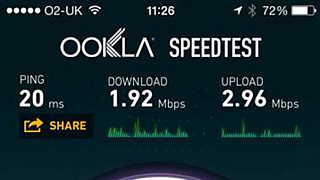
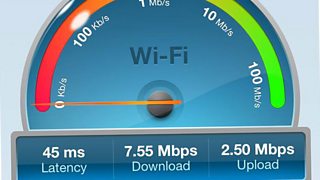
I'd suggest that the fastest connection you can manage will be the best, so move around and see if the speed improves or worsens.
A final word of advice: if the connection is poor or you can see that the line is dropping out occasionally, talk to the producer and tell them you need to change location. It’s much better to delay the live than for it to fall off air.
Smartphone journalism: Photographs
Blogs by smartphone reporting specialist Marc Settle
Marc Settle’s smartphone journalism films on YouTube
Seven tips to get your smartphone pictures on the news
Focus iPhone, record and send - instant video hit from storm-lashed Sardinia
