Using Twitter to find people at the scene of a breaking story

Paul Myers
is a BBC internet research specialist
As news stories break, journalists find themselves wanting to speak to members of the public. They could have witnessed an incident or may have been affected by an event. Their views count and they enhance our reports with a human angle.
There are many ways to locate ordinary people in extraordinary circumstances, but we don’t always know how our approaches will be received, or indeed if our messages to them will be read at all.
This is where Twitter comes into its own. If someone is tweeting from a situation, they obviously don’t mind sharing their views with the world and if they are currently active online you stand a good chance of getting a speedy response from them.
So how do you find someone genuinely tweeting from the scene of an incident or event? Of course a simple keyword search in Twitter will help if they have made reference to the situation you’re investigating. But you will probably find yourself drowning in tweets from people who are commenting on the story but aren’t necessarily at the scene.
Timely tweets
You might find it useful to filter out ‘background noise’ and focus on tweets that were posted around the time an incident occurred. Twitter’s own advanced search can be useful for many things but it won’t allow you to specify a timeframe. Instead, you can specify a date range in the search box using the since:YYYY-MM-DD and until:YYYY-MM-DDsearch operators.
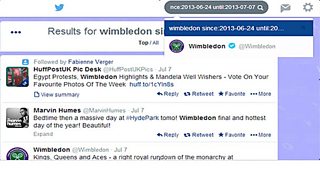
Of course people may make reference to their current location in their tweets but with the 140-character limit you can’t always rely on this.
Twitter’s advanced search allows you to specify a broad location, and you might want to suggest a particular area by specifying the language a message was tweeted in.
Tracing by location is possible because many Twitter users set their privacy options to display this information. Twitter allows users to manually tag an individual tweet with any chosen location.
Hoaxes are not unheard of, so you must take special care to check that someone is truly where they say they are. I sent the tweet (below) from Ealing in West London, but I manually tagged it with ‘Norway’.
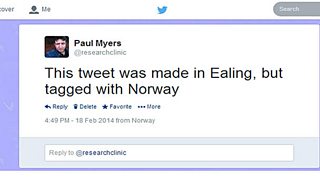
Tagged Norway, tweeted from Ealing
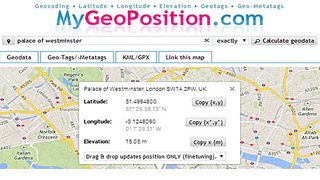
When you want to search for tweets made in a certain location, you’ll need the co-ordinates. Happily, there are a few sites that let you find them. MyGeoPosition.com, for instance, traces the longitude and latitude of an address and allows you to copy the co-ordinates in a format that is friendly to the Twitter search box.
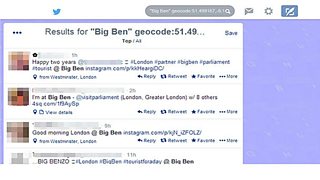
So a search for tweets mentioning Big Ben made, within a 0.2km radius of the Houses of Parliament, would be:
Searching for people online: Advanced techniques
Searching for company data: Advanced techniques
Investigative journalism skills
Investigative apps are useful tools for journalists, if rough around the edges
Other internet research blogs by Paul Myers
Google it by all means, but don’t stop there
The Pope, the dictator, the fake photo: It pays to fact-check social media
