How a smartphone turned a day at the seaside into a reporting assignment

Marc Settle
specialises in smartphone reporting for the BBC Academy
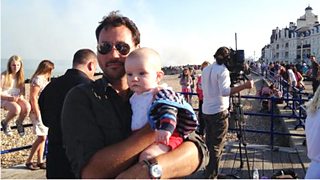
Phil Harrison and his son Noah at Eastbourne on the day of the fire
The old maxim ‘the best stills camera is the one you have with you’ has been transformed into ‘you will always have a pretty decent stills camera with you’. And video camera. And audio recorder. And computer. And mobile newsroom. And so on.
I’ve been training BBC journalists for more than three years in how to use their iPhones (and it is almost exclusively iPhones, for reasons I’ve blogged about before) to record, edit and send broadcast-quality video, photos and audio.
One of the points I try to drive home is that a mobile device will do a pretty good job of ‘capturing the moment’ as it’s what you always have on you. A broadcast camera such as the Canon C300 can record better quality footage but few journalists know how to use them and almost no-one carries one with them all the time.
The Eastbourne pier fire on 30 July was a news event where the iPhone came into its own.
Phil Harrison, a radio car reporter for BBC Radio Kent, was in the town with his son and wife Rebecca Kenyon (who works for BBC South East Today). It became apparent that their plans for a quiet afternoon at the seaside would have to take a back seat to this breaking story. In a few short hours he took numerous photos, sent radio reports using the iPhone’s in-built audio recorder and filmed vox pops with those who’d been on the pier when the fire broke out.
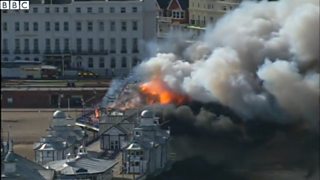
Later there was aerial footage of the fire
Film horizontally
A smartphone held vertically to record video will produce footage with huge black bars either side of the picture - and the content will only capture a small proportion of the available scene. “I’d had the training so I knew to film horizontally, as that’s the way your eyes are, and then it fills the screen,” Phil told me.
That’s not to say the BBC and other news outlets won’t run material recorded vertically if the story merits it. Equally, some argue that, with so much video now being watched on smartphones which are mainly held vertically, the ‘hold it horizontal’ argument is outdated. I disagree: video recorded vertically may look alright on a phone but it will look poor on TV or computer monitors, while video recorded horizontally will look fine on any device.
Go into ‘airplane mode’
One of the lesser-used functions of a smartphone is making and receiving calls. But if you’re recording video and receive a call at the same time, the phone call will override the recording and bring it to a halt. If you’re able to pick up filming where you left off, fine. But if not you have a problem.
Being at a big news story will mean getting a lot of phone calls. “All these different arms of the BBC were trying to contact me. When I was filming I went into airplane mode because otherwise… it’ll cut you off right in the middle of that killer interview. It was kind of second nature.”
Be aware of video file sizes
This was an issue for Phil both as he prepared to record video and when it came to sending it.
Although dependent on a number of factors, such as what is being recorded, a broad rule of thumb is that every second of video is around 1 megabyte in size on an iPhone. If you’re short of space, you can quickly find your device filling up. Phil had to take drastic action to get extra capacity: “I had to delete all the pictures from my holiday in Thailand from two years ago. I’ve got them backed up somewhere, but there was no way I’d have had the space to record otherwise.”
Equally, sending large files can be difficult, especially over a crowded 3G connection. My advice during the iPhone training course is to do whatever is necessary to get a faster speed, which Phil executed perfectly when he asked a local hotel owner to let him use their broadband.
But a fast connection is not the panacea it might seem, as large files can still be problematic to send. The PNG app has no file size limit, and also videos can be compressed to send quicker.
Not having PNG meant Phil had to find another way of sending his videos to South East Today. He used an option available to all smartphone owners: email. However, there’s a limit to the size of attachments that BBC addresses can accept.
That’s caused problems in the past, South East Today assistant editor Michael Gravesande admitted. Michael was in charge of the 18:30 regional news programme on the day of the pier fire. “We’ve had lots of breaking news stories where people have attempted to send stuff and we never get it in,” he told me.
The Tunbridge Wells newsroom has a solution, according to Richard Collins who works in the Media Hub there: “We use a Gmail address, with access limited to the Media Hub. Journalists use it themselves, or if they’re in touch with members of the public they can give the address to them.”
Once the footage was ingested into the system in Tunbridge Wells, it was available to journalists across the newsroom there. Network News in London was able to access it too, speeding up the process of getting the pictures on to the BBC News Channel.
Audio is an important part of video
You need to ensure your interviewee can be heard. An external microphone, or even the mic on a pair of headphones, can help - but Phil had neither: just the phone.
Going somewhere quieter wasn’t an option either as he had to film eyewitnesses on the beach with the pier in the background. His solution was novel: “I hate it when people talk quietly and you’re loud because you’re a broadcaster, so I told them they needed to imagine they were shouting at me.”
Michael acknowledged the sound “wasn’t the clearest - but it was good enough for broadcast”. He added: “The threshold is a lot lower nowadays, with people consuming news on tablets and mobile devices where people accept these sorts of pictures. So I didn’t have a concern with using this at all.”
Richard has further advice: “get closer”, and also to work out where your mic is, as it’s easy to put your hand over it. Place your hand so it’s behind rather than in front the mic.
A mobile device can get ‘better’ interviews
Undoubtedly, a bigger camera with a boom microphone, lighting rig and reflector would have led to far better quality recordings: but would interviewees have been as willing to speak?
Phil thinks his experience on Eastbourne beach shows that a small device like a smartphone, which many members of the public own, can make people feel more comfortable and less intimidated when interviewed. “The lady [who had been] in the amusement arcade [when the fire broke out]… if I had had a big camera she’d have run a mile. Instead, I just hit ‘record’ on my iPhone and started talking, maintained eye-contact, hit save and said ‘I’ve recorded that, do you mind if I send it back?’, and she said ‘OK’. If I’d have had a big camera she wouldn’t have gone for it at all.”
Record at the right frame rate
This was one issue that Phil wasn’t able to overcome using an iPhone without PNG. The in-built camera on the iPhone records at 30 frames per second - the same as the NTSC broadcast system used in the United States; in the UK and much of Europe, the PAL system is used, which is 25fps. (PNG has been adapted so that it delivers at 25fps.)
While South East Today’s Media Hub has a system in place to cope if videos are sent in at 30fps, Richard admits that “it would look better if it had been recorded at 25fps”. In fact several apps can record at this lower frame rate, such as Filmicpro, Videon or Videopro.
Regardless of issues such as frame rate, audio or file size, it was the immediacy of getting the content which most impressed those working back at South East Today in Tunbridge Wells.
Cameras and crews were sent down to Eastbourne at 16:20, but the distance they had to travel meant they weren’t going to get there before 17:30 at the earliest - meaning Phil’s footage was vital, according to Michael: “It led our programme. Without the clips via the iPhone, we probably would not have had a lead package - we may have ended up just going live to a reporter.”
Richard concurs: “They were pictures we wouldn’t have got otherwise. We’d have had technically better pictures with better sound if we’d waited, but we’d have lost the first-hand opinions and experiences. Getting the people who were there was fantastic.”
He concludes: “It was brilliant for Network to be able to use those clips as quickly as it did. The system worked - it was ‘one BBC’ and it just all worked, and the iPhone represents a fantastic tool for newsgathering in that respect.”
Phil Harrison's experience shows why it's vital to know how to use your smartphone (aka the newsroom in your pocket). Much of what I've written above applies broadly, regardless of the device you own. It's worth taking time to find out, for example, where the microphone is. If you practice, it will all come as second nature if you're called into action.
Marc Settle trains BBC journalists in smartphone reporting
Smartphone journalism training video with Marc Settle
Marc Settle blogs about smartphones
College of Journalism courses for BBC staff
