A smartphone, a good story and a social media plan: #BBCSyriaWar

Mark Frankel
is BBC News social media editor. Twitter: @markfrankel29
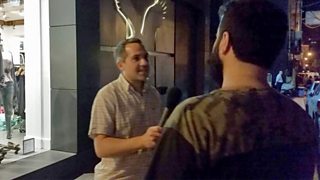
Mark Frankel reporting in Beirut
I was told to try lots of things and "fail often". I always suggest to other journalists it's best to keep experimenting when using social media, so this was music to my ears.
My task was to help BBC News report on the humanitarian crisis of the Syrian conflict as part of a two-day focus on the country and its people, millions of whom have become refugees both inside Syria and across neighbouring countries. I was to ‘extol the virtues’ of using social media to staff who were sent to work for TV and radio, and to enhance our digital footprint on the story by collecting my own material for use online and across our BBC News social media accounts.
As most of my colleagues headed out of Beirut to refugee camps to the north and south, I decided to stay in and around Beirut with a trusty fixer to help with translation and navigating the notorious Beirut traffic.
I’d travelled to Lebanon with an iPhone, a microphone and a laptop. I would try and restrict myself to using nothing else. Having completed Marc Settle's excellent College of Journalism course and refreshed my knowledge via the College site, I set about deleting lots of content from my phone.
There's little point embarking on a trip like this with less than 5GB of space to record audio or video and take photos, as your smartphone slows down to become almost unusable very quickly. So:
Tip 1
Transfer the photos and videos you want to iCloud, Box, Dropbox, Google Drive, or on to a disc or flashcard, and delete what you don't need. Then take a close look at the apps you have on your phone. Do you need them all or can you delete a lot of them and then reinstall them via iCloud on your return?
The BBC's PNG app is one that you won't want to delete. It allows you to record audio and video, and take straightforward pictures with your iPhone to transfer directly back to the BBC for use by colleagues in relevant areas. I had recently updated my phone to iOS 8 and found the editing feature a little glitchy.
This brings me to:
Tip 2
Think carefully about how much you want to record and where exactly you might showcase the material. Your editing options on an iPhone are limited and you will probably need a laptop with audio or video editing software to do fine edits - or will need to prevail on colleagues back home.
I decided to only use my phone to record what I intended to use in clip form. I uploaded longer video clips to a personal YouTube channel using the YT Capture app, which allows basic top-and-tail editing, and made shorter edits (when relevant) for Instagram and Vine. Here are the clips I uploaded to my YouTube channel.
I noticed that other BBC correspondents, reporters and producers were using AudioBoom quite a bit as well. This app also allows for basic editing before publication - or you can download it from your laptop for finer edits using more sophisticated audio-editing software like Adobe Audition.
There are a huge number of apps that help you fine-tune your photographs via a smartphone. I confess that I'm still a big fan of the iPhone's own camera app. It allows you to do all the basics and has the advantage of being very easy to use - and to flick between taking stills and video if needed. However:
Tip 3
Make sure you have decent 3G or wi-fi access before you embark on lots of panoramic or 360-degree photographs. They are difficult to publish without good connectivity and I found it tricky to republish them if they got stuck loading up.
Fortunately, wi-fi access is easy to find in Beirut and the city has good 3G coverage too. However, you will need a local SIM card, a data package and MiFi to avoid using all your own phone allowance in 48 hours when you travel around. BBC-issued iPhones are locked, so won't accept local SIM cards.
Of course, if you can't get an internet connection on your phone, you can always resort to using SMS to tweet, or even think about forming a broadcast group with other relevant colleagues to share insight, pics and video via WhatsApp, for example. So-called ‘chat apps’ are not set up for broadcasting, but they are excellent for newsgathering, reaching out to interviewees and sharing information among colleagues.
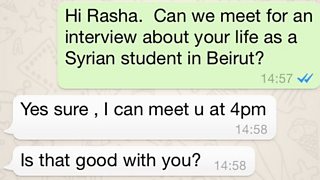
WhatsApp message
Sometimes, on a sensitive story such as this, it's difficult to encourage people to talk to us on camera or for radio. So:
Tip 4
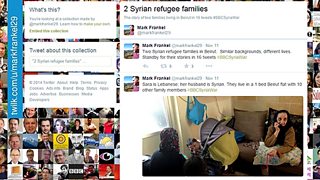
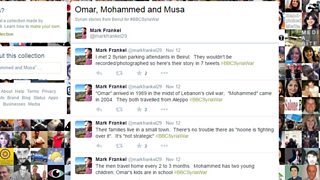
I decided to try to make the most of Twitter and tell the stories I had in a series of tweets, using pictures and videos where possible and paraphrasing or quoting otherwise. Here are two examples:
Tweet collection: 2 Syrian refugee families:
Tweet collection: Omar, Mohammed and Musa:
We also ensured there was time for two of our senior correspondents to break off from their TV and radio duties to answer questions on social media.
Lyse Doucet hooked up with BBC News’s Facebook fans and Jeremy Bowen spent an hour answering questions via his Twitter account. Both of these events were cross-promoted on television, online and radio, and involved filtering questions to Lyse and Jeremy to answer via email.
I should add that BBC correspondents, reporters and producers really made the most of their Twitter accounts on this story. They sent a variety of pictures:
Overall, the most important thing to remember is to keep it simple. There are loads of apps marketed to ‘help’ you take better photos and video, and designed to ‘show off’ your work in blog form on mobile. Be selective, think about your time constraints, and what will work best for your storytelling and the job you've been asked to do.
I learnt a lot from this trip. Some things I tried didn't work or proved tricky. I felt pretty smug leaving my TV colleagues as they drove off with a van load of equipment. I could never have accomplished what they did, but I definitely felt unencumbered and more liberated with only a smartphone and my social media accounts.
