User-testing web design was just what Doctor Who ordered

Helene Sears
is senior editorial designer for BBC News visual journalism
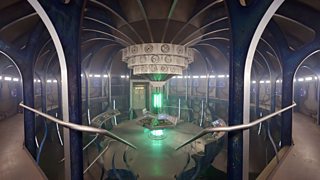
As part of the BBC’s Visual Journalism team, I was lucky enough to be asked to design a feature for BBC News telling the history of the show in an innovative way.
I have written previously about how BBC News meets user needs with responsive design. The Doctor project highlighted the importance of meeting audience needs through user testing.
What we made and why testing matters
The Visual Journalism team is a combination of television designers and the online design, development and editorial team. When this sort of project comes along we aim to do something special that makes use of all of that range of skills.
Inspired by an open source feature called 360 Langstrasse (where the code is available for anyone to use), we wanted to create a distinct experience that allowed the user to scroll through the Doctor Who set with collections of clips and galleries along the way.
Television designer Nick Davey shot a walk-through on Steadicam of the TARDIS set and worked closely with our online developers Tian Yuan and Chris Ashton to convert the video into stills.
Meanwhile journalist Christine Jeavans was researching and collecting the best content; while I was trying to work out how to present these ‘bubbles’ of content in a way that would be easy for users to understand.
As soon as we had a decent prototype together we decided to user test it. We were concerned users would not realise the bubbles were clickable.
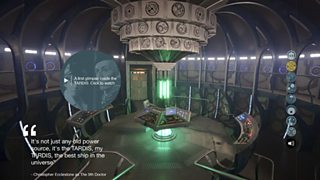
So we changed the introduction bubble entirely. We dropped large amounts of text and added an animated gif of the instructions, then tested again - but still had users clicking the intro bubble.
Finally, as we didn’t want our audience to get frustrated if they clicked the intro bubble and nothing happened, we made ‘SCROLL DOWN’ actually light up if the bubble was clicked.
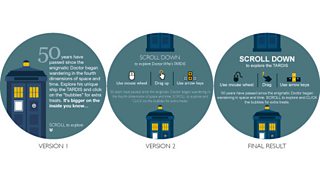
The testing was crucial for the success of the project - it meant taking a step back from the work we were immersed in and objectively checking it was actually working.
How to guerrilla user-test
There are multiple ways to user-test projects. At the BBC we have colleagues dedicated to conducting formal user testing, and audience research to ensure we are delivering the very best content. These sessions are booked in advance and take many days, if not weeks.
In visual journalism we are normally at the mercy of breaking news. Even our longer term projects rarely take more than a few weeks, making formal testing impossible. As a result I am a big fan of guerrilla testing: taking a prototype out and testing it informally on passers-by. It’s free, fast and very effective, so for any new format our team user-test designs. Here’s a quick guide to conducting your own:
What to bring
Produce a rough-and-ready prototype at an early enough stage for the feedback can be incorporated. I’ve used a range of formats including detailed PDF files, keynote presentations, basic prototypes in programs like FieldTest, early versions of the actually developed site, and even hand-drawn sketches.
People’s time is valuable, so set up before inviting them to have a go.
I find the most effective testing works in teams of two, with one person asking questions and the other taking notes. I try not to let the tester know that I designed it, so they’re less likely to feel obliged to be polite.
What to ask
It’s crucial to set the scene. Explain to the user that there are no wrong answers; how much time the testing will take (under 10 minutes ideally); and that it’s a prototype, so things might break.
Also get basic information about your user first (is this story something they would be interested in? How often do they visit this site?) before diving into the new feature itself.
All questions need to be very open. The goal is to get the user comfortable enough to navigate on their own and think out loud about what they’re doing. I often ask questions like ‘what do you think this page is about?’ and ‘what would you do if you arrived here?’
What to do with the results
Distilling what you’ve learned is really important, and watching people’s behaviour is as important as listening, because sometimes what users say is different from what they are doing. I’ve had a user spend most of the session explaining why they hated the colour blue we had used but when asked they understood exactly what the page was trying to do and had no problem getting around it.
On another project a user said they really loved the page and found it easy to use but when asked could not navigate back to the homepage. Colour choice is an opinion - inability to navigate indicates a serious problem with the design.
I find I can pull off effective testing sessions from start to finish in under half a day. I try to get between five and 10 people to have a go, and usually patterns start to emerge after the fourth or fifth tester.
As we affectionately tell our designers, journalists and developers, we are not normal users. We understand the story and our chosen method of presentation inside and out. Our audience however comes to our page fresh, often with their attention half on something else and possibly with completely different expectations.
For the Doctor Who feature our time spent user testing provided invaluable feedback on what was working and what wasn’t. Talking to our audience meant we could deliver a better feature for them to explore - always our top goal.
With special thanks to Christine Jeavans
Take the interactive Doctor Who history tour
What is responsive design - and what does it mean for journalists?
Responsive web design at BBC News
Doctor Who anniversary specials