How am I paid (PAYE)?
Everything you will need to know about how you are paid (PAYE Freelancers)
The information on this page is applicable to PAYE Engagements only.
Important Update: Easter Bank Holiday Weekly Payroll Dates
Due to the upcoming Easter Bank Holiday - there will be some changes to timings of weekly payments.
Anything claimed in the period Monday 23rd March - Friday 27th March will be paid on Thursday 2nd April.
Anything claimed in the period Monday 30th March - Monday 6th April will be paid on Friday 10th April.
Following these two affected weeks, the timings of the weekly payroll will return to the regular deadlines and Friday pay dates.
As a PAYE Freelancer, the payment amounts shown on your contract and the Freelance Payment Portal (the BBC's system that you use to manage your details and accept / claim your bookings) are the Gross amounts of your payments (i.e.. before any deductions). You will be paid the Net amount for each payment that shows on your contract. Your payments will be subject to the below deductions:
- Tax
- National Insurance
- Pension Contributions (if applicable)
- Student Loan Deductions (if applicable)
Pay Dates / Cut Offs
If you are paid on a weekly basis, payments will be made on Fridays, provided you have accepted your booking by 6pm on the Friday before.
If you are paid on a monthly basis, you are paid on the 15th of each month (if the 15th falls on a weekend, Pay Day will be the Friday before), for payments claimed up to and including the 3rd of the month (if the 3rd falls on a weekend, Cut Off will be the following Monday at 6pm). As your payments are automatically claimed on the payment date, if you believe a payment date to be incorrect, please contact your booker.
What do I need to do to get paid?
Your payments will be automatically claimed and included in the relevant payroll, as long as:
• You have accepted the booking in the Freelance Payment Portal
• A valid Eligibility to Work is held on file for you
Please ensure that you accept your booking within one working day of receiving your booking confirmation email.
Once accepted, your bookings will move to the Current Bookings tab, as usual, but you will not be able to select and action these. Instead, these will be automatically claimed overnight on the Payment Date (which is set by your booker) and will appear in your Claim History the following day. E.g. a booking accepted on the 3rd November, with a payment date of 3rd November, will be claimed overnight to be included in November payroll, and will appear in Claim History on the 4th November. If a booking is accepted after a payment date, that payment will be claimed overnight.
Tax
As your payments are subject to Tax deductions, it is important that you are aware of the Tax Code that you have been put on, as this will affect the amount of Tax deducted. There are two ways that you can confirm your Tax Code. Please ensure that one of the below is completed before the monthly cut off of your first payment to give Payroll enough time to process your correct Tax Code.
- Send a copy of your most recent P45 to BBC Payroll via Email.
- Complete a New Starter Checklist and send to BBC Payroll via Email.
P45/P60's
To request a P45 be generated for yourself, please contact BBCHR. The team will then process a P45 request, and a P45 will be available to you on the last working day of the month.
P45's prior to July 2024 will be available on BBC MyView.
P45's from July 2024 will be available on EYIP.
Please note that one month after your last BBC engagement ends, you will be automatically withdrawn from our system, for Data Protection and Compliance reasons. At this point, a P45 will automatically be generated for you.
As a freelancer, you may have multiple bookings in a financial year.
You may start one booking for 3 weeks, and after 3 weeks you will be made a leaver on our system, before your next booking starts.
At the end of your booking you will be issued with a P45, which you should hand to the next organisation you are contracted with, even if this is the BBC. If you are contracted with another organisation then hand them the P45; then if you return to the BBC, hand the P45 you receive from them to BBC Payroll.
What happens if you do not hand in a P45?
- Your tax may not be calculated correctly.
- Your P60 will not include the previous earnings
When do I get a P60?
- P60’s are only issued to individuals still in contract on 5th April.
- If your contract finished before this date, you would not receive a P60, as key payment information will be included in your P45.
What does this look like?
On the P60, you will have the following details:
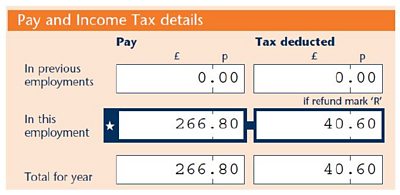
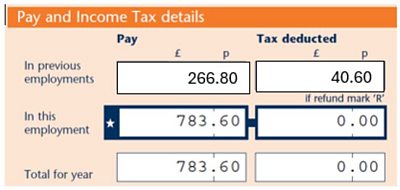
If you have had multiple periods of engagement throughout the tax year, and have not handed in your most recent P45 each time you were re-engaged, you will need to check that your P60 includes the earnings from each of your payslips for that financial year.
Please see this guidance on accessing your P60/P45/any other pay documents on the EY - Interact Payroll (EYIP) portal:
Accessing Pay Documents on EYIP Guidance
Payslips
We recommend that you check your payslips regularly to make sure everything is in order. payslips are available at least one day before payday, and if you think there is something wrong you should contact us immediately.
View your payslips, P60s, and P11d with EYIP. When weekly payroll is live your payslips will be available to you every Thursday.
Payslips
Register
If you are a new freelancer or have changed your email address you will receive a welcome email from noreply.BBCpayroll@xe02.ey.com which includes details on how to access your new payslips and raise payroll queries. This email will be sent to the email address we have on file for you, which is the same email address where your booking contracts are sent.
You can see the email address we have on file for you within your Freelance Payment Portal account in the Personal Details section. If you are not receiving your contract (excluding those linked to an agent) then it is likely that we have an incorrect email address for you – please refer to the ‘Incorrect Email Address’ section.
If you experience issues, please contact Payroll. The welcome email address is an unmonitored inbox.
Logging in
EYIP uses social login, which means you will need to use the password associated to your email address. The benefit of this is that you do not need to remember a different password to access your payslips and should have a smoother login experience.
Enter the email address that the welcome email was sent to and click ‘Sign In’. You will be redirected to the website of your email account provider in order to log in.
Incorrect Email Address
If we have the incorrect email address (e.g. one no longer in use or accessible) for you on your record you will be unable to access EYIP. If the email address we have on file for you is incorrect please contact BBC HR providing your personal number and new email address to be added to your record. You should also let your most recent booker know of any changes to your contact details.
How it works
From 1 July 2024 your new payslips will be available to download via the new app – EY Interact Payroll (EYIP). Everyone paid through BBC Payroll can use EYIP to view your:
- Payslips
- P60 for the end of the financial year (if you were paid in every month on the financial year)
- P11d for any taxable benefits
If you have accepted your booking in the Freelance Payment Portal and have valid right to work documents and bank details on file, you will be paid automatically. You should still check your payslips regularly to make sure everything is in order. Along with your payslip, you will have a payment breakdown document which itemises your payments.
You can use EYIP anywhere from any connected device - you do not need to be on the BBC network.
Pre July 2024 Payslips
Any payslips, P11Ds and P60s pre July 2024 will still be available to access and download via BBC MyView.
BBC MyView will remain open until June 2026 to enable you to download any payslips/pay data prior to July 2024.
MyView App
Payslips Prior to July 2024 are accessible via the MyView App on your mobile device.
Registering for the app is easy; we’ve put together a few notes to help you in our MyView Guide.
Payslips prior to July 2024 can be accessed via MyPay
You can use MyPay anywhere, from any connected device, to view your:
• Monthly payslips
• P60 for the end of the financial year
• P11d for any taxable benefits
Payments on your payslip are clearly itemised, so you’ll know what dates your payments relate to. You’re also able to compare your payments with previous payslips, and there are tools available to help you visualise your payments and deductions.
This means that it will be easier to match up what has been claimed on the payment portal and what has been paid on the payslip, and we hope to build on this in the future to further help you understand what you’ve been paid for.
You will receive a P60 for the last tax year (6 April to 5 April) if you worked for us on 5 April and received pay during the tax year.
How to register
Click on the 'Forgotten Password' link in the login box on the MyPay page and follow the instructions. If you do not receive an email to reset your password within 20 minutes follow the instructions below:
• Please contact the BBC Payroll Service Desk at: eyct@service-now.com
Multi Factor Authentication
From 27 June 2023, all BBC colleagues, including Freelancers, and leavers who access their Pay documents via MyPay will have to register for Multi Factor Authentication.
Setting up Multi Factor Authentication
If you already use an Authenticator app, please visit MyPay and login as usual. You will then be routed through the MFA registration screens. If you would like to find out more information or you haven’t used an Authenticator app before, refer to this guide on setting up multi factor authentication to access MyPay.
If you see an error message when you access MyPay, you may need to clear your browser cache. Please refer to guidance within your browser on how to do this.
Statutory Entitlements
As you have been assessed as a Worker / PAYE Freelancer, there are a number of entitlements that you should be aware of (please note that some of these entitlements are will be subject to eligibility criteria):
Maternity / Paternity Pay
Statutory Maternity (Paternity) Pay is a statutory entitlement that the BBC can claim back from the government.
For eligibility assessment, you will need to submit a copy of their MATB1/ SC33 (front and back of the form) to BBCHR, who check for 26 weeks' continuous service by the 15th week before the due date.
If these requirements are met, an average earnings check is carried out, and you're then provided with a breakdown of SMP payments to be received.
Statutory Sick Pay
What is Statutory Sick Pay?
Statutory Sick Pay Statutory Sick Pay (SSP) is a minimum weekly payment which employers must pay for 28 weeks to qualifying employees. Employees who are excluded from receiving SSP or who have exhausted their SSP entitlement may be entitled to claim sickness benefits from the state.
You can get £118.75 a week Statutory Sick Pay (SSP) for up to 28 weeks.
Eligibility
To be eligible for SSP, you need to earn an average of £125 per week If you have been ill for at least 4 days in a row (including non-working days) you’ll be paid SSP for all the days you’re off sick that you normally would have worked, except for the first 3. (so if you are only off for 2 or 3 days, SSP is not paid, if you are off for 4 days, you will receive 1 days SSP).
You’ll only be paid SSP for the first 3 working days you are off sick if you received SSP within the last 8 weeks, and that already included a 3-day waiting period before you were paid SSP.
You need to be classed as a PAYE Freelancer and have an active (accepted) booking that you are currently working on and unable to complete due to sickness. Future dated bookings where the work has not yet started are not taken into consideration.
If you’re not eligible or your SSP ends
You may be able to apply for Universal Credit or Employment and Support Allowance (ESA). You can use an SSP1 form to support your application.
Working Time Leave
Most individuals with a Worker employment status must receive at least 28 days’ paid annual leave a year, pro rata, as per HMRC guidelines. This is the equivalent of 5.6 weeks of holiday and can include bank holidays as part of that entitlement. Only those that are on a worker contract, either PAYE or a Modus Gross contract are eligible for working time leave.
You should aim to take your leave within your booking dates, and leave should only be paid out where it was not possible for leave to be taken for operational reasons. This will be paid out at the end of your contract.
Under and Overpayments
If you believe that you have been paid a duplicate payment, not paid a payment that you have claimed, or paid incorrectly, please contact us directly.
Pensions
Please note that the BBC Pension is subject to eligibility criteria.
As a PAYE Freelancer, you will be automatically enrolled into the NEST pension scheme once you have been engaged by the BBC for three months. You'll be sent a letter 30 days ahead of enrolment to inform you that you're about to be enrolled.
You can Opt into the Nest pension earlier by contacting the BBC Payroll department with an OPT In request.
To opt out, you will need to opt out within the NEST portal.
NEST deductions are reflected on your payslip.
Please note:
- If your engagement finishes you will be made a leaver on our system.
- When you are next engaged, you will need to wait 3 months before being auto enrolled into NEST, as this is a new period of work.
- However, if you wish you can opt straight into NEST without the 3 months postponement by contacting Payroll on your return, and we will re-enrol you into NEST from the next pay run (please note that if this is done after the first pay run since your return, we cannot backdate contributions).
Useful Pension Links
You may also find useful

Expenses
Important information on how to claim your expenses.
ETW's
Eligibility to Work checks, why they are important and what to expect.
Support
What we expect of you, and what you should expect of us, as a Freelancer at the BBC.
Contact Us
Get in touch with our specialist team with any queries or issues you may have.
