Web searching and the art of asking the right questions

Henk van Ess
teaches internet research, social media and multimedia. Current projects include ‘fact-checking the web’ and data journalism. Twitter: @henkvaness

Online research is often a challenge for traditional investigative reporters. Information from the web can be fake, biased, incomplete or all of the above.
Offline, too, there is no happy hunting ground full of unbiased people or completely honest authorities. In the end it all boils down to asking the right questions, digital or not. So here are some strategic tips and tools for digitising three of the most asked questions in journalism: who, where and when?
Who
Let’s do a background profile with Google on Ben van Beurden, chief executive of Shell.
Find facts and opinions
The simple two-letter word ‘is’ reveals opinions and facts about your subject. To avoid clutter, include the company name of the person or any other detail you know, and tell Google that both words should be not that far from each other. Try this search entry:
“van beurden is” AROUND(15) shell
The AROUND(x) operator must be in capitals. It sets the maximum distance in words between the two terms.
What do others say?
This search is asking Google to show me PDF documents with the name of the chief executive of Shell in them, but exclude documents from Shell:
filetype:pdf “ben van beurden” -site:shell.*
This will find documents about your subject, but not from his or her own company. This helps you to see what opponents, competitors or opinionated people say about them. And if you’re a perfectionist go for:
inurl:pdf “ben van beurden”–site:shell.*
That will also give you PDFs that are not visible with filetype.
Official databases
You can search for worldwide official documents about your subject like this:
inurl:gov “ben van beurden”
It searches for gov.uk (United Kingdom) but also .gov.au (Australia), .gov.cn (China), .gov (US) and other governmental websites. If you don’t have a .gov website in your country, use the local word for it with the site: operator. Examples would be site:bund.de (Germany) or site:overheid.nl (the Netherlands).
United Nations
The search below will let you trawl any United Nations-related organisation:
“ben van beurden” site:int
In this example we find the Shell chief executive popping up in a paper about Strategic Approach to International Chemicals Management.
Find the variations
With this formula you can find results that use different spellings of the name:
“mr * van beurden –ben shell
You’ll receive documents with the word ‘Shell’ but not those that include ‘Ben’ as the first name. So you’ll discover that he is also referred to as ‘Bernardus van Beurden’. (You don’t need to enter a dot [.] because Google will ignore points.)
Where
Use photo search in Topsy:
You can use www.topsy.com to find out where your subject was (top image) by analysing his mentions (1) over time (2) and by looking at the photos (3) that others posted on Twitter. If you’d rather research a specific period, go for “Specific Range” in the time menu.
Use Echosec
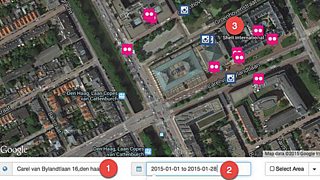
With Echosec you can search social media for free. In this example I entered the address of Shell HQ (1) in hopes of finding recent (2) postings from people who work there (3).
Use photo search in Google Images
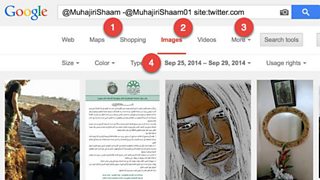
Combine all you know about your subject in one mighty phrase. In the below example I’m searching for a jihadist known as @MuhajiriShaam (1) but not the account @MuhajiriShaam01 (2) on Twitter (3). And I just want to see the photos he posted on Twitter between 25 September and 29 September 2014 (4).
When
Date search
Most of the research journalists do is not based on today but an earlier period. Always tell your search engine this. Go back in time.
Let’s investigate a fire in a Dutch chemical plant called Chemie-Pack. The fire happened on 5 January 2011. Perhaps you want to investigate whether dangerous chemicals were stored at the plant.
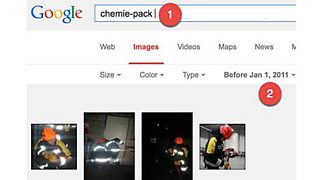
Go to images.google.com, type in Chemie-pack (1) and just search before January 2011 (2). The results offer hundreds of photos from a youth group that visited the company days before the fire. In some photos you can see barrels with names of chemicals on them. We used this to establish some of the chemicals that were stored in the plant days before the fire.
Find old data with archive.org
Websites often cease to exist. There is a chance you can still view them by using archive.org. This tool can do its work only if you know the URL of the web page you want to see. The problem is that often the link is gone and therefore you don’t know it. So how do you find a seemingly vanished URL?
Let’s assume we want to find the homepage of a dead actress called Lana Clarkson.
Step one - find an index. You need a source about the missing page and in this case we can use her Wikipedia page.
Next, put the index into the time machine. Go to archive.org and enter the URL of her Wikipedia page. Choose the oldest available version: 10 March 2004. There it says the homepage was http://www.lanaclarkson.com.
Now find the original website. Type the link into https://archive.org/index.php but add a backslash and an asterisk to the URL:
https://web.archive.org/web/*/http://www.lanaclarkson.com/*
All filed links are now visible. Unfortunately, in this case you won’t find that much. Clarkson became famous only after her death. She was shot and killed by music producer Phil Spector in February 2003.
This is an edited version of Henk van Ess’s contribution to the free online Verification Handbook for Investigative Reporting.
How to track a company or subject using a private Twitter list
Searching for people online: Advanced techniques
