Browser add-ons help web sleuths strike gold or travel back in time

Paul Myers
is a BBC internet research specialist
As previously discussed in this blog, you can customise your web browser with ‘add-ons’ and get amazing extra functionality to support your internet research. Chrome and Firefox have the widest variety of add-ons, but some are also available for other browsers.
I previously looked at add-ons that help users grab videos and images of web pages, trace the hosting of web servers and download YouTube videos. Here are a few more essentials:
Reading image metadata

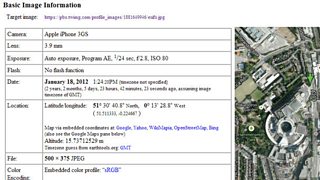
A lot of this is contingent on the photographer having their phone camera’s ‘location services’ turned on. On some cameras the accuracy of time and date information also depends on the camera being programmed properly at the start (others set themselves) and it's also possible (though difficult) to fake this information. Some sites like Facebook strip out the Exif data. But there is often some useful information that will aid your investigation or help authenticate a source.
Quite a few add-ons and websites will read the Exif data, but Jeffrey’s is one of my favourites. Installing this (Chrome) add-on will allow you to right-click on an image and send it to Jeffrey’s for analysis. Other Exif readers are available for Firefox.
Another add-on will help you to search for an image on Google. It can help to identify anonymous profile pics, buildings, even logos. Simply install the Search by image for Google add-on for Firefox (or its nearest equivalent for Chrome), then right-click on the photo you are interested in and choose ‘search by image on Google’ from the menu that pops up.
If you can’t find the photo on Google, try using Tineye. This produces add-ons for all the main browsers.
Look up domain names
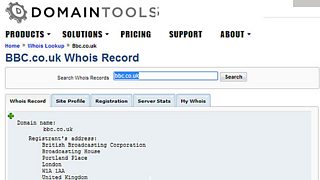
Whois add-ons are available for Chrome, Firefox and most other browsers.
Find information from the past
Investigators often need to find information that has been deleted from the web. You might need the former postal address of an organisation that is now using a PO Box. You might need to check that a person was employed by a company back in 2008. Maybe you need to find a photo that has disappeared from a web page. Don’t despair - there are a few ways to time travel on the web.
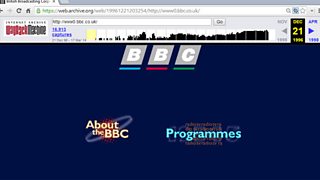
Add-ons will take you back in time with the click of an extra browser button. I am currently using Resurrect Pages on Firefox and Web Cache on Chrome, but, as with all of these add-ons, exciting alternatives are available - many for Opera, Safari and Internet Explorer.
Part one of this blog by Paul Myers on customising your browser.
Searching for people online: Advanced techniques
Searching for company data: Advanced techniques
Using Twitter to find people at the scene of a breaking story
Investigative apps are useful tools for journalists, if rough around the edges
Other internet research blog posts by Paul Myers
Google it, by all means, but don’t stop there
The Pope, the dictator, the fake photo: It pays to fact-check social media
