#Paris: Streaming video apps mean we're all reporters now

Peter Stewart
is a journalist with BBC Surrey and author of Essential Radio Skills
To paraphrase Mark Twain: 'Amateur video streams will go around the world while the traditional broadcasters are still putting their boots on…'
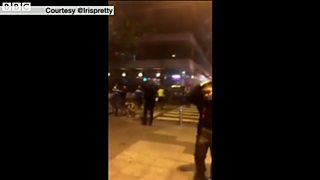
And so it was in Paris on the night of Friday 13 November, with dozens of people (‘social’ or ‘citizen journalists’) showing live video of the aftermath of the terrorist attacks from their phones to the world, well before TV crews arrived.
From Facebook Mentions, NomadCast, MyEye, Meerkat and Periscope, this has been the year of live-streaming apps. And perhaps the strapline for the Periscope app - “explore the world through the eyes of somebody else” - has never been more appropriate; the events in Paris have been called Periscope’s Hudson River moment.
With a couple of taps on their smartphone, people fleeing the scenes of the attacks - as well as in the days after - were able to broadcast their views and emotions to thousands of people around the world at the same time. The viewing figures are thought to be among the highest seen in the short life of the app (less than eight months). Demand was high enough to crash the platform numerous times.
There was no way traditional broadcasters could compete with the speed of mobilisation of these eyewitnesses who had ‘a TV station in their pocket’.
Updates to the app, released just a few days previously, meant it was easy for viewers to discover live and ‘replay’ streams. Several of the broadcasts were included in the app’s new Trending list.
The streams showed crowds in closed-off streets and racing emergency vehicles. One man showed his view while crouched behind a police car after gunshots were heard; another interviewed eyewitnesses.
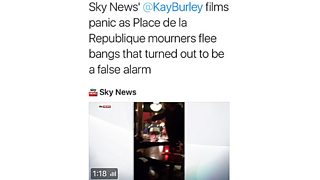
Later the professional broadcasters streamed their own ‘behind the scenes’ view: notably the BBC’s Gavin Hewitt and Sky News’ Kay Burley whose view from a restaurant floor during a safety scare was put live to air.
Although Periscope and Meerkat were released this spring, live-stream apps are not new (Ustream and Bambuser arrived in 2007). While often used to show conferences and events, and for indoor talking-head presentations, they come into their own when ‘streamers’ make their phones genuinely mobile and show views outside.
Video streamed in landscape orientation not only looks better on a mobile phone (and when mirrored through a widescreen TV), it also stands a better chance of being picked up by TV news channels. And that’s what happened to several user-generated content (UGC) videos from Paris.
For newsroom staff there are potential verification issues: rather than a live-stream on-location, is the stream actually via a phone that’s showing video on an HD monitor? Additionally, so-called ‘fake location’ apps can show the streamer to be at a location other than where they actually are.
There are also obvious safety concerns for those live-streaming from the scene of a breaking story: one man in Paris on Friday night told his viewers: “I’ve heard the gunman is up this street, so that’s where I’m going…”
And possible ethical considerations: the BBC could blur parts of some recorded images, and only used the audio track from a Periscope taken at the concert venue. By comparison, at the scene of the Bangkok bombings one ‘scoper’ showed a body-part on the ground before he or his viewers realised what it was. And live-streaming arguably adds to the ‘oxygen of publicity’ that the attackers may crave.
Additionally, on the Periscope app viewers who appreciate what they are being shown can tap the screen and send pastel-coloured hearts that are superimposed on the broadcast - possibly inappropriate over scenes of panic or devastation.
Live-streams could be valuable in evidence-gathering for authorities - as was the case after the bombing of the Boston marathon in 2013. Scopers could also unwittingly broadcast sensitive information - a SWAT team preparing to move in, snipers taking position on a roof - but that behaviour is not exclusive to the amateurs.
By definition, no-one knows when news will break, either natural or man-made. ‘Social’ or ‘citizen journalists’ can add a valuable layer of understanding to a story before and after the event.
With on-the-spot, in-the-moment reporting, live-streamers are media’s ‘first responders’.
So for anyone likely to be live-streaming at a breaking news event any time soon, here are some practical tips:
- Rewrite your biography in the live-streaming app so you can be easily contacted if a broadcaster wants to use your video or interview you as an eyewitness
- Keep your phone charged. Have a spare battery pack: live-streaming eats power and your data allowance. Remember, at a mass event you may have trouble getting a signal because of the multitude of other phones also using the network
- Ensure that you’ve signed up to video capture services (such as Katch.me) which will save your video as soon as you end each broadcast. Alternatively, have plenty of storage on your phone to avoid losing what you have filmed
- Switch on the location feature for discoverability (so you appear on the app’s map, which is what reporters will search to find people streaming where news is breaking)
- When writing the title of your stream, use a recognised hashtag for the event - certainly key words such as ‘Paris’, ‘explosion’ and so on
- Get noticed by putting Twitter @names in your title (Periscope titles are automatically tweeted as soon as you go live)
- Film in landscape to show more of the scene and to fit the dimensions of broadcast TV
- Move the camera phone slowly and steadily, and look out for shots of events that will only happen once
- Have an external mic so you don’t have to shout: that will reduce background noise, and allow you to be more discreet if necessary
- If nothing much is changing at the scene, change your location. The same scene from a different perspective (the other end of the street, or from a building) will keep interest. Getting up higher is usually very useful
- Don’t forget to describe elements the camera can’t pick up, such as the mood of the crowd, the smells etc. Give context if you know it - the location or the immediate lead-up
- Remember respect: being ‘first’ is not always ‘fair’. Do the families of those affected want this to be the way they hear what’s happened?
- Don’t obstruct those who are trying to help or investigate. Obey the authorities. Keep your cool. Don’t lose your temper. Know your rights: it’s OK to film in a public place. You don’t have to stop if they tell you to (although pressure from other bystanders may persuade you to)
- Immediately after the stream, alert the media to it. Think in advance who to tell.
Peter Stewart is an author, BBC journalism trainer and early adopter of live-streaming apps. He has written about the subject for Cardiff University’s School of Journalism, Media and Cultural Studies and was a speaker at September’s inaugural Periscope Community Summit in New York. @TweeterStewart @UpYourPeriscope
Our mobile journalism blogs by Marc Settle
Our section on smartphone training for journalists
Our mobile journalism blogs by Nick Garnett
Focus iPhone, record and send - instant video hit from storm-lashed Sardinia
