Testing
Testing strategy
Although a programmer will have tested code throughout development, programs are then formally tested in order to evaluate their suitability and to decide if improvements could be made.
Test plan
Test plans are used to test how a program will work when deployed. A test plan is presented in a table.
For example, the table below identifies the test case, the test data and the expected result:
| Test# | Test | Test data | Expected result |
|---|---|---|---|
| 1 | validateName function | Normal data - Harriet | Name accepted and returned as valid |
| 2 | validateName function | Null data | Error message appears and user asked to enter a valid name |
| 3.1 | validateName function | Erroneous data - 12345 | Data rejected and user asked to re-enter name |
| 3.2 | validateName function | Random string with 51 characters | Data rejected and user asked to re-enter name |
Design test plan
In the test plan, it's important to take note of the “type of test data”. Test data should include examples of typical, extreme and erroneous data.
Typical or standard data – is data that is expected input and falls within the range as defined within the program. Typical data should be processed correctly by the program.
Extreme or boundary data – is data that is correct but is right at the edge or boundary of an acceptable range of values. Extreme data is used to check that a program works at its limits, for example asking for a number between 0 and 100.
Erroneous data – is data that is incorrect and would cause the program to fail if it isn’t checked or blocked during validation. For example entering a string when the program is looking for a integer.
Implement test plan
Every test result should be recorded and cross referenced to the test plan. This typically includes putting a screenshot of the actual result into the test plan, along with explanations for any failed tests or unexpected results.
Test results - Python
| Test # | Input - Python | Results |
|---|---|---|
| 1 | Please enter your name: HarrietWelcome HarrietPlease select the level of difficulty from the menu:``1. Easy2. Hard | Test passed: Normal data accepted |
| 2 | Please enter your name:Please enter your name:Please enter your name:Please enter your name: | Test passed: Null data not accepted |
| 3.1 | Please enter your name: 12345Welcome 12345Please select the level of difficulty from the menu:``1. Easy2. Hard | Test failed: integers accepted (see corrective action 1) |
| 3.2 | Please enter your name: bobbobbobbobbobbobbobbobbobbobbobbobbobbobbobbobbobPlease enter your name: | Test passed: 50+ characters not accepted |
Testing and refining code
Corrective action
When testing every effort needs to be made to correct errors or offer alternatives.
Example - Test 3.1 failed
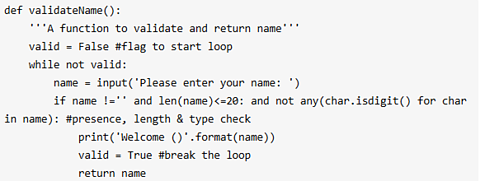
The original code could not detect when a user entered digits instead of letters for their name. This resulted in a data type error (program was expecting a string, but received an integer).
This was corrected by extending the validation rule in line 7.
The isdigit() method (a method that returns true if any character is a digit) was used to go through the name variable and check that no digits are in the name variable.
Result:
Please enter your name: Suzy7
Please enter your name: Suzy
Welcome Suzy
Please select the level of difficulty from the menu below:
1. Easy
2. Medium
3. Hard
The code now checks if any character in the name is a digit. If a digit is entered, the name will not be accepted and the user is asked to enter their name again.
This process is carried out until tests run as expected.
After testing, all results are collated and analysed. Presenting outcomes involves creating reports and documenting the tests that passed and failed and how the overall system works. Reporting in this way helps organisations know when a product is ready for release and can perform the intended purpose for which it has been created.
Future development
The feedback from the testing process helps organisations to plan which features to add to a program, that can make a product easier to use, give an organisation better value or be more reliable. Testing identifies what changes are needed to ensure better versions in the future.
Take, for example, an app that is used for ordering food in a restaurant, the app may start off with features such as booking tables and when this is working well, later the restaurant may wish to add extra loyalty points for bookings at certain times.
Planning for the future involves writing the code and tests, to allow for adding new features without causing errors to what has already been created. This means that software developers need to have a vision of the entire system.
Refinement
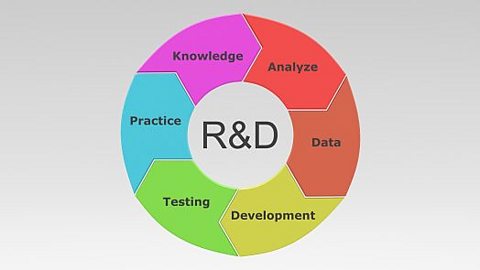
Refinement involves making gradual improvements, such as improving a piece of writing until it’s the best it can be. For computers, this could include fixing bugs, improving speed or adding missing features.
Software generally is not written perfectly the first time. Therefore, refinement is a key part of the development process as it helps to improve the code to make it more efficient, readable and effective.
Refinement involves identifying the areas to be improved, then the changes need to be implemented in the code, along with checks to ensure that new bugs have not been introduced into the code.
Examples of improving code could include the following examples:
replacing repeated code with a A method used in programming to repeat a set of instructions. - this improves maintainability but it can become complex if not properly documented
using The way that data is stored in a database or program. such as A set of data values of the same type, stored in a sequence in a computer program. Also known as a list. , to store data more efficiently with the aim of making the code run faster or use less memory
using a A method of searching in which the data being searched is halved with every step. for a large dataset instead of a A simple method of searching, in which the search moves from one item to the next in sequence, until either a match is found or end of the data is reached with no match found.. This would make a search more efficient, instead of an item-by-item linear search. However, the dataset would need to be sorted first.
Usually the changes would be documented by the user as part of the development process. This could include using version-numbers in the code, annotating the code to show what has changed, or creating screenshots showing before and after changes.
More on Systems analysis
Find out more by working through a topic
- count1 of 5
- count2 of 5
- count3 of 5

- count4 of 5