File handling
Programs process and use data. When a program finishes or is closed, any data held is lost. To prevent loss, data can be stored in a file, so that it can be accessed again at a later date.
Files have two modes of operation:
read from - the file is opened so that data can be read from it
write to - the file is opened so that data can be written to it.
Each item of data written to or from a file is called a record.
Basic file handling
A file must be open before a record can be read from or written to it. To open a file, it must be referred to by its identifier, for example:
file = openRead("grades.txt")
This would open the file grades.txt and allow its contents to be read.
file = openWrite("grades.txt")
This would open the file grades.txt and allow it to have data written to it.
file.close()
This would close the file grades.txt while ensuring that all data is saved. It also allows the system to release any resources that were being used.
Reading from a file into a variable
Once a file has been opened, the records are read from it, one line at a time. The data held in this record can be read into a variable.
file = openRead("grades.txt")
grade = myFile.readLine()
file.close()
Reading from a file into an array
Once a file has been opened, the records are read from it, one line at a time. The data held is commonly read into an A set of data values of the same type, stored in a sequence in a computer program. Also known as a list. as shown in the example below:
file = openRead("grades.txt")
for x = 0 to 5
`grades [x] =myFile.readLine()`next x
file.close()
Writing to a file
Data is written to a file one line at a time, using the writeLine statement. The code below would write the contents of an array grades to the file grades.txt.
grades = [95,90,87,92,79]
file = openWrite("grades.txt")
for x = 0 to 5
`file.writeLine (grades[x])`next x
file.close()
End of file
When reading a file that has more than one record, the computer needs to know what to do when there are no more records to read. The endOfFile() statement checks to see if the last record has already been read, for example:
file = openRead("grades.txt")
while NOT file.endOfFile()
`grades[x]=myFile.readLine()` `x = x + 1`endwhile
file.close()
The above code would read each record and place it into an array called grades. The program stops when there are no more lines to read.
Records
Programmers often need to store related information about a person or product. A record is a The way that data is stored in a database or program. that groups different types of data about each item.
A record stores related multiple pieces of data in a single structure. Each piece of data in a record is called a field.
Records are useful because they keep related data together, they can store multiple data types in one structure and they are easy to understand and maintain.
In Python, a software language, a dictionary can be used as a record. Here is an example below:
student = {
"name": "Sheryl", "age": 15,"grade": "B","passed_exam": True }
Multiple records can be stored in a list as in the Python example below:
students = [
{"name": "Sheryl", "age": 15, "grade": "B", "passed_exam": True},{"name": "Mithul", "age": 16, "grade": "E", "passed_exam": False}]
String manipulation
A string is a A memory location within a computer program where values are stored. that holds a sequence of one or more A combination of letters (A-Z) and numbers (0-9). characters. It is usually possible to manipulate a string to provide information or to alter the contents of a string.
The following examples use strings:
word1 =
"Hello"`
word2 =
"World"
Length
The length of a string can usually be determined using the len statement. This gives the length as an integer:
len(word1) - would give the answer five, as there are five characters in the word "Hello"
Character position
It is possible to determine which character features at a position within a string:
word1[1] - would give the answer "e", as "e" is the second character in the word “Hello” (remember computers start counting at zero)
word1[0,3] - would give "Hel", the first three characters in the string
word1[1,4] - would give "ello", the four characters starting from position one
Uppercase and lowercase
It is possible to change all letters in a string to either lowercase or uppercase. This can be very useful, for example when checking possible inputs:
Greeting = "Hello World"
topic = greeting.lower() - would give a value for the topic of "hello world"
topic = greeting.upper() - would give a value for the topic of “HELLO WORLD"
Concatenation
To concatenate strings means to join them to form another string.
For example:
sentence = word1 + " " + word2 - would give "Hello World"
Alternatively, a string can be lengthened by adding more characters.
For example:
word1 = word1 + " World" - would result in the value of word1 becoming "Hello World"
Slicing
In programming, slicing is a way to access parts of a A type of data structure used for mixed data types., A sequence of characters often stored as a variable in a computer program. These characters can include numbers, letters and symbols. or A set of data values of the same type, stored in a sequence in a computer program. Also known as a list. .
It lets the programmer "slice" out a section without using a loop - by specifying a start and end point.
Example
data [start:stop]
'start' is the index to begin at. The start is included in the slice, indexes start at 0
'stop' is the index to stop at. The stop is excluded from the slice.
Slicing strings
text = "ComputerScience"
print(text[0:8])
The output is 'Computer' as it includes characters 0 to 7.
text = "ComputerScience"
print(text[8:15])
The output is 'Science' as it includes characters 8 to 14.
Slicing lists
Slicing also works on lists:
scores = [70, 80, 90, 85, 60]
print(scores[1:4])
The output is 80, 90, 85 as it includes values 1 to 3.
Slicing can also be used to get part of a list, copy a list or remove or replace sections of a list.
It helps programmers to avoid writing loops and it is very useful in searching, filtering and processing data.
Graphical user interfaces (GUIs)

Graphical user interfaces (GUIs) are designed to be an intuitive way for users to interact with a program using visual elements instead of typing in commands. The GUI is the part of a program which a user sees and clicks on, for example:
text boxes – used where user input is required. For example a text box lets users type inputs such as name and email address
buttons - a button performs an action when clicked, such as submitting data or opening a file
drop-down lists – these are normally shown with a down arrow. When clicked, they give you a number of options to choose from
forms - used to collect and submit multiple inputs that collect data together
check boxes – a tick to give a response to a question, eg "Do you accept the terms and conditions?"
Maintainability
The purpose of maintainability is to ensure that, over time, a program can be easily updated.
A programmer may decide to return to a program they wrote some time before in order to add an extra feature. Additionally, another programmer may wish to modify the program in order to improve it or debug an error.
In both situations, the understanding of the program, how it works and the purpose of the code will be made easier if the program is written in a maintainable style. This includes:
self-documenting
using meaningful identities
using white space
annotations
using indentation
explaining the solution.
Self-documenting
Self-documenting code is a technique that ensures that code is written in a clear and purposeful way that then does not need lots of annotations (comments). This is done by having clear, meaningful variable and function names and a logical structure, that shows a clear pathway (flow) through the program. This helps to ensure that code is easy to maintain and follow by the programmer and others in future.
Meaningful identities
Choosing and using descriptive names for variables and functions helps others to understand the purpose of the variable and the data it is intended to hold. Meaningful identifiers help to make code intuitive and makes it easier for a programmer to debug the code.
H = input( “enter the value”)
In this example there is a variable called H however, it is unknown what this means to anyone. Giving the variable a name such as height, means it is then known that a value that's related to height needs to be entered, such as a numerical height value.
White space
White space is used to help make it clear where code is placed. White space is used to separate different subprograms and functions so that it is easier to see each module (section) of code. White space helps to aid code readability.
Annotations
Annotations (also known as comments) are notes added to code as it is written, by a programmer. These notes help other programmers to understand how the code is designed to function.
When a program is run, the comments are ignored and not read. Different languages implement comments in different ways. In Python, for example, a comment might begin with a hash symbol and be coloured in red. In Java, the at sign ( @ ) would instruct to the compiler interpreting the language, that what follows is an annotation.
Example
#This section has been designed to …
In this example, the comment is explaining to the reader (a programmer) what the code has been designed to do.
Indentation
Code within selections or iterations should be indented. This allows the programmer to easily see which code falls within the selection or iteration, and where it ends.
Some programming languages, such as Python, indent such code automatically.
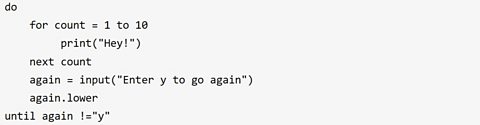
In this example the print(“Hey!”) is indented as it is in the for loop. The 'for' loop is also indented into the 'do until' loop.
More on Systems analysis
Find out more by working through a topic
- count5 of 5
- count1 of 5
- count2 of 5
- count3 of 5