Local area network hardware
The hardware needed to connect standalone computers into a LAN
To connect a computer or device to a A group of interconnected computers/devices., a number of The physical parts of a computer system, eg a graphics card, hard disk drive or CD drive. components are required:
- A circuit board that is installed in a computer so it can be connected to a network. or A connection that does not need wires and transmits data through radio signals. network interface controller
- a transmission Physical devices that are used to transfer data., either wired or wireless
- a point to connect to, such as a A device for connecting computers and other network capable devices together to form a network., A piece of hardware used in computer networks used to connect multiple devices., A device for connecting computers and other network capable devices together to form a network. or A device that connects computers to a network using Wi-Fi.
Network interface controllers
A network interface controller (NIC) provides a method of connecting to a network. A NIC offers an interface The end point of communication between networks. for a wired connection. A wireless NIC provides a radio A device that transmits and receives messages. for connecting wirelessly.
Most modern PCs come with a NIC and wireless NIC built in, providing the option of either connection method. However, mobile devices such as tablets, smartphones and many embedded devices only feature a wireless NIC, giving only wireless connection.
Transmission media
Transmission media carry Units of information. In computing there can be different data types, including integers, characters and Boolean. Data is often acted on by instructions. signals from one computer to another. Media are either wired or wireless.
In modern networks, wired media use either twisted copper wiring, or Cable that carries data transmitted as light.. Each wired medium has differing characteristics.
| Twisted copper wire | Fibre-optic cable | |
| Cost | Cheap | Expensive |
| Maximum transmission speed | Up to 1 gigabit per second | Over 40 terabits per second |
| Maximum distance for reliable communication | Up to 100 metres | Over 2 kilometres |
| Cost | |
| Twisted copper wire | Cheap |
| Fibre-optic cable | Expensive |
| Maximum transmission speed | |
| Twisted copper wire | Up to 1 gigabit per second |
| Fibre-optic cable | Over 40 terabits per second |
| Maximum distance for reliable communication | |
| Twisted copper wire | Up to 100 metres |
| Fibre-optic cable | Over 2 kilometres |
Wired connections are reliable and not usually subject to interference. However, they limit mobility - a wired device usually has to stay in place.
Wireless connections use radio waves to carry signals. These signals are limited in range (usually up to 50 metres), but are subject to magnetic interference - they can also be blocked by walls. However, they are ideal for mobile devices as a device can connect to a network as long as it is in the range of a wireless access point.
Network connection devices
A network connection device allows computers to connect to a network. There are four types of connection device to consider:
- hubs
- switches
- wireless access points
- routers
Switches
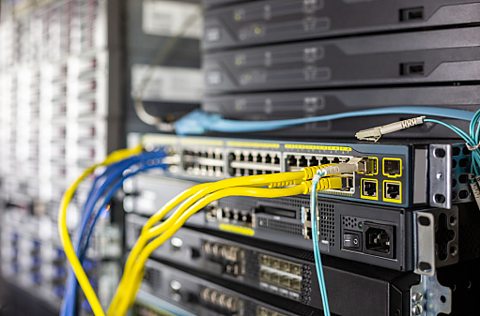
Switches are similar to hubs, with one important difference - a switch records which computers are connected to which ports. When traffic is received, the switch forwards the traffic to its intended recipient only. This improves network performance by cutting down on unnecessary transmissions.
Wireless access points
A wireless access point (WAP) uses a radio transceiver to allow wireless connections to a network. In effect, the WAP creates its own wireless network, which devices connect to. The WAP then sends wireless traffic it receives onto the main wired network.
WAPs can also be used to extend the range of a wireless network. In this case the WAP can either receive and transmit traffic to other WAPs, or it can be connected via a cable to the main network.
Routers
Routers are one of the most commonly used connection devices. They are used to send data signals across the A global network connecting millions of computers.. Routers work by collecting knowledge of available routes to transmit data. They then determine the most suitable route for sending data.
Routers are also commonly used in homes. These types of router usually contain a hub and a WAP, enabling a small A type of network model where all computers on the network share responsibility and there is no one central server. network to be formed. Additionally, they contain a Meaning 'modulator/demodulator'. Allows computers to connect to a network over a telephone line., which allows users to connect to the internet.
