Modes of connection
Wired and wireless networks
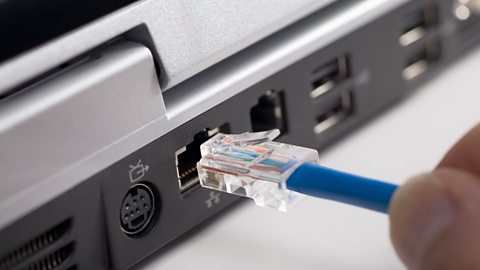
A connection that needs wires or cables to transmit data. networks are identified by their use of physical wiring to connect devices. They are most often used for office networks or for devices that are unlikely to move as the cables limit the ability to move away from the connection point.
Ethernet
Ethernet is a form of wired communication that is used to connect devices on a local area network Local area network. A network of computers that covers a small area, eg a school or college.. It allows computers, printers and other A group of interconnected computers/devices. devices to communicate through a wired connection (cable).
The advantages and disadvantages of ethernet
| Advantages | Disadvantages |
| It provides a stable and reliable connection that is not affected by walls or interference. | Devices must be near to a connection point. |
| It offers higher speeds than Wi-Fi. | It can be difficult to install because it may have to be run through walls and floors. |
| It is more secure than a wireless connection, because physical access is usually required to cables. Also, data that is travelling through cables is harder to intercept than a wireless connection. | Cables can appear to be messy. |
| Advantages | It provides a stable and reliable connection that is not affected by walls or interference. |
|---|---|
| Disadvantages | Devices must be near to a connection point. |
| Advantages | It offers higher speeds than Wi-Fi. |
|---|---|
| Disadvantages | It can be difficult to install because it may have to be run through walls and floors. |
| Advantages | It is more secure than a wireless connection, because physical access is usually required to cables. Also, data that is travelling through cables is harder to intercept than a wireless connection. |
|---|---|
| Disadvantages | Cables can appear to be messy. |
Wi-fi

Wireless networks use radio waves to carry signals. These signals are limited in range - usually up to 50 metres - but are subject to interference. They can also be blocked by walls.
However, they are ideal for mobile devices as a device can connect to a network as long as it is in the range of a wireless access point (WAP).
A comparison of wired and wireless networks
| Wired networks | Wireless networks | |
| Cost | Installation costs can be expensive. | Cheaper to set up, devices can connect if in the range of a wireless access point. |
| Installation | Installation requires technical knowledge and space to install cables. Cables can appear to be messy. | Installation is simple as most wireless devices will connect automatically. |
| Maximum transmission speed | Up to 1 gigabit per second for Ethernet. | Up to 50 megabits per second. |
| Maximum distance for reliable communication | Up to 100 metres for Ethernet - over 2 kilometres for fibre optic. | Up to 50 metres. |
| Security of connection | More secure as a physical connection is required to intercept data. | Less secure as wireless signal cannot be contained within a building and no physical connection is needed to intercept data. |
| Cost | |
| Wired networks | Installation costs can be expensive. |
| Wireless networks | Cheaper to set up, devices can connect if in the range of a wireless access point. |
| Installation | |
| Wired networks | Installation requires technical knowledge and space to install cables. Cables can appear to be messy. |
| Wireless networks | Installation is simple as most wireless devices will connect automatically. |
| Maximum transmission speed | |
| Wired networks | Up to 1 gigabit per second for Ethernet. |
| Wireless networks | Up to 50 megabits per second. |
| Maximum distance for reliable communication | |
| Wired networks | Up to 100 metres for Ethernet - over 2 kilometres for fibre optic. |
| Wireless networks | Up to 50 metres. |
| Security of connection | |
| Wired networks | More secure as a physical connection is required to intercept data. |
| Wireless networks | Less secure as wireless signal cannot be contained within a building and no physical connection is needed to intercept data. |
Advantages of wi-fi:
- Allows you to set up LANs without wires
- Wi-fi enabled devices are now widely available
- Users can log in from anywhere within the wi-fi network using any wi-fi device
Disadvantages of wi-fi:
- Signal strength weakens the further away you are from the router
- The wireless connection may not be as secure as a wired connection
- Wi-fi signal can be affected by adverse weather conditions. Water droplets absorb the 2.4 Ghz radio frequency and partially block the signal (however, most WAPs are located indoors)
Bluetooth
Bluetooth is a form of wireless communication that enables different devices to connect. It works like a small private network between two devices, allowing them to share data and documents.
Many modern devices incorporate Bluetooth. It is often used to connect wireless devices such as:
- a keyboard or a mouse to a computer
- a speaker to a smartphone
- a smartphone to a car's multimedia system
Bluetooth provides a simple way of connecting devices. However, it is limited in transmission speed and range. Transmission speed is often only up to 2 megabits per second.
Advantages of bluetooth:
- Low cost to set up
- Uses relatively little power compared to other types of wireless connection
- You can easily set up bluetooth networks with other bluetooth enabled devices
Disadvantages of bluetooth:
- Short range
- Low level of security
- Low data transmission rate
