We've all been there. You're searching for the latest must-have clothes and find a website where they're far cheaper than anywhere else. And there's free shipping too! It's too good to be true, right? Well, usually yes.
Whether it’s shopping, general searches or the latest news or gossip, scammers thrive on sucking you in and once they do your personal data can be at risk for even the most tech savvy people.
BBC Bitesize Other Side of the Story asked the BBC’s Cyber Correspondent Joe Tidy to share his top tips on how to spot – and avoid – scam websites.
And if you want to go even deeper you can learn how to check a website’s source code, and all of the instructions the creators have programmed in, by watching Solve the Story’s video guide on checking a website’s source code.
Here are Joe’s top tips for you.
1. Check that the website has a secure connection
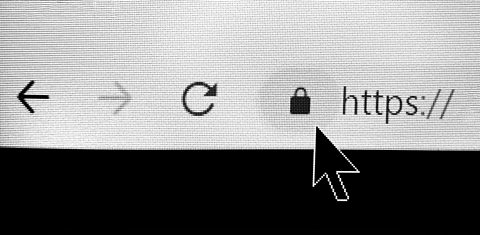
A padlock in the top left corner of a website is a way to tell if it’s encrypted end to end. This means that communications through it can’t be intercepted.
If you can’t see a padlock, you should be able to click on the settings button next to the URL to view the site information. “Connection is secure” is what you’re looking for here.
Joe says: “It means that your information, for example passwords and card numbers, is private when it’s sent to this site and the certificate is valid. That means the website has at least done the basics – but that doesn’t necessarily mean that the website is legitimate.”
A secure website will have certificates that will protect the data going through it – but again, it’s always worth being cautious.
Joe adds: “You can buy those certificates and you can fake those things but it’s a good place to start.”
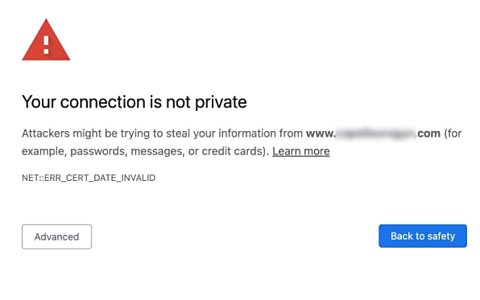
2. Don’t ignore a warning from your browser
Sometimes you’ll get a security warning when you go to certain websites.
Joe says: Sometimes your browser will say “this is not a secure connection, are you sure you want to visit that website”, in which case you would say no.
“Browsers are getting much better at protecting us from that kind of thing."
3. Always check the reviews
Joe says: “When I use new shops I’ll go through the process of looking at if they’re legit, where they’re based and what the reviews are like.
“Does the website have contact details for that company? And is there a Trustpilot or a TripAdvisor link and page for that company or experience or place?
“It’s always worth typing in reviews and the name of the company on Google and it will hopefully come up with some.
“Again, you have to be careful because those reviews can be purchased and they can be fake but with something like Trustpilot I have more trust that those are real verified people and not bots.”
4. Think about what you want from the website
Joe says it’s important to think about the context in which you’re visiting a website.
He suggests always looking at the “About Us” page to see who is behind a site and - when it comes to searching for facts - ensure it’s going to have the information or expertise that you need.
He adds: “What do you want from that website? Do you want a product, do you want to buy something?“You’ve got to think ‘Why am I visiting this website? What is it for?’ and then you scrutinise from that basis.”
5. If it looks too good to be true, it probably is
It might go without saying, but always be cautious about offers that seem too good to be true.
Joe says: “If an offer looks really, really good, let’s say it’s offering a free trip or 50 per cent off, I’m afraid that if it looks too good to be true it probably is.
“There’s going to be a reason why they’re giving these things away.”
Remember you can find out how to check a website's source code by watching our video guide.
Test your skills in spotting a scam in our quiz which was part of last year's Scam Safe Week.
Can you help to Solve the Story?
Solve the Story is an exciting, brand new six-part series from the Other Side of the Story.
It's designed to be used in the classroom to help young people question what they see online, verify sources, spot fakes, and understand how misleading narratives spread.
The series also has guides on subjects including how to do reverse image searches, identifying bot accounts and seeing a website's secret code.
Solve the Story's characters must apply their media literacy skills to uncover the truth around a mystery by analysing sources, questioning assumptions, identifying deepfakes, challenging viral claims and spotting bias. Meet Misha and her friends Aaron and Sam in episode one, The Glitch.
This article was published in February 2026

Not sure if the news you’re seeing on social media is true or false? Can you always tell if the things you see online are real or fake? Learn how to get the other side of the story with our quizzes, videos and explainers.
How to outsmart scammers
Be aware of some of the latest scams, learn how to protect yourself and read expert advice on how to outsmart scammers.
How to spot a scam
Scams come in a variety of forms including text messages and emails, but how can you spot a real advertisement from a scam?