Solve the Story Episode 1: The Glitch
One skate trick. One video. One big problem.
When Misha lands a trick at the skatepark, her friends film it on their phones. It’s meant to be fun… until an edited version of the video suddenly appears online. But something isn’t right. The video doesn’t quite match what really happened.
Can you help Misha figure out what's going on?
Misha: Hi guys, Misha here. I'm here with Sam and Aaron. So, today I'm going to be filming a trick I've been seeing everywhere; you know the one. And I'm filming it because it's going to be huge. All right, here goes nothing.
Aaron: Getting a second angle on Misha nailing it… Or not. (CHUCKLES)
Sam: Hopefully we get a few fouls in, eh?
Misha: What did you say?
(PUNK MUSIC)
(EVERYONE) Yeah!
(EVERYONE) Whoa!
(LAUGHING)
You okay?
Aaron: Only you could have stacked it without even skating.
Misha: You better have filmed me.
(SOFT MUSIC)
(MESSAGE BLEEPS)
(SKATEBOARD SCRAPING OVER PUNK MUSIC)
What'd you say?
Delete it and back off.
What'd you say?
Delete it and back off!
What'd you say?
(SOFT PENSIVE MUSIC)
(MESSAGE BLEEPS)
(MESSAGE BLEEPS)
(MESSAGE BLEEPS)
(PHONE RINGS)
Sam: Where's that come from? It weren't me, I swear.
Misha: Well, how'd they get the footage? I didn't say any of that stuff. And who's that other guy? (PHONE RINGS)
Aaron: It's gone up to 500 views already. It's not funny, Sam.
Sam: Seriously, guys, it wasn't me. I swear, I'll show you. We need your help. Here's your first challenge. Watch that video again and see if you can spot three things that don't look right. Ready? Let's go.
(SKATEBOARD SCRAPING OVER PUNK MUSIC)
Misha: What'd you say? (SAM GROANS) Delete it and back off. What'd you say? Delete it and back off. What'd you say?
Aaron: The original post is from an anonymous account, but that's been deleted. It's been shared loads of times. It's up to athousand views.
Misha: Oh, no.
Sam: Hold on, check this out.
Misha: Delete it and back off. I never said that. It doesn't even sound like me.
Sam: Your lips don't even sync up.
Aaron: I think it's a deep fake. It looks like someone has stuck an AI version of your voice on the clip.
Misha: People are going to think I'm horrible. Look at the comments.
Aaron: You're the only person who could have done this, Sam.
Misha: Didn't you realise it would blow up?
Sam: Seriously?
Aaron: It's your footage. You're always messing with AI stuff. Like that deep fake you made on your dad the other week.
Sam: You could just as easily have done this. Why would I stitch you up like that?
Misha: It must be whoever that is in the video. Who is that?
Sam: Maybe not. Look at this.
Aaron: What are we looking at?
Sam: The person you're supposed to have punched in the video. I don't think it's a real person. Look at what they're wearing.
Aaron: That's your T-shirt. You were wearing it in the park that day.
Sam: I think whoever's done this has put somebody else's head on my body.
Aaron: AI again?
Sam: Probably.
Misha: You swear it wasn't you, Sam?
Sam: Honestly, it wasn't me. There's plenty of other people who could have done this.
Misha: Like who?
Sam: I think we need to find out whose head's been put on my body. I could try to cut it out, reverse image search it.
Aaron: Sam, speak English, man. What's a reverse image search?
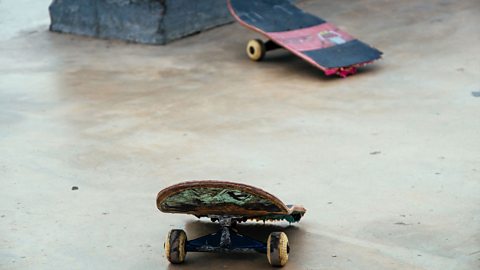
Sam: I can upload the picture and see where else it's been used online. Sometimes it will show me the exact same image, sometimes ones that are just similar. But it might help us find out who the skater is and who posted the original video. And there's one more thing that shows that the video is fake. The image of that broken skateboard.
(PUNK MUSIC)
Where did that picture of the broken skateboard come from? We need your help. Watch the "How to do a reverse image search" videoon the Other Side of the Story website. Then, use your new skills to do a reverse image search of the skateboard pic to help us solvethe story.
(PUNK MUSIC)

Episode takeaways
In this episode, you will learn how to:
- Spot signs of manipulated images or videos.
- Understand what deepfakes are and how AI can change voices and faces.
- Use a reverse image search to find where pictures come from.
- Think more carefully about what you see on social media before believing or sharing it.
Key points to think about:
- Why do fake or edited videos spread so quickly online?
- What responsibility do we have when sharing videos about other people?
- How could a fake video affect someone’s mental health or friendships?
How to: Do a reverse image search
A reverse image search scans the internet using a picture instead of words. It’s a simple but powerful way to find out where an image came from, see where else it’s been used, and help you decide whether a photo might be fake.
In this video, you’ll learn how to use a tool, like Google Images, to upload a photo or paste an image link and let the internet do the searching for you.
James: How to do a reverse image search on Google. Ever wondered where an image came from, or if a profile picture is real?
A reverse image search lets you use a picture to look something up online.
You can use photos from any source, including social posts, news photos, or profile pictures.
So, how do you do a reverse image search?
The easiest way is to use a search engine like Google Images.
Instead of using text, click on the little camera icon in the search bar and from there, you'll see two options.
You can either upload an image by selecting a photo saved on your phone or computer, or you can paste an image URL.
This means copying and pasting the web address of an image you've found online.
The search engine then analyses your picture, looking at its colours, shapes, and patterns, and searches the web for matches.
With a reverse image search, you can find out where a photo came from and the creator of the image.
You can check if a profile picture is fake, find a similar image, or even find a higher quality version of an image you like.
If a reverse image search shows that a picture has been used hundreds of times before, or comes from somewhere different to what'sbeing claimed, then it could be a bit of a red flag.
(MUSIC)
You can perform a reverse image search on Google Images by pressing the camera icon that you will find alongside the search bar. If you hover over the icon with your mouse it will say 'search by image'. You can then drag and drop, or upload an image from your documents/desktop into the box that appears. You'll also be able to paste a URL of an image that is already online. You will then receive your results.
Reverse image searches are useful for:
- Finding the original source of a photo.
- Helping to check if a profile picture is real or fake.
- Spotting reused or edited images in viral posts.
- Finding better quality versions of images.
Help to Solve the Story by performing a reverse image search on this picture of a broken skateboard.
Classroom film: How to spot disinformation and misinformation
Have you ever scrolled past a headline that made you think twice? Or viewed a video that seemed so wild you had to share it? Social media can be a powerful tool for connection and creativity, but it's equally important to understand how and why stories are shaped and shared. In a world where we're bombarded with online content, it's getting harder to separate facts from fiction.
Watch this video to find out more about how misinformation and disinformation work.
You can find more teacher notes and classroom resources on our Bitesize for Teachers Solve the Story page.
James: Have you ever scrolled past a headline that made you think twice? Or viewed a video that seemed so wild you had to share it?
Social media can be a powerful tool for connection and creativity, but it's equally important to understand how and why stories are shaped and shared.
In a world where we're bombarded with online content, it's getting harder to separate facts from fiction.
Today, we're going to take a closer look at how misinformation and disinformation work.
(MUSIC)
By the end of this film, you'll have some of the critical thinking skills needed to investigate online media.
These skills are vital for analysing sources, but also for managing your own digital lives and wellbeing online.
Let's look at three headlines for the exact same event.
I want you to think about how each one makes you feel and why.
How does the tone, language and image in each one change the story? Who is the headline aimed at? And what emotional reaction is it trying to get from you?
Pause the video and take a few minutes to break each headline down.
(MUSIC)
You've probably noticed how just a few words can completely reframe a story, by telling it from a different angle.
That's not an accident.
Some online content and headlines are specifically engineered to make you have an emotional reaction that gets you to click, increasing the chances that that post will go viral.
It's important to know the difference between misinformation and disinformation.
Misinformation is false content shared by people who are misinformed.
They don't know the real facts and don't realise the information is fake.
But disinformation, often known as fake news, is created with a specific purpose to deliberately mislead you, either to influence your opinions, to make money from your clicks, or simply to stir up anger and division.
It works by triggering a strong emotional response like shock, amusement, or outrage.
That feeling bypasses our critical thinking and pushes us to share instantly.
The real trick is to ask, 'What information is being left out of this picture or clip to make me feel this way?'
'How does this piece of content compare to other pieces of content on the same topic?'
Now, your mission is to become the creators of disinformation.
Pick a completely mundane school event - someone handing out textbooks or the food being served up for lunch - anything you can think of.
Your task is to create a sensational misleading headline for that event. Your goal is to make people click, even if the story isn't true.
How could you frame that simple action to make it seem shocking or scandalous?
(MUSIC)
Creating your own disinformation shows just how easily reality can be distorted.
Think about how easy it was to twist the story. What information did you include and leave out?
What were the differences between your version, other students' versions, and the simple facts about the events?
Next time you see a viral story or post online, you'll know what to look out for and you can make up your own mind as to whether it's true or not.
Remember to always question the intent behind a story. Analyse the tone, look at what context might be missing, and pay attention to how it makes you feel.
Before you believe it, and especially before you share it, take a moment to deconstruct it and cross-reference it against other sources.
Always ask 'Who made the story and why?' The goal isn't to distrust everything you see, but to be an active critical thinker.