You can no longer submit your playground survey data, but you can still do all of the activities with your class.
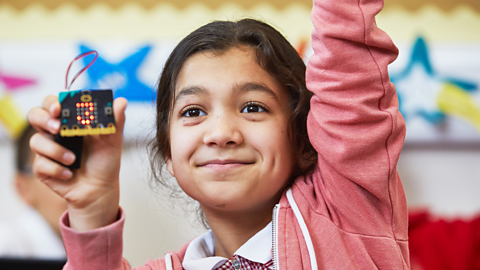
An exciting whole class Information collected for use elsewhere. collection activity that uses the BBC micro:bit as a wearable activity tracker to identify pupil’s physical movements in the school playground. Pupils answer the questions:
What types of activity do we do in the school playground? How accurate is the data?
Watch the video
Tilly: Hey there, my name is Tilly and I always loved playing football in the playground, especially being in goal. What about you?
Yussef" I'm Yussef, and I used to run around the playground with my friends playing tag. I always ended up out of breath, though.
Tilly: Well, that's probably because you were doing a lot of physical activity, which leads me to our next task. We want to see how we can use our BBC micro:bits to keep track of that.
Yussef: And Lionardo from Newport in Wales has an important question for us.
Lionardo: What type of activity happens at the school playground?
Tilly: That's such an interesting question and I'm so excited
because we can actually use our micro:bits to help us find this out.
Yussef: Really, how?
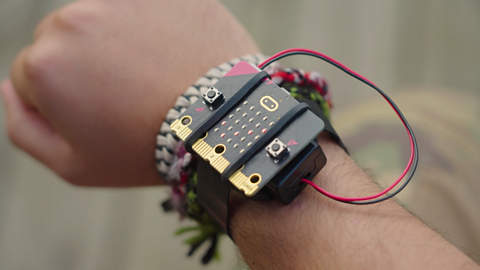
Tilly: Well we're going to wear our micro:bits while spending time in the playground and it’s going to be able to track our physical activity thanks to a special activity tracker we can put on it. This program was created specifically for the micro:bit using something called machine learning.
Yussef: What's that?
Tilly: Computer scientists say that machine learning is when we train a computer to learn from the data that we input. For example, have you heard of fitness tracking watches or stepcounter apps?
Yussef: I have, yeah.
Tilly: They use a piece of hardware called an accelerometer to sense and measure movement. A software program trained by machine learning takes this movement data. And because it's been trained, it can actually identify our movements. We call this a model. A few months ago, we asked some children to wear micro:bits in their playground and move around lots. We stored that movement data from the micro:bit’s accelerometer. A computer scientist took this movement data and used it to train a special program called a Machine Learning model that now recognises when we’re doing things that we often do in the playground, like running and jumping. This model is running on the special activity tracker program on our micro:bits right now.
Yussef: That's really cool. It sounds a lot like artificial intelligence.
Tilly: Yeah, we seem to be hearing about AI everywhere these days. And machine learning is a very specific type of AI where we train computers to learn to to recognise different kinds of data.
Yussef: That's actually so interesting. I can't wait to test it out. Shall we go put them on?
Tilly: Yeah. I'm going to go for a sprint as that's what I’d normally do.
Yussef Sounds like a plan. I think I’ll just sit here and read my book.
Tilly Look at that. It knows I went for a sprint and it even recognised the jumps I did at the end.
Yussef: And it can tell that I was sitting still. That is awesome and impressive.
Tilly: Not only impressive, though, but really useful. If we were to wear these throughout the whole day it would give us a really
good idea of how much physical activity we’re doing, how much rest we're getting and how much more we should get of each.
Yussef: I mean, I'm definitely going to wear mine for the rest of the day.
Tilly: I really do think it's so amazing how technology can help benefit our health and wellbeing. I guess it’s pretty similar to
how technology helps me move around with my bionic arms. Without them, I wouldn't be able to do certain things and multitask as easy as I do now. Now it's your turn. Wear your micro:bit when you're out in the playground at lunchtime and break time and see if it can track your physical activity. But don’t forget how important it is to collect accurate data. So don't just keep running around being silly for the sake of it. Now let's get out of here. See you next time.
How to complete the activity
Download the resources. document
Download the teacher instructions, class poster, curriculum map and parent/carer letter.
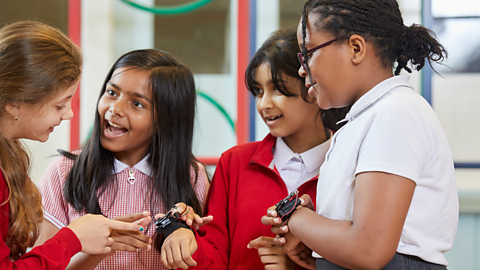
Transfer the code onto the micro:bit. External Link
Visit the Micro:bit Educational Foundation's how to guide to download the special code.
View your movement data External Link
Interpret graphs showing your movement data, discuss findings and rate the accuracy of the data.

Playground survey teacher notes
- To complete this survey activity you will need the helpful teacher instructions.
- This activity will support pupils to explore their own physical activity levels, and it offers the opportunity to discuss the idea that they need a balance of different levels of activity to stay healthy.
- Pupils will be using the micro:bit as a wearable digital device to record information about their physical activity levels over a period of time. This process is called data logging. They will learn that the micro:bit has a built-in An input that senses things in the real world, such as movement, temperature, and light levels. called an A sensor that detects movement. that can be used to measure when the micro:bit is moved in different directions.
- Pupils will be using a special activity tracker A set of instructions written in code that performs a given task. using a specific type of The ability of computer software designed by people to perform tasks that usually need human intelligence. called machine learning. Machine learning is where computer A set of programs used to perform a task, which is usually more complex than a single program. is designed to perform a task quickly and reliably having been Providing samples of data categorised and labelled by humans to help machine learning software to build a model. by data provided by humans. This training process can be described as ‘learning’ and this is why we use the term ‘machine learning’. The computer system is given samples of data categorised and labelled by humans to help machine learning software to build a model. The model can then use the set of rules developed by a machine learning system to categorise new data.
- We would love to see how your class is getting involved with the BBC micro:bit playground survey. Why not share updates about your activities on social media and let us know by tagging @BBC_Teach and using #BBCplaygroundsurvey
Topics covered
- Science: Human body - skeletons and muscles; Carrying out an investigation to answer a scientific question; Using equipment to carry out an investigation.
- PHSE/RSE/Health and Wellbeing: Know that we need a balance of types and levels of physical activity to stay healthy.
- Maths: Reading and interpreting data in the form of table, charts and graphs.
- Computing/ICT: Data sent to a computer for processing such as button presses and sensor readings. and Data sent from a computer such as information shown on the LED display.; Recording and storing data; Using a sensor eg. accelerometer.
Suggested learning objectives
- Introduction and planning: To investigate the different types of pupil physical activity that happen in the school playground during break and lunchtime.
- Computing: To understand that a type of computer programming called machine learning can be used to train a computer program to recognise a range of physical activities.
- Fieldwork: To use a BBC micro:bit to log data over a period of time.
- Data analysis and recording: To be confident reading and interpreting their activity data in the form of graphs and tables; To understand the limitations of technology.
Suggested extension activities
- Science: Link the micro:bit activity tracker to an investigation into heartrate/pulse changes before, during and after different types of physical exercise.
- PHSE/RSE/Health and Wellbeing: Create a group presentation that explains the importance of different types of physical activity to health and wellbeing - try aiming it at different audiences – eg parents, younger children etc.
- Maths: Present some of the raw data in a range of different ways (including different types of graph using ICT); Use the data to explore concepts like averages or percentages.
- Geography: Link data from the activity tracker to location in the playground and answer Geographical enquiry questions about what happens in different areas of the playground; Create a map of the playground and add map symbols and a key to show playground terrains and features/resources, and to locate where different types of activity happen.
- Art and Design: Use the Geographical enquiry answers to design the 'ideal' playground layout/features/resources.
- Design and Technology: Design a better strap/case/fastening to ensure the micro:bit is secure even during high levels of physical activity; Create a prototype and test using a ‘fake’ micro:bit of similar size and weight; Get user feedback regarding comfort, ease of use etc and adapt design in the light of this feedback.
- Computing/ICT: Discuss how machine learning and AI are changing the way we use technology - using familiar examples; Discuss some of the online safety issues related to collecting personal data, consent and privacy.

More activities from the playground survey
Exploring machine learning. video
Explore how computers learn from data using the new micro:bit machine learning tool. Have fun training your own machine learning model!
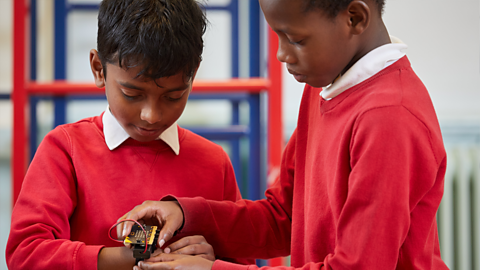
What next? video
Enjoy choosing extension activities with your class once you have completed the playground survey.
Playground survey glossary
A helpful glossary to increase your confidence when teaching the seven BBC micro:bit playground survey activities.