
Hi, I’m Sam Taylor and I’m the Senior Android Engineer for BBC Sport.
If you’ve updated the Sport app in the last few days, you may have noticed that we have added support for Google Chromecast on both the iOS and Android platforms. This update coincides with the start of the Commonwealth Games and enables you watch live and on demand sport – including up to 17 streams of live action from Glasgow – on your TV using your Chromecast.
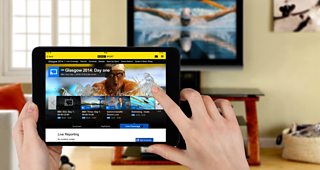
What is Chromecast?
Chromecast is a thumb-sized device that plugs directly into any HDMI port and allows supported apps to stream media directly to your television over your wireless network. We are pleased to be the latest BBC app to support this new way of consuming live video streams and on-demand video clips.
Cross-Team Collaboration
After the success of the Chromecast integration in BBC iPlayer, we had a unique opportunity to take all of the multi-stream content from the BBC Sport website and provide our users with a new way of viewing this summer’s live sporting events on the big screen.
We worked closely with the BBC's Mobile and TV Platforms teams to define and create a reusable component which would enable us to include this functionality in the BBC Sport app. This collaboration started with a two day technical investigation, which involved people from both teams brainstorming and prototyping various ideas about how this feature could be included. This process gave us a better understanding of the challenges we would face, and the steps required to complete the work in time for the Commonwealth Games.
How Chromecast Works
If you have Chromecast devices registered on your network, the BBC Sport app will automatically detect these and show the cast button in the top-right of the screen. Selecting this button will then show you the list of available devices, so you can decide which screen to cast to.
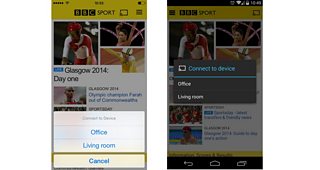
Once you are connected, any videos you play through the BBC Sport app will automatically cast to your TV screen. It’s simple. At any time you can click the cast button again to control the video. You can even connect multiple devices so your friends and family can share their favourite sporting clips.
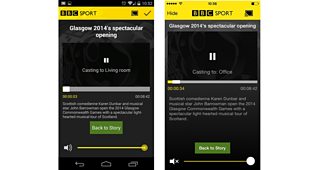
From the sender control screen you can control the volume, subtitles, playback position, and return to the related article, so you can pick up where you left off.
I hope you enjoy using this great new feature and find it a useful addition to the BBC Sport app. We are always grateful for feedback and would love to hear your thoughts and opinions on any new features.
Sam Taylor is Senior Android Engineer, BBC Sport
