
As John Barratt explained two weeks ago the BBC Online search facility at bbc.co.uk/search has been relaunched.
This was the culmination of several years’ effort including a complete technology refresh, the formation of a new technical and product team in Salford and collaboration with many other teams across the BBC Future Media organisation.
With the relaunch of such a significant part of BBC Online we thought it would be interesting to give a more technical insight into the Search system.
The search results page is just the tip of the iceberg. Behind it is a system of software components centred around our search engines.
There are four key components within the Search system, shown in yellow below:
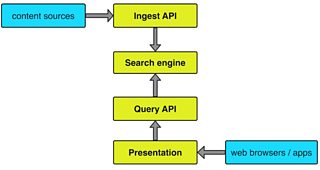
Search overview
Search engine
The search engine is the core of the service, responsible for finding the most appropriate content based on the words you type.
Text and other metadata (titles, URLs, etc) from pages and programmes is analysed and indexed so that results for searches can be found as quickly as possible.
We’re using third-party software to provide this core functionality, but we still have to understand how it works, what it can and can’t do so that we can tune and tailor it to suit our needs.
Ingest API
In order to find content we need to know about it. To enable this we’ve implemented a component that provides an Application Programming Interface (API) so that the various content management systems used across BBC Online can send content as soon as it’s published.
Query API
Our Query API allows requests to be sent to the search engine. This is where queries are converted to the special syntax used by the search engine. It removes the need for different parts of BBC Online to understand how to interact with our specific search engine, and gives us the flexibility to upgrade and change it without having any impact on them.
Presentation
The presentation components provide the user interface people use to perform search queries.
These components know nothing about the content itself, how it’s organised or why certain results are showing – they simply focus on displaying the results the Query API gives them.
They include apps such as BBC iPlayer on phones, tablets and TVs, and the new search page at bbc.co.uk/search. This is a “responsive” site, compatible with all current web browsers on computers, tablets and mobiles.
We recently helped the World Service team relaunch their search results pages too - they’re using our new search engine via the APIs on more than twenty sites in many different languages.

Samples of search across different sites
System performance and resilience
We’ve provisioned the new system to support current and expected traffic rates, and made it much more resilient to component failure - for example we now have separate copies of the system in two different data centres. We’re very happy to report that the new service is at least ten times faster than the old, delivering responses in less than half a second on average even at peak times when it’s dealing with upwards of thirty queries and over a hundred suggestion requests per second.
Monitoring
We now have real-time monitoring of all aspects of the system, so the BBC’s 24/7 Operations team can be notified immediately should any component fail or behave outside its expected boundaries. We also have “Search TV” on in the office showing the current status of the system and a sample of live search queries as a big tag cloud.
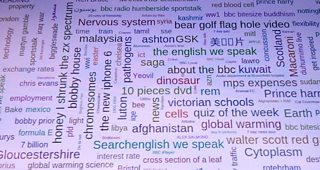
A word cloud of search terms
Andy Webb is acting Technical Architect for BBC Search
Thanks to Mark Kay - Development Lead for BBC Search - who coauthored this post.
