
I'm Monalisa Rath and I'm the Senior Developer in Test in the iPlayer team.
I have worked for BBC for close to 2 years now in the iPlayer team starting as a Senior Developer in Test working on major releases like the BBC Channel and TV Homepages and the new iPlayer, testing the key Playback feature, metadata (data feeds), social media and discoverability within BBC iPlayer.
Recently I took over the Test Management responsibility for BBC iPlayer with focus on the responsive front-end work that is currently in full flow.
The new BBC iPlayer was extensively researched and tested before launch. Dan Taylor has outlined some of the details of the research in this comment on his recent post. But to compliment these approaches we also wanted to try a different, unique and collaberative approach to our testing.
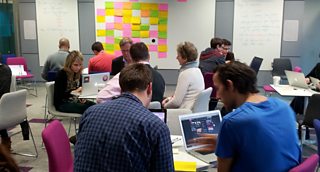
Testing in the BBC's Ada Lovelace room
The product team had a discussion about confidence in the new product, the automation coverage and the manual testing that was being done. Although we were happy with what had been done we felt that some more general exploratory testing would be beneficial. However we thought that rather than just taking the development team and asking them to do this we would try a new approach.
We looked at a few ideas and agreed that we would run a session inviting people from all areas of BBC Future Media to try out the new BBC iPlayer and use this to get feedback. The people we invited seemed very keen and really entered into the spirit of the event.
The test team sat down and came up with a number of areas for the journeys to focus on. These included Playback, Categories & A-Z, TV Guide & Channel Schedules and the iPlayer Homepage, the individual Channel Homepages and the Search facility.
For each of the areas we came up with user journeys by looking at the features we already had in our automation suite, some of our manual tests and also some general team experience.
We made the user journeys very generic so as not steer the users too much. The user journeys were written in plain language and then had a tips section on the user journey card to give any specific requirements or any specific ideas for other things to look out for.
Example Journey Below:-
Area
Playback
User Journey
Can you restart an already broadcasting live programme?
Tips
1. Can you restart with just the scrub bar?
2. Have you gone past the previous programmes?
3. Did the programme information change?
4. Does it work the same in full screen and on devices?
The cards were then all stuck up on a board with the areas all mixed up and people were asked to pick a random card, follow the journey and note the operating system, devices and browsers the journey was tested on. People worked in pairs to make sure there was lots of interaction and discussion throughout.
We had a selection of laptops and devices people could use and swap between them.
While people worked through the journeys the test team were in the room talking to them and helping with any queries. If someone found a defect they called over a tester and showed it to them, and if it was an issue it was recorded on a small post it and stuck to the front of the journey card. If a screenshot was required it was taken by the tester and saved.
As the testers went round looking at the defects found, any that were deemed as interesting were put on a separate wall.
We also asked the pairs running the journeys to make any notes about their journeys on the back of the cards. These could be about the way the journey was detailed but also about how they felt about what they did and if anything didn’t feel intuitive. This gave us good feedback for changing the cards for next time and also feedback for the product team about how the user experience was.
When the pair had finished with the card they put it back on the board in the ‘Done’ column and picked up another random user journey and started again.
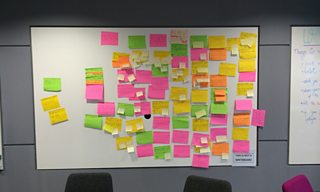
After the two-hour session was finished the defects on the wall that the testers had deemed interesting were voted on and the top two won prizes, including an BBC iPlayer cake, which was kindly baked by someone in the team.
The first prize was won by the Head of Programmes and On Demand Test team and a Senior Tester in the Media Playout team. To make the judging fair the winner was voted on by the whole group so the testers wouldn't just chose their boss or peers.
After the session had finished and we had gathered all the information, the project team sat down and looked at the defects that were raised and the feedback on the journeys. If a defect had been raised previously we discarded the new one and what was left were either raised as tickets to be worked through within the sprints or re-tested to check or get more information on. This was a really important part of the process and the involvement by the project team was really what made the whole thing work so well.
We got some very good feedback from how the people who attended felt it worked and we will be doing more of these in the future across various BBC locations so everyone has a chance to attend.
If you have any questions about the workshop please leave a comment.
Thanks to my colleague Alex Neal who was one of the organisers of the workshops and helped write this post.
Monalisa Rath is Senior developer in Test, TV iPlayer, BBC Future Media
