How the BBC England data unit scraped airport noise complaints

Daniel Wainwright
is a journalist with BBC England’s Data Unit
A BBC News story used ‘scraping’ to gather data on noise complaints. BBC England Data Unit’s Daniel Wainwright explains how.

To anyone new to data journalism, a scraper is as close to magic as you get with a spreadsheet and no wand.
Numbers and text on page after page after page after page just effortlessly start to appear neatly in a spreadsheet you can sort, filter and interrogate.
You can even leave the scraper running while you ring a contact or just make a cup of tea.
Scraping Heathrow noise complaints
I used a fairly rudimentary scraper to gather three years’ worth of noise complaint data from the Heathrow Airport website.
With the third runway very much on the news agenda that week I wanted to quickly get an idea of how much of an issue noise already was.
The result was this story, which was widely picked up by other outlets.
Here’s how I did it:
Complaints data for each day of the year was published on a separate URL. To create the spreadsheet would have taken me hours or even days.
Using Google Sheets, I created a standard formula to import the data from HTML tables on each of the pages of the operational data site.
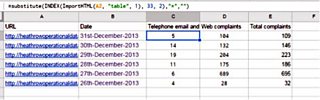
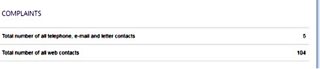
Note how the first two numbers correspond to the number of telephone, email and letter contacts and the total number of web contacts:
Column E contains a basic sum to add the cells in columns C and D together: “=C2+D2”.
The formula that grabs the data
Now let’s break down the formula.
Starting from the middle, the ImportHTML is telling the sheet to drag in something within the HTML of a web address in cell A2.
The “table” is telling the sheet to look for a table. The following numbers mean this: 1 = the first table it finds. 33 = row 33 of that table. 2 = column 2 of that table.
The substitute relates to the bits on the end. It’s telling the scraper if it finds an asterisk to replace that with the contents of the “”, in this case, put nothing in its place. As it happens, there was no asterisk to replace so it’s a bit redundant. But it can be used to replace spaces with %20, which a browser will need to work properly.
How do you know which row it is?
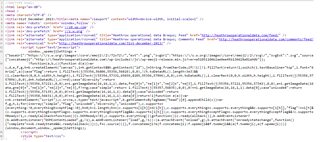
To find this, we have to look on the website itself. Right-click the mouse and select “view page source”. This brings up something that looks like this:
Don’t panic
Use Ctrl and F and search for “complaints”, which is the bit we want.

You’ll see it says “row-33”, with the actual number we want just after the bit that says “column-2”.
It’s the same for the other data we want at row 34. We’ll change that number when we copy the formula into the adjoining cell (column D) of the spreadsheet.

Copying it for all dates
You could easily spend just as long as you would filling the spreadsheet manually if you were to copy the URL for every date into column A.
Every date has the same basic start to the URL, namely http://heathrowoperationaldata.com/
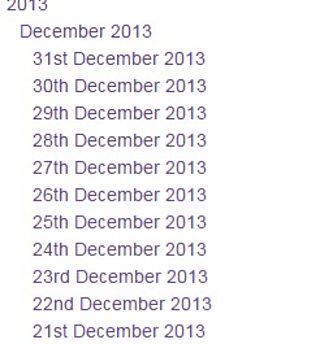
We can copy the dates from the drop down list on the right hand side.
We do that and put them into cell B.
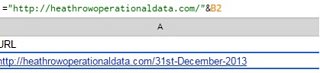
Then back in Cell A, we start off with an = and paste the start of the URL. We then use an & and put the number of the next cell, B2 in this case.
What this is telling it to do is append the date onto the rest of the URL, thus creating a clickable link.
But you’ll notice we have spaces between each of the day, month and year. We need them to have dashes (-) instead otherwise the URL won’t work.
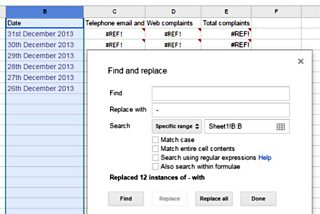
You can then copy down the formula in Column A so a URL is created for each individual date.
Once that’s done, our scraper should spring to life and start populating the sheet.
“Should” being the operative word.
Good practice note
Remember, there’s no substitute for thoroughly checking your facts.
A scraper allows you to pull in information that is all stored in the same format.
But it’s up to you to make sure that what you are relying on is accurate.
And that’s just as applicable in writing and publishing news stories as it is in giving an impromptu demonstration about something you only managed to do successfully yourself once.
A version of this article appeared on Online Journalism Blog, and is used here with kind permission.
