Computer programs

We use A device that processes information by following a set of rules called a program. and computer-controlled devices in all areas of our lives.
They are extremely fast, accurate and brilliant at organising large amounts of Information collected in the form of numbers.. They can also perform many tasks at the same time.
Before they get to work, we must tell them what to do using a computerA sequence of instructions written in a coding language that a computer can understand..
We write instructions that make up a computer program using a A language that may contain numbers, symbols and text than can be understood by a computer. that computers understand.
We need to organise our instructions so the computer can carry them out efficiently.
Repeat, repeat, repeat

One important way that we organise instructions in a program is with a REPEAT command.
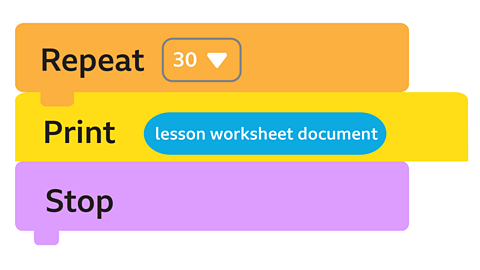
Let's think about photocopying a document 30 times.
If we had to enter each copy command separately, we'd be at the photocopier all day.
We can tell the photocopier we want to print 30 copies by filling in the number in the photocopier settings.
This instructs the printing program to repeat the copying process 30 times.
The repeat instruction goes first. We call this kind of repeat command a fixed loop as the number of repeats is fixed.
This program might look like this:
Repeating until something happens
Sometimes we don't know exactly how many times we want to repeat an action or task.
We might want to repeat it UNTIL something happens.
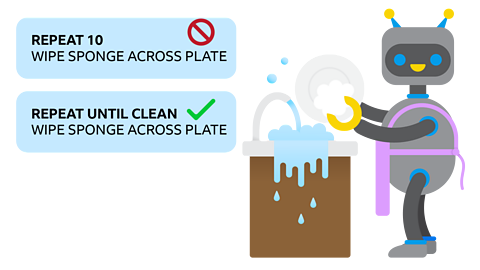
When we are washing up, we don't wipe the sponge across the plate a set number of times. We wipe the sponge UNTIL the plate is clean. We keep checking the plate for food and when we see it is clean, we stop wiping.
Programming with REPEAT UNTIL
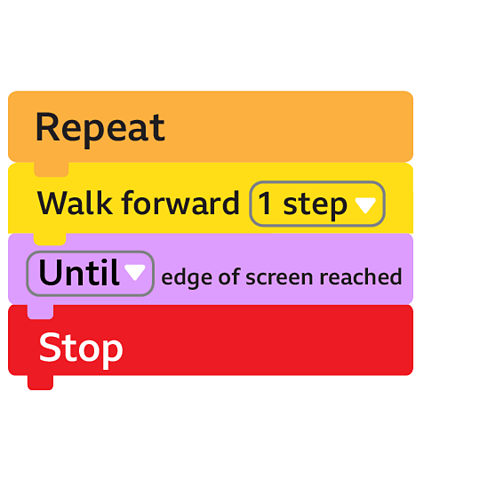
Using the REPEAT UNTIL command in a computer program means we are asking the program to keep on repeating an action until a specific thing happens.
Let's say we want a robot in a game to walk across the screen and stop at the edge.
The problem is that we don't know the size of the screen it might be walking across.
We can use the REPEAT UNTIL command to make it stop when it reaches the edge of the screen, whatever the screen size is.
But how will the program know when the robot reaches the edge? Now we have a problem to solve.
Asking a question
Let's think about how to solve this problem with an A precise set of ordered rules or instructions that can be followed by a human or a computer to achieve a task..
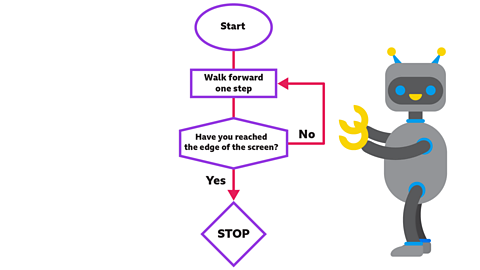
We know the program will need to check if the robot has reached the edge of the screen. The program will have to ask this question.
Have you reached the edge of the screen yet?
- If the answer is YES, then the robot will stop.
- If the answer is NO, then the robot will carry on walking forward, while checking for the edge of the screen.
Because this type of repeat command asks the program to check the conditions it finds, we call it a A repeat loop that contains a condition that must be met before a repeat loop will stop..
This is what it looks like as an algorithm flowchart.
Watch: Repetition
Learn more about repetition with this video from BBC Bitesize for Teachers.
NARRATION: Repetition is a word you've probably heard before. Repetition is a word you've probably heard before. Repetition is a word you've probably heard before… Haha, sorry.
We don’t always know exactly how many times we want to repeat an action, we might want to repeat it until something happens. Like shouting at your sister to come and sit down at the table for dinner over and over again until she actually turns off the TV and comes into the kitchen! You don’t know at the start how many times you will need to repeat the action, you just keep on doing it until you get the result you want.
Let’s say we want our little robot from earlier to walk across the screen, but we don’t know how big the screen is. Maybe it’s a laptop, or a TV, or a mobile phone… We could tell little robot to repeat the walk one step command until she got to the other side, then it wouldn’t matter what size it was. Clever huh?
Our program would look like this: Repeat, walk forward one step until edge of the screen reached. Stop. See how tidy and efficient it is?
The big question though, is how will the program know when little robot has reached the edge of the screen? And yes, it involves a big question. Each time the robot takes a step forward the program checks if she is at the screen edge by asking a question like in this flow chart. If the answer is no, then the program carries on around the loop and little robot takes another step. If the answer is yes, then the program stops and she stops walking.
This type of loop, where the program checks something by asking a question, is called a conditional loop. The program is checking on what is happening, the conditions, and deciding whether to continue around the repeat loop or stop.
It sounds simple enough, right? But imagine trying to write the program for an online game played by thousands of people with hundreds of characters and worlds. If you had to write each line of code without using the repeat command it would take you weeks, no months, or even years! So, using repetition and loops can be a great way to save ourselves time.
So that's repetition. If you don't get it, repeat this video until you do!
Selection - what should I do?

We can see from looking at the conditional loop example above that adding questions to a computer program can help it solve tricky problems.
We can use questions in computer programs to get a computer to make a choice or a Instructions in a computer program where the program action depends on the outcome of a choice..
This allows them to deal with different situations and problems, running different sections of code or even separate programs for different conditions.
The use of selection in computer programs is what makes them so flexible and good at dealing with changing situations like traffic, weather and everyday life!
Making choices

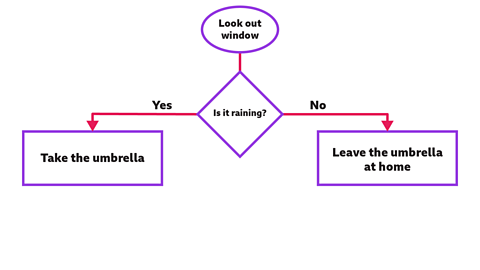
You are getting ready for a day out in the park and wonder whether to take your umbrella. You need to make some choices, depending on the weather.
You take a quick look out of the window. If it is raining, then you will take an umbrella. If not, then you can leave it at home.
We make these kinds of choices all the time, checking conditions and making decisions based on what we find.
We can draw a flowchart to show how this works:
Programming a computer to make a selection
Someone that creates programs for a computer. call this way of organising instructions in a program selection.
The program is selecting an answer or action from several choices.
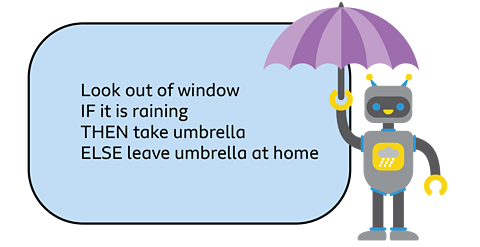
We often use program commands like IF,THEN and ELSE when we write programs that use selection.
ELSE is used in coding language to say 'otherwise' or 'if not'.
It is usually quicker to use IF and ELSE instead of YES and NO.
If we wanted to program a robot to go to the park, then you could write a program like this:
Real life selection
Watch: Selection in computer programming
Find out more about selection in computer programming with this video from BBC Bitesize for Teachers.
Activities
Dance Mat Typing game! game
Build and test your computing skills with different levels of touch type challenges.

More on Computer science
Find out more by working through a topic
- count5 of 12
- count6 of 12
- count7 of 12
- count8 of 12