Common types of secondary storage
Non-volatile memory external to the CPU and used for long-term storage of programs and data.devices are generally separated into three types:
- magnetic storage devices, such as A device used to store large amounts of data.
- optical storage devices such as CD, DVD and Blu-ray discs
- solid state devices such as solid state drives (SSD) and USB memory sticks
Magnetic devices
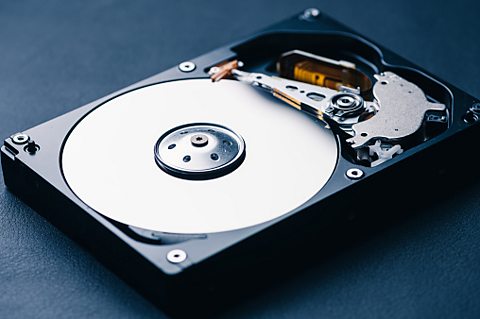
Devices such as hard disk drives use magnetic fields to magnetise tiny individual sections of a metal spinning disk. Each tiny section represents one bit. A magnetised section represents a A number system that contains two symbols, 0 and 1. Also known as base 2. '1' and a demagnetised section represents a binary '0'. These sections are so tiny that disks can contain terabytes (TB) of Units of information. In computing there can be different data types, including integers, characters and Boolean. Data is often acted on by instructions..
As the disk is spinning, a read/write head moves across its surface. To write data, the head magnetises or demagnetises a section of the disk that is spinning under it. To read data, the head makes a note of whether the section is magnetised or not.
Magnetic devices are fairly cheap, high in capacity and durable. However, they are susceptible to damage if dropped. They are also vulnerable to magnetic fields - a strong magnet might erase the data the device holds.
Optical devices
Optical devices use a laser to scan the surface of a spinning disc made from metal and plastic. The disc surface is divided into tracks, with each track containing many flat areas and hollows. The flat areas are known as lands and the hollows as pits.
When the laser shines on the disc surface, land reflects the light back, whereas pits scatter the laser beam. A sensor looks for the reflected light. Reflected light (land) represents a binary '1', and no reflection (pits) represents a binary '0'.
Optical media also come in different types:
- ROM media have data pre-written on them. The data cannot be overwritten. Music, films, The programs, applications and data in a computer system. Any parts of a computer system that aren't physical. and games are often distributed this way.
- Read (R) media are blank. An optical device writes data to them by shining a laser onto the disc. The laser burns pits to represent '0's. The media can only be written to once, but read many times. Copies of data are often made using these media.
- Read/write (RW) media works in a similar way to R, except that the disc can be written to more than once.
Solid state devices
Most solid state devices use a type of flash memory to store data indefinitely. They tend to have much faster access times than other types of device and, because they have no moving parts, are more durable.
Since this type of memory is expensive, solid state devices tend to be smaller in capacity than other types. For example, a solid-state drive that holds 256 gigbytes (GB) might be of a similar cost to a hard disk with several terabytes capacity.
Solid state devices require little power, making them ideal for portable devices where battery life is a big consideration. They are also portable due to their small size and durability.
Cloud storage
Storing data at a remote location online is known as cloud storage. When files and data are sent to the cloud, they are actually being sent to a server (or servers) connected to the internet.
Services such as Dropbox, Google Drive, Amazon Drive, OneDrive, Box and iCloud are examples of cloud storage. Files can be uploaded to a folder system and downloaded as required.
In cloud storage users pay for what they use. They need to pay for the storage and the facilities that the cloud company have in place to maintain and manage the service.
In the same way that operating systems use virtualisation to hide the complexities of the hardware from the user, storing data in the cloud also employs abstraction to hide the physical organisation of the hardware storage and the internet connections used to access the storage. The data could be stored on a single folder on a single server or in multiple locations on multiple servers. All the user needs to know is that the data is stored safely and can be retrieved when requested.
Cloud storage has many advantages:
- data can easily be accessed from anywhere with an internet connection
- the business running the cloud storage service manages backups and security
- additional storage can be added easily without having to invest in additional hardware locally
Cloud storage also has a number of disadvantages:
- hackers could take advantage of the fact that data can be accessed from anywhere with an internet connection
- if the internet connection fails, files cannot be accessed
- it relies on other people correctly storing and backing up data
A business that is considering using a cloud computing service will have to think about whether the advantages outweigh the risks. This is a complex decision and will depend on many factors, including the type of data to be stored in the cloud system.
More guides on this topic
- Decomposition and abstraction - Edexcel
- Algorithms - Edexcel
- Further algorithms - Edexcel
- Truth tables - Edexcel
- Binary and data representation - Edexcel
- Programming languages - Edexcel
- Networks - Edexcel
- Network security and cybersecurity - Edexcel
- Encryption - Edexcel
- Environmental, ethical and legal concerns - Edexcel
