What you need to know about the internet
As something you probably use in some form every day across various different devices, the internet is one of the most important fixtures of our day-to-day life, allowing us to search, stream and surf on the world wide web. But what actually… is it?
Well, here at BBC Bitesize, we've put together this comprehensive guide on all things internet - to give you a better understanding of what the internet is and how it works!
1. What is the internet?
The internet is a global network of computers. Any computer device (including phones, games consoles, etc.) that is connected to the internet forms part of this network. In fact, there are well over a billion devices connected to the internet, all able to communicate with each other from right across the globe.
But… what's a network?
Well, think of a network like a friend group. A network is just a collection of computers that are connected to one another, allowing them to share information and data - much like friends telling each other stories about their lives and hobbies.
The internet allows a computer in one network to communicate with a computer in a different network. This allows data and information to be shared speedily all across the world, so something happening in England can also be read about in Australia!

2. Who invented the internet?
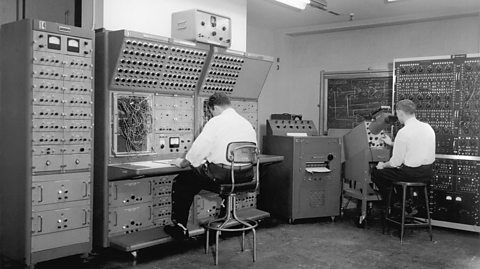
Like many great innovations, the invention of the internet can't just be credited to one person. Its origins trace back to the 1950s, when US government agencies based at different universities wanted an easier way to communicate and share information.
To solve this problem, ARPA (the Advanced Research Projects Agency) created the ARPANET - a network of connected computers across various bases. Other organisations saw how useful this could be and began developing their own networks.
However, communication between these individual networks also proved a challenge, so a protocol was developed in the 70s that allowed these separate networks to communicate. The joining of these networks created what is known as a wide area network (WAN), which eventually went onto be known as the internet.
To read more about the invention of the internet and how it has grown since, check out this article from BBC Bitesize.
3. What is my IP address?
An IP, or Internet Protocol address, is what the internet uses to make sure information gets sent to and from the correct devices. Every device connected to the internet has one, and it comes in the form of a long number. These are split into two parts - one showing what network the device belongs to and another identifying the specific device on that network.
Think of it like your home address. If you wanted to have a friend over, you wouldn't tell them what country you lived in, or what town, you'd give them a more specific address so they could easily find your house. This is kind of how an IP address works, each device on a network has its own IP address so the information you’re looking for can find its way to the right place.
Internet terms you need to know
As useful as the internet is, it can be a minefield of language and lingo you might not understand - so we thought we'd breakdown a few key terms you need to know!
4. What does Wi-Fi stand for?

Whether Wi-Fi stands for anything at all is actually something of a debate within the world of tech.
Some say that Wi-Fi stands for 'wireless fidelity', much the same way Hi-Fi stands for 'high fidelity'. However, industry leaders Wi-Fi Alliance maintain that Wi-Fi stands for…
Well, nothing!
It's simply shorter, catchier and altogether easier to type than Wi-Fi's official name, IEEE 802.11b Direct Sequence - with the phrase 'wireless fidelity' hailing from bosses that didn't feel comfortable with a name that meant nothing.
But what does Wi-Fi do?
Well, put simply, Wi-Fi is what allows us to connect to the internet wirelessly, allowing us to communicate and gather information from the internet without knotting ourselves up in a sea of cables and connectors.
5. What does a VPN do?

VPN stands for Virtual Private Network.
Normally, when we go online, we connect directly from our device to the wider internet - through our internet service provider. But a VPN acts as a sort of funnel, channelling our internet activity through another computer - hiding who we are and where we’re connecting from.
VPNs are used for a number of reasons. Some organisations use these at work, to ensure employees are securely connected to the internet and no data is leaked.
Another common reason for VPN use is to access content only available in another country. For example, if you were in America, but still wanted to access all the amazing Doctor Who content on BBC iPlayer, you could use a VPN to re-route your internet connection through the UK - allowing you to stream Doctor Who anywhere in time and space.
6. What is AI and what does it do?
AI, which stands for Artificial Intelligence, is when a computer is able to perform tasks in a way that mimics human intelligence.
AI can take lots of different forms, from self-driving cars, to virtual assistants (hey, Siri!) to the kind of chatbots you might've seen online.
AI is trained on vast amounts of data, allowing it to soak up lots of information which it is then able to generate responses based on what it has read or seen. What an AI is trained on will define its abilities, with models becoming more advanced as they are given more data to train on. To learn more, check out this simple guide to understanding AI.

AI can already do incredible things, but it isn't without major drawbacks! AI generated imagery, for example, throws up all sorts of issues around ownership and copyright - as the images AI creates are based on real images and artworks created by real artists.
Think you can tell the difference between AI images and the real thing? Test your skills with Other Side of the Story's AI or Real quiz.
7. What does a router do?
A router is a device used to manage the transfer of data between computer networks.
They are responsible for sending 'packets' of data from one network to another, determining the best route of travel for the data being sent.
A router will scan the data entering a device, and determine whether it is being sent somewhere within the current network or in another network altogether, and then send the data on its merry way.
You might also have come across a router at home. These types of router usually include extra hardware that allows for a network to be formed. They also contain a modem, which allows users to connect to the internet whilst in range of the router.
