
These games resemble classroom activities where children arrange interlocking cubes in different numbers of rows and columns. The computer equivalents of these cubes are creatures called Sgogain. The task is to guide them through a series of puzzles in order to reach the treasure room. The Sgogain have to be arranged so that the groups they form are the correct size and shape to move through the chosen doorway and on to the next part of the activity.
Bird Games
Click on the cup sign to play the numbered games. Help Bird get the Sgogain to the treasure in the lowest number of turns. Make the rectangle or square of Sgogain the right size so that it can to move through the chosen doorway from one room to the next. Use the objects placed in the rooms to help.
There are 60 games. Game 1 is the easiest and game 60 is the hardest. The games are arranged in six groups of ten games of a similar level of difficulty:
• Lava (1 to 10)
• Crystal (11 to 20)
• Desert (21 to 30)
• Jungle (31 to 40)
• Creepy crawly (41 to 50)
• Cog (51 to 60).
Games can be played in any order. The tenth game in each level is locked and you have to win a gold cup in the other nine games in order to unlock it.
Game Objectives
Your aim is to guide the Sgogain to the treasure room in the least number of turns. A gold, silver or bronze prize is awarded at the completion of each game depending on the number of turns taken. During the game the number of turns taken is displayed in the top left corner of the screen.
A turn consists of any of the following:
• rotating the Sgogain
• rearranging the Sgogain
• using the adding, subtracting, multiplying, dividing, doubling or halving machines
• moving from one room to another.
Game Instructions
• Click on Bird for audio help.
• Click on the rectangle of Sgogain to display the number it contains.
• Use the buttons on the left hand panel to move, rotate and rearrange the rectangle of Sgogain. The map of the puzzle appears on the right hand side.
Rotate Button  Click on this (or press the Space Bar on the keyboard) to rotate the Sgogain through a quarter turn.
Rearrange Button  Click on this to rearrange the Sgogain in to a rectangle of a different length and width.
Re-start Room Button  This enables you to start the puzzle in the current room from the beginning.
Move Buttons Click on the move buttons (or use the arrow keys on the keyboard) to move the Sgogain towards objects in the room and to other rooms.
Map
The map in the right hand panel shows the rooms in the present game. Click on a room to view it.
Game Objects
The games contain the following objects.
Door Doors allow the Sgogain to pass into the next room. The rectangle of Sgogain can only pass through a door if it is the same width as that door e.g. a door that is four blocks wide will only allow a rectangle of Sgogain that is also four blocks wide to pass through it.
Whirlpool Whirlpools allow a certain number of Sgogain to pass into the next room. The rectangle of Sgogain must contain the exact number displayed on the whirlpool in order to pass through it e.g. a whirlpool that displays the number twelve will only allow a rectangle containing twelve Sgogain to pass through it.
Tunnel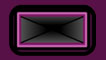 Tunnels allow the Sgogain to pass into the next room. The rectangle of Sgogain must be the same size and shape as the tunnel in order to pass through it.
Adding Machine This object adds more Sgogain. The rectangle of Sgogain must be the same width as the machine in order for it to work e.g. an adding machine that adds two Sgogain will only work with a rectangle of Sgogain that is two blocks wide.
Subtracting Machine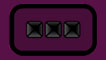 This object subtracts Sgogain. The rectangle of Sgogain must be the same width as the machine in order for it to work e.g. a subtracting machine that adds two Sgogain will only work with a rectangle of Sgogain that is two blocks wide.
Halving Machine This halves the number of Sgogain. The rectangle can be any shape and size.
Doubling Machine This doubles the number of Sgogain. The rectangle can be any shape and size.
Multiplying Machine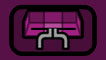 This multiplies the number of Sgogain by the number of squares in its width e.g. a multiplying machine that is two blocks wide multiplies the number of Sgogain by two. The machine will only work if the rectangle of Sgogain is the same width as the machine's arms.
Dividing Machine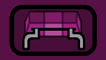 This divides the number of Sgogain by the number of squares in its width e.g. a dividing machine that is two blocks wide divides the number of Sgogain by two. The machine will only work if the rectangle of Sgogain is the same width as the machine's arms.
Bird Explore Activities
Click on the balloon sign on Bird's path to choose the Explore activities. These are open ended games where there are no preset goals and children are encouraged to explore. They are designed to be played by children on their own, with another child or with a parent or mentor.
Explore 1 (left hand balloon) includes feedback on:
• counting on in 2s, 3s, 4s, 5s and 10s
• simple inverse operations.
Explore 2 (right hand balloon) includes feedback on:
• counting on in 6s, 7s, 8s and 9s
• multiples of 2, 5 and 10
• inverse operations.
Explore Instructions
• You can change the existing puzzles by changing the size of the objects placed in the rooms. If you want to change an object, click on it and then use the plus and minus buttons that appear to make it larger or smaller.
• You can also add new objects. There are icons for doors, adding machines and subtracting machines in the right hand panel of the screen. To place one of these objects in a room, click on an icon and drag it to the room. Use the plus and minus buttons to adapt the object. Remove objects from rooms by clicking on them and dragging them from there. You can add a new room by placing a doorway in a wall and moving the Sgogain through it.
• When a red ballon appears, move the Sgogain towards it to start a new explore activity.

