500 Words 2025/26 has now closed for entries.
You will receive a confirmation email once your story has been submitted successfully. If you haven't received one, then please or contact 500words@bbc.co.uk.
Important: Once you submit your entry, it cannot be changed. If you no longer want your story to be considered, you’ll need to email us to request for your entry to be deleted. Please check your story carefully before submitting.
In February, 50 finalists will be invited to a grand final at Windsor Castle, hosted by Her Majesty The Queen. Make sure you check out the highlights from the 2024/25 grand final.
There are lots of prizes to be won, including books for the bronze, silver and gold winners (and 500 for the gold winners' schools), as well as original illustrations of the stories.
There is still time to sign up as a volunteer judge - 500 Words relies on the thousands of volunteer judges that whittle down the entries to progress to round 2. Each volunteer judge is also added into a random draw, where they could see themselves attending the grand final!
A step-by-step guide to submitting more than one story
Whether you’re a parent or a teacher and need to submit multiple stories - we’ve got you covered! We know that submitting a class’s worth of stories can be a huge task, especially when you have day-to-day duties involved. So, let’s talk through how to submit and some top tips for making it easier!
Step 1
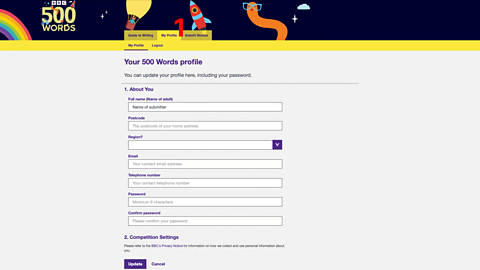
Once you have signed up as a submitter, you’ll find the marking criteria, which is the same criteria our volunteer judges use, as well as our panel.
You can click onto ‘My Profile’ (1) and find the personal details you have entered. If you need to update them, type in a new answer in the field and click 'update' at the bottom of the page.
Step 2
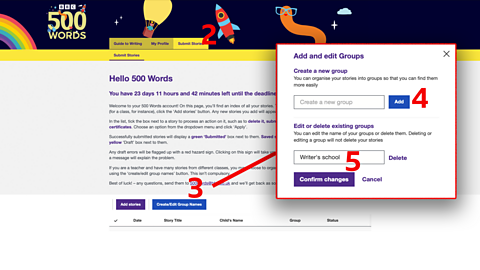
Next, click on to the ‘Submit Stories’ tab (2). In bold writing at the top, there is a reminder of the deadline for submitting.
Remember – we cannot accept ANY story after 9pm on Friday 7 November.
To submit a class’s worth of stories, or if you are librarian, sports or community group leader submitting on behalf of a group, you first need to create a group name. Click onto the ‘Create/Edit Group Names’ tab (3). Type in the name of your class and click ‘Add’ (4), and then ‘Confirm Changes’ (5).
Step 3
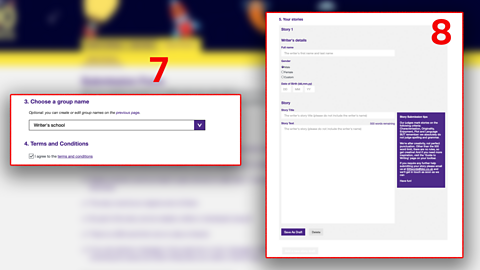
There will now be a tab for your group/class. Now we get to the fun part – click ‘Add stories’. Check the details of your school, then tick the correct option for your relationship to the writer.
From the drop-down menu (6), choose your class’s name (that we have just created). Read and click agree to the terms and conditions.
Next, click ‘Add Drafts’ and fill in the writers details (7). You need to type in the story title and then the actual story (8). Remember – the story title is not included in the 500 words and the title and story cannot include the writers name.
This step can take a while, especially if you're a teacher submitting stories for an entire class. We advise that you type up each story in a word document and save it. Then you can copy and paste each story into the story field with ease and still have a back-up.
Top tips for saving time
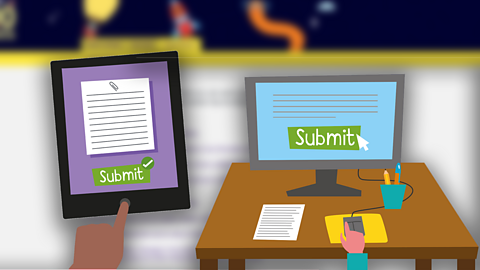
To save time on typing up a class or group's worth of stories, you can use digital devices to speed up the process. Try dictating the story directly into word or scanning the story with a tablet. Don’t forget – you can always ask parents to submit the story on behalf of their child or send you the typed story instead, to make uploading easier.
The story must remain exactly as the child originally wrote it. You don't need to correct spelling, grammar or punctuation as these factors are not marked.
Step 4
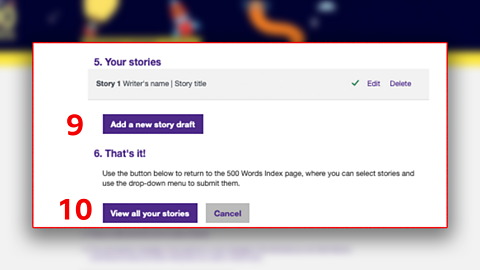
Once complete, click ‘Save As Draft’. To add more stories from your class, click “Add a new story draft (9)’ again and complete the same process.
Remember! These stories are just saved as drafts and do not count as submitted.
You need to scroll down to the bottom of the page and click ‘View all your stories’ (10).
Step 5
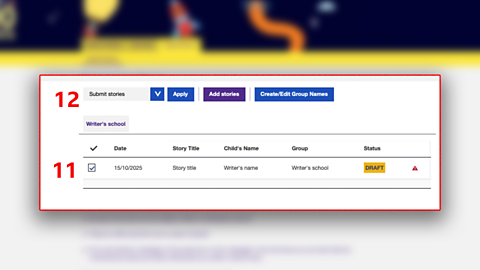
Tick every story from this group that you want to submit (11), and from the drown down menu, click Submit Stories (12).
Now that whole class (or group/individual) has been submitted, you will receive a confirmation email. If you don’t receive a confirmation email then the stories have not been submitted successfully and will not be counted. Please make sure your entries are not still in ‘draft’ and you have clicked submit!.
Need more inspiration?
Back to 500 Words
Click here for more information on 500 Words.

500 Words' marking criteria
Find out what the marking criteria is to help inspire children when they write their stories.

What makes a brilliant 500 Words story?
We caught up with judges Charlie Higson, Frank Cottrell-Boyce and Sir Lenny Henry to hear what they think makes a brilliant 500 Words story.