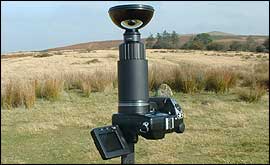
A lot of preparation went into obtaining our panoramic images - but the main thing we needed was luck with the weather! Because of the expense involved, we share the camera with six other sites in the Midlands, but when our turn came it coincided with the warmest of the autumn weather in 2003. Not only was the weather kind to us, we were also able to take advantage of the best autumn colour for many years. We weren't quite so lucky in our second stint with the camera in March 2004, but we're looking forward to the summer. Our kit consisted of a Nikon Coolpix500 digital camera equipped with a pair of lens adaptors and a special 360 degree lens.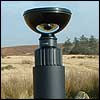 | The lens must be completely level |
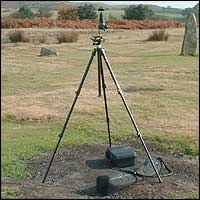
The camera and lens assembly is then fitted to a tripod via an L-bracket which makes the camera point straight up. Now comes the tricky part - the camera must be completely level, otherwise the horizon on the finished image will appear uneven. We used a spirit level placed on top of the lens and tested in all directions. Unfortunately this can be quite a delicate operation and not entirely suited to some of the locations we chose. Our image of the Devil's Chair, for example, was taken during a gale in a spot known for its high winds at the best of times. We actually had to hold the camera steady to stop it falling over (and smashing itself into very expensive pieces) when we took the images! With the camera level on the tripod, we next had to set bracketing exposures and take our pictures, which presents a problem of its own. The camera takes an all round image in one shot, and so the operator has to hide while the image is taken. And there's only one place to go - under the tripod. Needless to say, the taller you are, the more difficult this is! Taking care not to get our fingers in the picture (it has happened!), we take three exposures at different shutter speeds and apertures. Then we pack the camera and tripod into their cases and head off to the next location.  | Unprocessed image of the
Buck's Head, Wellington |
It's back at the office that the real wizardry begins. At this stage, the image we bring back looks like this one on the right. This picture is of Telford United's ground taken from the pitch. You can see the camera takes a picture of itself(the dark circle in the centre of the image), while the image we want appears as a disc. It is then processed using special software that removes the black disc at the centre of the image, and arranges the picture like this: 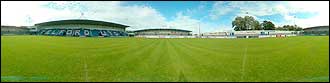 | The same image as above once it has been processed |
Once the image is processed in this way, it's ready to go on our server, but it doesn't look like this when you view it. That's down to the code in each page containing a panoramic image, which instructs your computer to download a viewer. This viewer then allows your computer to display the image as a moving panorama that you can zoom into and away from, as well as control its direction. |