
Home > Features > Let me entertain you
Let me entertain you
20th January 2011
Technology correspondent Adrian Higginbotham kicks off 2011 with news of some recent developments in access to entertainment for people with a visual or reading disability.
Accessible TV equipment
While subtitles, sign language and audio description on TV are now usable by most, what about access to features such as the electronic programme guide?
In the UK, TV broadcasters are obliged to make almost 100 per cent of their programmes available with subtitles, 6 per cent available with audio description and for signed programming, it’s 5 per cent by 2013. These requirements are set out in the code on television access services, which is upheld by Ofcom, the independent regulator for the UK broadcast industries.
All modern TV equipment can receive subtitles and sign language where programmes include them but unfortunately, accessing audio description isn’t quite so straight forward.
Audio description, or AD, uses an extra audio track to voice what’s happening on the screen during breaks in the dialogue.
Your equipment needs to be AD-ready to receive it; always check before purchasing. A good place to start is Ricability, the research institute for consumer affairs - established by Which?. It generally focuses on the needs of disabled and older consumers. They produce regular reports on the usability of a range of TVs, digital recorders and other similar equipment. You'll find information about which equipment has AD, details on the usability of the EPG and much more.
In the UK, TV broadcasters are obliged to make almost 100 per cent of their programmes available with subtitles, 6 per cent available with audio description and for signed programming, it’s 5 per cent by 2013. These requirements are set out in the code on television access services, which is upheld by Ofcom, the independent regulator for the UK broadcast industries.
All modern TV equipment can receive subtitles and sign language where programmes include them but unfortunately, accessing audio description isn’t quite so straight forward.
Audio description, or AD, uses an extra audio track to voice what’s happening on the screen during breaks in the dialogue.
Your equipment needs to be AD-ready to receive it; always check before purchasing. A good place to start is Ricability, the research institute for consumer affairs - established by Which?. It generally focuses on the needs of disabled and older consumers. They produce regular reports on the usability of a range of TVs, digital recorders and other similar equipment. You'll find information about which equipment has AD, details on the usability of the EPG and much more.
The TV Help website provides a detailed breakdown of audio described programme listings for Sky, Freeview, Freesat and Virgin Media. It also contains up-to-date information on how to enable audio description on each of these platforms.
But 21st century television is about so much more than just watching the shows. Internet connectivity that will let you check news headlines or weather forecasts at your own convenience, or view email, Facebook, and Twitter during ad breaks are all on the near horizon. The journey to accessibility for these features is a long and difficult one. We'll look at this in a future article as the options for disabled people become more obvious.
But 21st century television is about so much more than just watching the shows. Internet connectivity that will let you check news headlines or weather forecasts at your own convenience, or view email, Facebook, and Twitter during ad breaks are all on the near horizon. The journey to accessibility for these features is a long and difficult one. We'll look at this in a future article as the options for disabled people become more obvious.
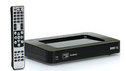
In the meantime, at the higher end of the price scale, Portset Systems sell two specialist accessible Freeview products with recording ability. But broadcasters and mainstream hardware manufacturers, still haven’t conjured up built-in accessibility to important basic features like the EPG or recording and playback.
Enter then in late 2010 two products which finally aim to do just that.
The Goodman’s SmartTalk set top box costs £100 and has been available from the RNIB and many high street stores since July 2010. It speaks the title of each button as it is pressed, has talking menus giving access to all of the settings and controls, and it speaks the name of the Freeview channel you're watching.
I’ve used the SmartTalk at home for several weeks and have certainly found it a leap forward in Freeview TV access. As soon as you become familiar with it however, you may want to switch off many of the prompts as it is rather verbose. Even then you might, like me, decide to consign it to a secondary TV where it becomes a “nice to have” back-up, but doesn’t interfere with established family viewing routines. Sadly it can't record off television.
Enter then in late 2010 two products which finally aim to do just that.
The Goodman’s SmartTalk set top box costs £100 and has been available from the RNIB and many high street stores since July 2010. It speaks the title of each button as it is pressed, has talking menus giving access to all of the settings and controls, and it speaks the name of the Freeview channel you're watching.
I’ve used the SmartTalk at home for several weeks and have certainly found it a leap forward in Freeview TV access. As soon as you become familiar with it however, you may want to switch off many of the prompts as it is rather verbose. Even then you might, like me, decide to consign it to a secondary TV where it becomes a “nice to have” back-up, but doesn’t interfere with established family viewing routines. Sadly it can't record off television.
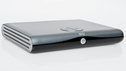
Sky Talker has been available since October 2010. It is a little different in that it integrates with a Sky subscriber’s existing equipment, adding, (at a cost of approx £75), text-to-speech functionality to the Sky Digibox interface. Like the SmartTalk, the Sky Talker improves access to the programme guide, including identification of audio described content. Sky Talker also enables limited access to the Sky personal video recorder.
That more people can now independently check what is on TV and record and playback programmes is fantastic and long overdue. However, both of these products have some limitations and are respectively still the only solutions for Freeview and Satellite customers. Users of other platforms are as yet without access to these features.
That more people can now independently check what is on TV and record and playback programmes is fantastic and long overdue. However, both of these products have some limitations and are respectively still the only solutions for Freeview and Satellite customers. Users of other platforms are as yet without access to these features.
Audio gaming comes to mobile:
Audio only games and the desktop computer are old friends, demonstrated again this month by the launch of Three-D Velocity, a self-voicing, audio only game by BPCPrograms. Until now though, sophisticated accessible games hadn’t made their way on to portable devices such as mobile phones.
This is surprising, as mobile is a platform where games rich in graphics are very popular. Papa Sangre, the videoless video game for the iPhone, iPad and iPod touch changes all that.
This is surprising, as mobile is a platform where games rich in graphics are very popular. Papa Sangre, the videoless video game for the iPhone, iPad and iPod touch changes all that.

Often the interface to audio games is cumbersome and convoluted while the content is underwhelming, lacks variety, and is short on interactivity. In contrast, Papa Sangre is easy to play but hard to beat.
Described by the creators as a “first-person thriller”, the game is based in Papa Sangre’s palace and using only sound, your job is to save someone you love who’s in grave danger ... while being attacked by monsters.
Working with the game’s interface is easy. Holding your device in landscape orientation, you use both thumbs to tap the lower quarters of the screen, left right, left right, and you’re walking.
Swipe a finger left or right across the upper half of the screen to turn in that direction. I shan't ruin the surprises in store for those poor lost souls who haven't yet discovered Papa Sangre, but take it from me, there’s plenty that you’ll want to run from. The plot is credible, the challenges heart-wrenching and the soundscape chilling.
The triumph that is Papa Sangre shows that games can be accessible, exciting, and horrifying all at the same time.
It’s available for £3.99 on the iTunes app store and has an age 12 certificate.
Described by the creators as a “first-person thriller”, the game is based in Papa Sangre’s palace and using only sound, your job is to save someone you love who’s in grave danger ... while being attacked by monsters.
Working with the game’s interface is easy. Holding your device in landscape orientation, you use both thumbs to tap the lower quarters of the screen, left right, left right, and you’re walking.
Swipe a finger left or right across the upper half of the screen to turn in that direction. I shan't ruin the surprises in store for those poor lost souls who haven't yet discovered Papa Sangre, but take it from me, there’s plenty that you’ll want to run from. The plot is credible, the challenges heart-wrenching and the soundscape chilling.
The triumph that is Papa Sangre shows that games can be accessible, exciting, and horrifying all at the same time.
It’s available for £3.99 on the iTunes app store and has an age 12 certificate.
More articles about
television, accessibility, audio, blind, entertainment, technology
Bookmark with...
Live community panel
Our blog is the main place to go for all things Ouch! Find info, comment, articles and great disability content on the web via us.
Listen to our regular razor sharp talk show online, or subscribe to it as a podcast. Spread the word: it's where disability and reality almost collide.
More from the BBC

All the latest news from the paralympics.

News and views for people who are blind or partially sighted.

Weekdays 12.40pm. Radio 4's consumer affairs programme.

~RS~q~RS~_bbc_=0&__ip__=54.77.26.26&dnainitialtitle=Let%20me%20entertain%20you&dnahostpageurl=http://www.bbc.co.uk/ouch/features/let_me_entertain_you.shtml&dnauid=ouch:article:2375&s_baseHeadingLevel=1&dnashow=10&dnafrom=0&dnato=9&dna_encoding=utf-8&s_sssicomponent=1&s_sssiCommentCount=&dnacommentforumlistprefix=%5B_%5D&dnarecentcommentsprefix=%5B_%5D&s_commentprofileurl=/dna/mbouch/CommentProfile?&s_contact=0~RS~z~RS~40~RS~)

Comments
As somebody with hearing issues and a PS3, I love my PlayTV. It is essentially a Freeview Plus box that allows subtitles and audio description, and retains subtitles on recorded programmes for as long as they're on the digibox.
Complain about this comment
This is very interesting, it is important everything is "Accessible" and the more things that are the easier it is.
http://www.wheelchairaccessible.org.uk
Complain about this comment
View these comments in RSS