Designing the CBeebies Storytime App

Leanne Dougan
Senior Designer
Hi, I’m Leanne Dougan, the senior designer who led the user experience and design across the CBeebies Storytime App. This blog post aims to give you some insight into the process and approach we took to create and design a fun experience for a young audience.
CBeebies Storytime is a free mobile app available to download from Apple iTunes, Google Play and Amazon app stores. The app is filled with lots of playful and imaginative stories designed to help support early years reading. Like our first CBeebies App - CBeebies Playtime, this app also has an area for grown-ups. My colleague Lizzie has written in more depth about the app features.
The Design Challenge
Our design challenge was to create an app that was fun to play with, simple to use, whilst being encouraging and educational to develop young children’s reading skills. The app importantly had to incorporate everything which Children love about CBeebies, the humour, surprise, and excitement. We also needed to make sure it was scalable for an audience who are driven by image led navigation, and reliant on large hit states. Hit states are the areas needed on a touch screen to detect a finger – young children tend to need larger hit states because they don't have the accuracy of older users. My colleague Rory has written in more depth about touch input and hit states.
First Steps
Working closely with editorial, product and technical teams we first brainstormed what the app should be. Then we created a mission statement and some core User Experience (UX) principles to make sure that all our visions were aligned. Immersive, encouraging, tactile, safe and delightful were the principles, which the app design and essence needed to meet.
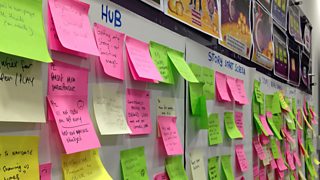
Next, I ran a creative workshop with other BBC UX designers to generate ideas around fun navigation patterns, which would drive the user around the app. One of the techniques used to do this was called brain writing. Brain writing is a technique where you silently write for 5 minutes about different ideas, you then rotate your ideas around the group and others develop the ideas further. The ideas were then grouped and we dot voted our favourites. The concepts were then worked up into initial navigation models.
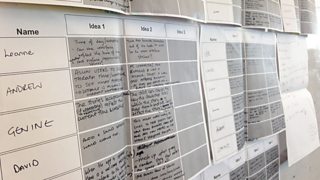
Below shows some of the different concepts taken from the brain writing exercise drawn up by Julianne Powell.
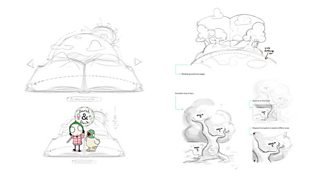
After exploring how these navigation models could work we decided that a pop up world was the direction we wanted to head. It felt fun, immersive, playful and allowed us to create a navigation model which would be visually driven by programme brands. A brand driven model we knew from previous research is what children really connect with.
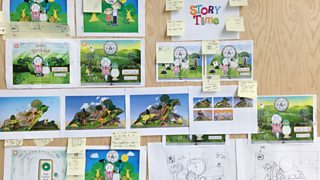
A series of prototypes were created that allowed us to the test the navigation model, basic interactive elements within the games, look at how the user would move through the story and investigate how far visually we could push the design whilst considering the weight of the app.
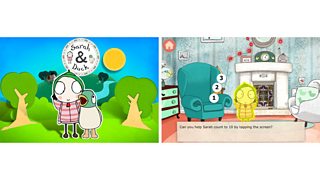
Prototypes for the CBeebies Storytime app.
User Centred Design
When we began this project we had no doubt in order for this app to be a success we would need to test our ideas and designs often. Using prototypes, we regularly went out to schools, nurseries and commissioned formal lab based sessions to gather feedback on the design.
Conducting user research is always very insightful and you are guaranteed to learn something new each time. When testing with children you need to be flexible, and although you need to have a clear objective of what you want to achieve, you can’t always stick to a tight script as each child is very different. Some will be very shy, others aren’t able to articulate their thoughts. The research sessions, which I ran, started with free play on the app. You can learn a lot just from observing where they go, how they interact and what is drawing their attention. After 5-10 minutes I would start to do some task based research. I would ask simple questions to gather their thoughts and understandings. For those children who can’t articulate their thoughts there are some tools and techniques I tend to use. One I’ve used in the past is asking them to place smiley faces on something they like which can help to open up the conversation. The sessions lasted no more than 30 minutes and it was always important to tell them how helpful they have been.
From the first round of testing we discovered which interaction methods worked well and which methods children were finding too difficult within the app. For example tap, swipe, shake, shout and drag were all very well received but tilt forward and back was seen to be a difficult interaction. By undertaking this research it helped us to map interaction methods to the stories so they would be fun and engaging.
Another interesting finding from this research taught us how users were navigating between pages in the stories. Initially we were asking users to press an arrow after every page and after every interaction, but we learnt that this behaviour was too repetitive and seemed to slow the tempo of the story for the children. It also was quite distracting to the child and took their focus off the story, as they tended to wait for the arrow to reappear each time. This led us to change the frequency of when the arrows would display.
Thirdly, another valuable finding was that the proposed design was too close to the CBeebies Playtime app and although we wanted it to feel part of the same family it needed to have it’s own personality. This led us to look closely at pop up books and look at what really made them fun, why people want to play with them, how the pages open and fold as we needed to make sure we got some of that magic and surprise into our design.
Scalable Design
One of the key challenges we faced when designing this app was how to make the app easily scalable so that it looks great on a wide range of screens from iPhones to 10 inch Android tablets. Although each double page spread feels and looks different, the design is based on a set of guidelines which not only helps us to remain consistent, but also helps the development team to build it more efficiently. Working closely with the development team we designed a template that meant each layout would only need to be designed once, and it would scale across all different screen resolutions. This template consisted of safe areas to ensure the design looked consistent and was usable across the smallest of devices and devices with wider screens. Importantly, core UI elements sit on separate layers to the content so they can scale accordingly so they would never be too small to interact with.
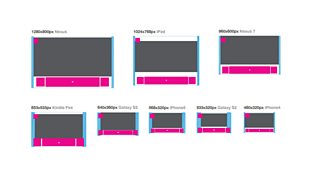
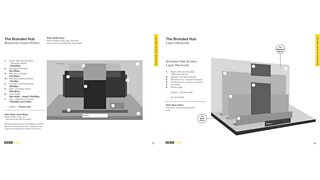
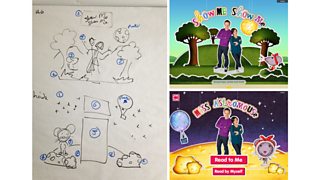
Once this piece of work was completed and the brand assets had been designed we could next create our final layouts. To do this we read the stories and worked closely with the producer to pick out key features that we should represent on the story start screens. We initially sketched out the layouts and mapped these to our set of guidelines so we were clear which assets would be folding in which direction and how big they needed to be. This process was very effective and didn’t restrict our creativity as we did the design first and then mapped them to the guidelines.
Below is an example of one of the sketches, how they mapped to the rules and then visually executed.
The CBeebies Storytime app only launched 8 weeks ago and it is already proving popular with the CBeebies audience. More fun features and stories are planned for the CBeebies Storytime app but in the mean time, I would love feedback, so please feel free to leave any comments on our design process below.
Leanne Dougan is a Senior User Experience Designer, BBC Future Media
