Computer control systems are used to allow you to control external devices to run several output functions.
A computer control system is made up of an input, process, and output.
A computer control system
As with all systems there are both advantages and disadvantages.
Advantages of Computer Control:
- Respond quicker than humans.
- Easily replaced.
- The computer does the work.
Disadvantages of Computer Control:
- Initial set up costs are high for the computers.
- Computers are replacing humans – job losses.
ANIMATION SEQUENCE
JOE
Hi there and welcome to Tech Bitez, your one stop shop for everything Technology and design. If we don't know about it, well then it's probably not worth knowing.
SANDY
Well, I did witness you forgetting the word mechanical for about 10 minutes this morning, so I wouldn't go quite that far.
JOE
Ah come on. That happens to everyone.
SANDY
But when it happens almost daily, like in your case, I wouldn't go around bigging up my knowledge base quite so much.
JOE
Well, this episode was supposed to be about computer controlled systems, but instead it's take the hand out of Joe.
SANDY
All right, All right. Someone touchy today.
JOE
Sorry, I'm just a bit tired. I was up all night. The burglar alarm kept going off randomly.
SANDY
Brilliant Joe, a burglar alarm is the perfect example of a common computer control system.
ANIMATION SEQUENCE
SANDY
A burglar alarm is a great example of a common computer control system. In a computer controlled system, a sequence is created that the computer will follow to achieve the desired result. These sequences are created using flowcharts, like our burglar alarm example. Different symbols are used to represent the actions that can be used within the flowchart.For example, each flowchart will begin with a start symbol like this and finish with a similar stop symbol like this.Simple decisions with two different items can also be added to the flowchart. A decision symbol is shaped like this. In our burglar alarm system. The first decision is has the alarm been set? This means the flowchart will only continue once the alarm has been set. If not, the flowchart will just continue to loop until the condition is met. By linking a number of decisions together we can create sequences of instructions that allow computers to control systems in real life situations.In our example, once the alarm has been set and the motion sensors have been tripped, we can see the flowchart continues and turns on the alarm. This is known as an output and this is the symbol used to represent them.In our example, the alarm will then continue to sound until the alarm code entered decision has been satisfied. Once it has, we look back to the beginning of the flowchart. For certain computer control systemsa wait time maybe needed. A wait symbol like this can be used to add in a time delay if required.
JOE
I mean, yeah, that's interesting and everything, but it still doesn't explain why this burglar alarm kept going off.
SANDY
Sorry, that could have been me. I left a 3D printer running last night on a project. It probably tripped. The motion detector whoops.
Flow charts
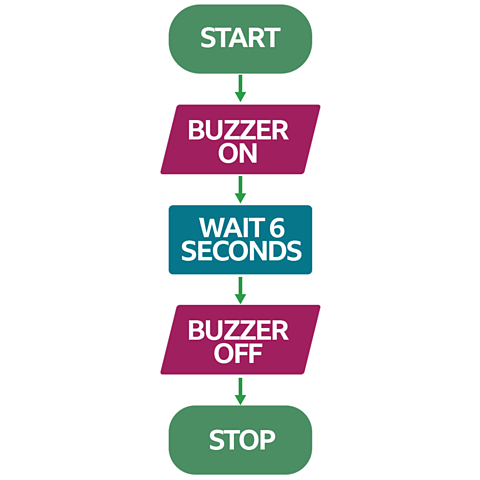
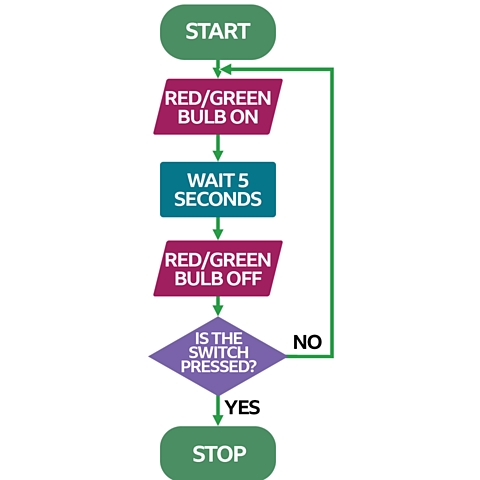
Computer control programmes are written using a series of symbols that are set up in the format of a flow chart. Flowcharts are diagrams of connected shapes, combined to represent instructions to a workflow or process. Different shapes in a flowchart represent different types of operation, and these shapes have the same meaning worldwide.
Flowchart symbols
Test yourself
More on Control systems
Find out more by working through a topic
- count1 of 5
- count3 of 5

- count4 of 5