What is debugging?

The process of finding and correcting errors or bugs in a computer program. is an important process in developing A precise set of ordered rules or instructions that can be followed by a human or a computer to achieve a task. and computerA sequence of instructions written in a coding language that a computer can understand..
It involves testing the outcome of programs and looking for any errors or mistakes, either in the original algorithms or in the final program A language that a computer can understand..
Different types of bugs
Syntax bugs
The word syntax means the order of elements in a language sentence. The language can be a familiar one like English or a coding language.
A syntax bug is one that involves typing mistakes and errors in the symbols, letters and numbers used to write the code itself.
A syntax bug means the code doesn't make sense to the computer, so often the program will not run at all.
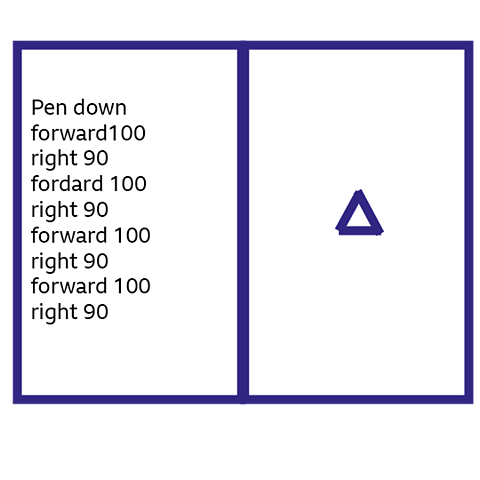
This program is written in the coding language called Logo. It is supposed to make the pointer draw a square with sides 100 units long.
Can you spot the syntax bug in the program?
Hint: When we clicked on the run button, the computer sent the following message:
'I don't know how to fordard.'
The syntax bug here is a typing error. The command fordard 100 has been typed, instead of forward 100.
Logic bugs
A logic bug is an error in the organisation or sequence of the algorithm or program instructions themselves.
Perhaps the programmer has written the wrong command, missed one out or put the instructions in the incorrect order.
A program with a logic bug is usually able to run and tries to carry out the instructions written in the code.
However, because the instructions are wrong, things don't turn out how the programmer intends!
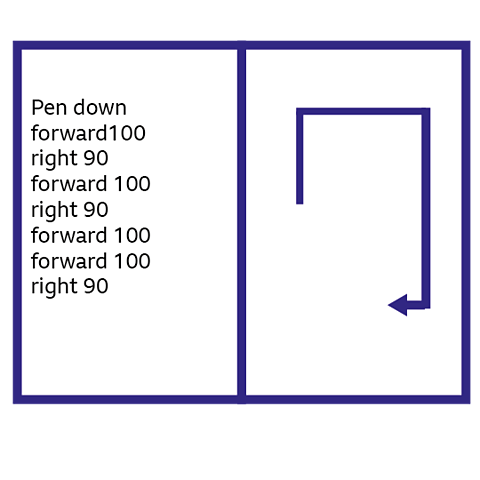
Let's check what has happened with the shape this time.
Remember, it is supposed to be a square with sides 100 units long.
This time, the program has a logic bug. Can you spot it?
Hint: The program did run and start drawing a square, but something went wrong on the third side.
Our logic bug here is the sequence of instructions. The last two commands are in the incorrect order.
Changing the order to right 90, followed by forward 100 will fix the logic bug.
Watch: The differences between syntax bugs and logic bugs
PRESENTER: I recently wrote some code to program myself to make a banana smoothie as though I was a robot.I clearly have some bugs or mistakes in my code. But that’s ok. Mistakes happen when you’re writing code.
What's important is that you know how to debug your code.
Debugging is going back over the algorithms and code you have written, identifying where the programme stops working, finding the bugs - and then most importantly, fixing it.
So, there was definitely a bug when it came to adding the milk.But when I look back at my code, I can see that I have a syntax bug. There's a spelling mistake here. Mil should be milk.
There was also a bug when it came to drinking the smoothie. This was a logic bug. I clearly missed something important out.If I think logically, I can see that I've forgotten to include an instruction for the robot.
I should have put: pour smoothie into the serving glass. And then I can even add a straw. Then drink smoothie. Right, that's me debugged. Let's rerun my programme.
Put two peeled bananas into the blender. Put the lid on the blender. Lift the blender from the base. Pour the smoothie into the serving glass. Add a straw. Then drink.
Brilliant. Thanks to debugging, my code works. Delicious!
Hang on, I’m meant to be a robot. Am I allowed to drink?
Where are the bugs hiding?
It's important to remember all the stages we go through to create a computer program. This will help us become better at debugging our algorithms and programs.
- We start by breaking the task or problem up into smaller sections - decomposition.
- Then we make a list of rules and instructions for the different parts of the task or problem - these are called algorithms.
- Finally, we translate these algorithms into a language that a computer can understand - code.
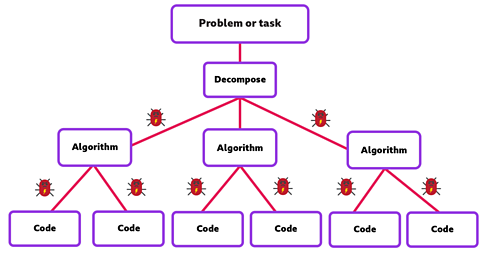
Errors or An error or mistake in a computer program that affects the outcome. can creep in at all these different stages so we will need to check them when we debug.
The debugging and testing cycle

One of the main strategies for successful and efficient debugging, is to keep testing and debugging at all stages of a project, as we go along.
If we wait until the end, we will have to search through all the algorithm instructions and every bit of our program code, which could take a long time.
We know what our program is supposed to do. So, we can check to see if it works and if not, go back and debug and then test again.
The cycle of testing, debugging and testing again, is a key skill that we need to learn to become good computer programmers.
Teamwork can defeat the bugs

We all know that problem solving is always easier with friends to help. It's the same with debugging.
Sometimes another person will spot a bug you might have missed and you might catch one that they didn't see.
Being able to work as part of a team is a useful skill for successful debugging. Computer programmers often work together in teams to debug complicated projects.
You can try it out with your classmates, friends and family as you learn to write your own computer program.
Debugging in real life

When it comes to computer games, we all like to download new features and characters as soon as they come out.
Unfortunately, the first version of the updated program usually has a few bugs that slipped through the testing process.
This can lead to all sorts of problems like incorrect game controls, graphic glitches and characters behaving strangely.
The programmers listen to feedback about bugs and then debug the programs. They update it to a new version, usually with a number such as version 1.2.
The 18 million dollar bug

The fate of the Mariner 1 spacecraft back in 1962 is an example of a tiny bug causing a huge problem!
The unmanned spacecraft was programmed to visit the planet Venus nearly 200 million miles away and send back information to scientists here on Earth.
Unfortunately, someone had typed the wrong symbol into the program code somewhere and hadn't spotted the mistake.
Mariner 1 went crashing off course and had to be destroyed just 290 seconds after launch to prevent it crashing back to Earth.
This turned out to be an 18 million dollar bug. But was it a syntax bug or a logic bug?
As the error was due to someone typing the wrong symbol into the program code, it was a syntax bug.
Watch: Debugging
Learn more about debugging with this video from BBC Bitesize for Teachers.
NARRATION: Take computer games for example. I like to download new features and characters as soon as they come out. The trouble is, the first version of the updated program usually has loads of bugs that haven’t been tested properly. This can lead to all sorts of problems like game controllers going wrong, graphic glitches and characters behaving strangely. It’s always better to wait for the program update to be debugged before rushing to download.
An example of a bug causing problems on a much bigger scale was the Mariner 1 spacecraft back in 1962. The spacecraft was programmed to visit the planet Venus nearly 200 million miles away and send back information to scientists here on Earth. Unfortunately, someone had typed the wrong symbol into the program code somewhere and hadn't spotted the mistake. Mariner 1 had to be destroyed just 290 seconds after launch to prevent it crashing back to Earth. This turned out to be an eighteen million dollar bug! Ouch, that's a nasty bite!
One of the keys to debugging is knowing what your program is meant to do. This means going back to the original algorithm, or list of instructions, and comparing this to what is actually happening when the program runs. Then you can debug, and test, and debug, and test again. Another thing to remember is that problem solving is always easier with friends to help. It’s the same with debugging. Programmers will often work together in teams to debug big and complicated projects.
So what are you waiting for? Get together and get exterminating - Dr Who style!
Activities
Dance Mat Typing game! game
Build and test your computing skills with different levels of touch type challenges.

More on Computer science
Find out more by working through a topic
- count9 of 12

- count10 of 12

- count11 of 12

- count12 of 12