Methods to detect and prevent cyber security threats
The security methods used to access computer accounts are known as factors of authentication. These are ways to prove that people are who they say they are. These factors can be divided into three sections:
- something a person is - fingerprint or other Authentication techniques that rely on measurable physical characteristics (eg fingerprint or iris) that can be automatically checked. detail
- something a person knows - passwords, PINs, secret answers
- something a person has - a phone, a smart card
Biometrics
Biometric security makes use of unique physical characteristics and features to identify people when they are using a computer system. This form of security could be a scan of a fingerprint using the sensor built into a button on a mobile phone, or facial recognition to unlock a mobile device.
Passwords
Keeping passwords safe is important, especially when the password allows access to sensitive or valuable information. Some password systems help to keep passwords safe by only asking for certain characters of a password instead of the whole thing. This helps to prevent A program secretly installed on a computer to automatically collect information about the user over a period of time like A software program or hardware device that records all keystrokes on a computer keyboard. from stealing passwords.
CAPTCHA
Completely automated public Turing test to tell computers and humans apart. This is a way of working out if a user is a human or robot by asking them to identify image features. forms challenge humans to prove that they are indeed human. Computers are very good at looking at text and numbers, but people are much better at understanding images.
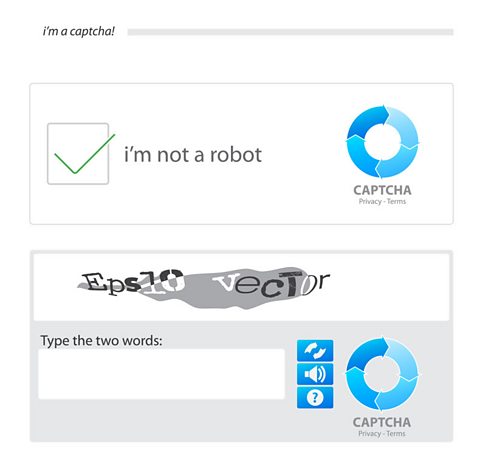
Basic CAPTCHA forms often ask people to type in the words they see in a picture. More sophsicated tests may ask people to solve a puzzle, for example, finding all of the images that contain cats in a gallery of animals.
Email confirmations
When a person signs up for a new account, they often receive an email asking them to confirm that they asked for the account to be created by clicking a specific link.
This security feature alerts them that their email is being used to create an account and acts as a way for them to prove their identity to the company they are creating the account with.
Automatic software updates
By regularly updating the The programs, applications and data in a computer system. Any parts of a computer system that aren't physical. on a computer, users are as protected as they can possibly be.
Setting automatic updates means a computer system will attempt to install An update to a piece of software, usually to fix bugs or improve the software in some way. or fixes as soon as they are available by searching for them on a regular basis. If this task was left to users, it would be easier for them to forget or ignore the updates.
More guides on this topic
- Computer systems - AQA
- Classification of programming languages and translators - AQA
- Systems architecture - AQA
- Fundamentals of computer networks - AQA
- Network topologies, protocols and layers - AQA
- Relational databases and structured query language (SQL) - AQA
- Ethical, legal and environmental impacts of digital technology - AQA
