Using audio in post-production
Even simple editing software will allow you to create a detailed soundtrack for your film.
It is, however, easy to accidentally overload your soundtrack with too many elements or to create a soundtrack where important sounds like dialogue cannot be heard.
By following these tips you could avoid some of the more common pitfalls.
Use WAV files
Editing software allows you to import almost any kind of audio file - so you may be tempted to add music or sound effects recorded as A standard audio file format which uses lossy compression. Compatible with most media players. Designed by the Moving picture experts group - layer 3. to your project.
However, because the MP3 is a heavily compressed, low quality format, using such files in your edit might cause problems.
Some MP3 files will actually add flaws such as ticking noises to your film.
Instead you should always import audio files as high quality An uncompressed audio file format developed by Microsoft. files.
Adjust the volume settings for each clip
All editing packages will allow you to adjust the volume level for each individual clip or sound in your sequence.
You should make sure that none of these are too loud.
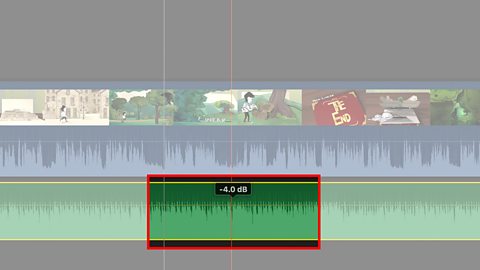
If your music is drowning out the dialogue you might need to make your music track a little quieter and your dialogue track a little louder.
Remove wind noise
When recording scenes outside there is a chance that your footage could be affected by wind noise.
Wind noise is the sound made when wind blows against an uncovered microphone.
If wind noise is present during a take with dialogue you may be better off re-filming that scene in a quieter, less exposed place.
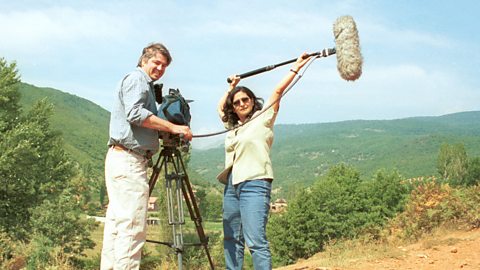
If you have no control over the location, it's best to use a wind shield over the microphone.
If you have filmed an exterior scene but wind noise can be heard, mute the audio to use the footage in the edit.
Make sure your meter stays outside of the red
The interface on your editing software will have an audio meter of some kind.
The meter is a visual guide to how loud your soundtrack is.
It has two bars - one for noise coming from the left hand channel and one from the right.
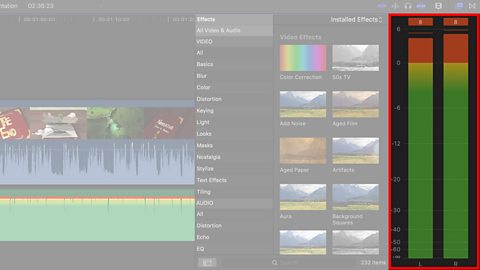
As each bar gets higher it moves into a different colour region.
Noise that peaks into the red is too loud and will be distorted. Adjust the audio level of your clips, where needed, to avoid this.
Using sound effects for emotional impact
Where possible, make sure that any significant actions are accompanied by sound effects.
If, for example, your film has a scary scene where a door to a haunted house is opened, you will want to emphasise that moment.
The footage may already have an audible noise made by the door, but you may want to replace it with a scarier sounding and more dramatic sound effect.fect.
