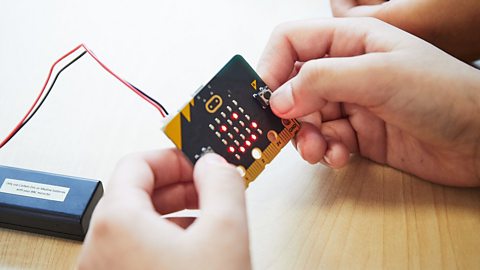
In the CBBC series The Dumping Ground, Izzy, Dita and Erin use the BBC micro:bit to create a radio door alarm to monitor the door to their secret den. They set up a trap as they want to find out who has been stealing their chocolate.
Watch the video below with your class to see how things go and then try out the activity for yourselves. You’ll also find teacher notes on this page along with a link to a video on the Micro:bit Educational Foundation website that explains the activity.
At the beginning of this video, Izzy tells us that she and her friends used the micro:bit to make a radio door alarm to monitor the door to their secret den. The door alarm uses the micro:bit’s built-in compass, called a magnetometer, which can be programmed to send an alert when it moves. We then see a clip from the episode showing Izzy, Dita and Erin devising a way to find out who has been stealing their chocolate and deciding to use the micro:bit to help. The alarm goes off and they rush off to find out who the culprit is.
Izzy: This is my micro:bit. It’s just like the ones you’ve got in your classroom. As you probably already know, it’s a tiny little computer that helps you learn about coding. It’s really easy to use. Keep watching to see how we used the micro:bit to alert us and catch anyone who might be trying to steal our chocolate.
Dita: We can’t accuse people without evidence.
Izzy: Then we get evidence. Set a trap.
Erin: Great! We rig the cupboard, and when anyone tries to steal any chocolate, alarms go off. And bang! A net falls over them. It could just be a duvet if we can’t find a net…
Izzy: Or… we do this. We set up one of our phones in the cupboard on video call.
Erin: And catch them in the act.
Izzy: And we’ll rig up micro:bits to set an alarm when the cupboard door is opened. It’ll be easy.
Erin: They’ve hit. Go, go, go!
Izzy: We did it by creating a door alarm sensor using the micro:bit’s in-built compass, called a magnetometer. When the door opened, the micro:bit was triggered to alert us. Why don’t you see if you can create your own door alarm sensor? Are you ready to have a go?
Radio door alarm. External Link
Visit the Micro:bit Educational Foundation for an easy-to-follow guide to the activity. Please be aware that this link will take you away from the BBC.
Teacher notes
Before watching
- Introduce the BBC micro:bit device and MakeCode programming platform if pupils are not already familiar with it
- Check pupil understanding of sensors - link to their own senses and familiar sensors they may have already encountered, e.g. smoke alarms, automatic doors, automatic lighting, smart speakers etc.
- Discuss why a door alarm might be useful - make a list of scenarios
After watching
- Revise understanding of magnets (Science/Science and Technology) and compasses (Geography/Humanities)
- Clarify understanding of key terms mentioned in the clip - compass, magnetometer
- Discuss how many micro:bits they will need to make the alarm - one to sense the door movement and send an alert signal and one to receive the signal remotely and set off the alarm
- Talk about how the two micro:bits will communicate with each other - using wireless radio waves - give some simple background information
- Clarify that they understand how the magnetometer will be able to sense when the door is opened - it will measure changes in the strength of the magnetic field produced by the magnet stuck onto the door, if the strength falls below a specific level or threshold the alarm will sound
Visit the project page on the Micro:bit Educational Foundation website and work through the steps to:
- Complete the coding project
- Program the micro:bits to set them up as Radio Door Alarms
- Test them in small groups/pairs on cupboards and doors around the classroom
After completing the activity
Discuss what you discovered during the project:
- How far can the micro:bit transmit the radio alert signal?
- Did the door alarm work if the door was only opened a tiny bit?
Discuss ways of improving the device
- How could you make the sensor more/less sensitive?
- How could you modify the program so that the alarm would output only a visual alert or only a sound alert?
- Can you change the alert symbol/sound?
Extension activities
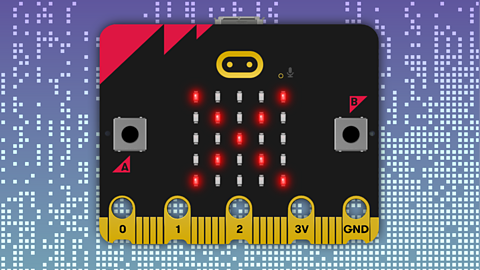
- Annotate photos/images of the micro:bit - label the key components and features
- Annotate a photo of the radio door alarm set-up to show what all the elements are doing
- Try out ways of using different sensors on the micro:bit to trigger an alarm – e.g. the touch sensor and tilt sensor
- Create a glossary to explain key vocabulary and technical terms used in the project
- Write an instruction manual for the micro:bit for younger children
- Compare a traditional compass with the micro:bit compass – do they give the same direction readings? Walk around the school/playground and compare
- Research other types of door alarm and the way that they work – make a table to compare
- Create an advert/marketing campaign for the wireless door alarm
- Create a comic strip starring a cartoon version of the micro:bit exploring other types of problems that they could solve
- Write their own version of a script/screenplay for The Dumping Ground characters in a new scene where they use the micro:bit
- Write a story (using The Dumping Ground characters or their own characters) where the micro:bit is used to solve a problem
Extension ideas for pupils with special educational needs
- Provide images of the different stages of the activity (write code, transfer code to micro:bit, set up door alarm, receive alert signal) and ask pupils to sequence them
- Complete gap-fill descriptions and explanations about the project using word-banks of key vocabulary
- Ask pupils to annotate a photo of the door alarm set-up using prepared word cards
- Work with a small group on the Simple Door Alarm that only uses one micro:bit – see the Micro:bit Next Gen website for more details
Download as a PDF:Computing topics covered | Cross-curricular links and activities
Educational context
Compass
A compass is a device that helps us find the cardinal directions - North, South, East and West. It uses a small, magnetised piece of metal that is fixed inside the compass in a way that allows it to spin freely. It will always rotate to align itself to show North using the Earth’s magnetic field.
Magnetometer or digital compass
A magnetometer is an input sensor that detects magnetic fields. It can be programmed to act as a digital compass that can detect the direction in which it is facing. It can also measure the strength of the magnetic field produced by a nearby magnet and how the strength changes when the magnet moves further away.
Radio Waves
Radio is a way of transmitting and receiving messages over a distance. The micro:bit uses radio waves to communicate wirelessly between micro:bits and in order to generate and detect these waves the micro:bit has an antenna on top of the board. When one device transmits or sends a message, the other will receive the message and can be programmed to send a message back.
Senses
Humans use their five senses to find out what is happening in the world around them. Other animals may have extra senses that humans don’t have. Having senses means we can react to things around us, and stay out of danger.
Sensors
Computer sensors also collect information about the world. They convert this information into digital data and it can then be understood by a computer. We can program the computer to react to this information in a particular way, by making a sound, or switching something on or off. For example, an automatic door has a sensor that can tell if there is movement nearby and open to let someone through.
You can watch The Dumping Ground on CBBC or on BBC iPlayer

More from BBC micro:bit - the next gen
Make an indoor-outdoor thermometer. video
Watch as So Awkward's Martha talks about the micro:bit and then have a go at the activity with your class.

Make a funny voice recorder. video
See Joe get pranked using the BBC micro:bit and then try out one of the activities yourselves.
Make a game of Hot Potato video
Watch as Leah codes a game of Hot Potato on the micro:bit and the Lagging team have a go at the activity.

Make a teleporting duck. video
Watch as Shereen demonstrates how to play Teleporting Duck using the micro:bit and have a go at the activity.
Make a kick strength data logger. video
Watch as Raf uses the micro:bit to see who has the most powerful kick and have a go at a similar project.

BBC micro:bit playground survey
Discover seven cross-curricular activities to find out more about your playground.

Six easy starter lessons. External Link
Get six lessons from the Micro:bit Educational Foundation to introduce your class to the micro:bit.
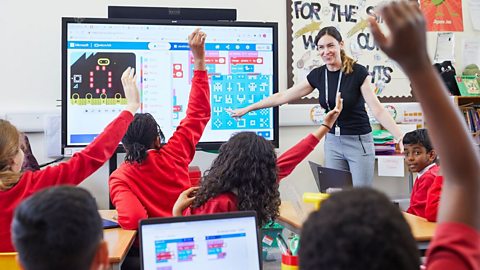
Classroom resources
Check out resources that will help you get ready once you receive your micro:bits.

Training resources for teachers
Find out about the free courses - both online and in-person - to help primary schools teach about the micro:bit.
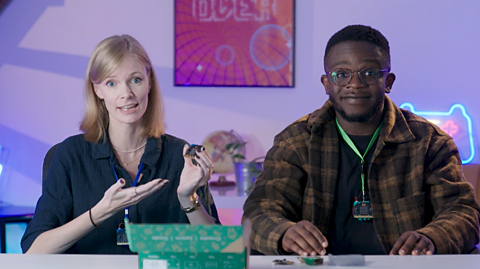
Assembly video. video
Watch along with your class as gamer FalseSymmetry and Newsround's De-Graft unbox the BBC micro:bit and explain some of the exciting features and activities.
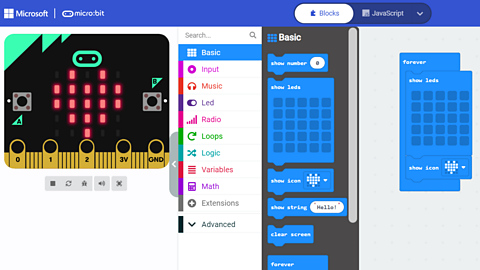
Coding made easy with the MakeCode platform
Find out more about using MakeCode and the training resources available to get you started.
Our partners
Find out more about the organisations supporting our micro:bit initiative.