Once Chris has got all the information into his database he can then start using it. The most obvious job his database can do for him is to tell him who has got his videos and DVDs.
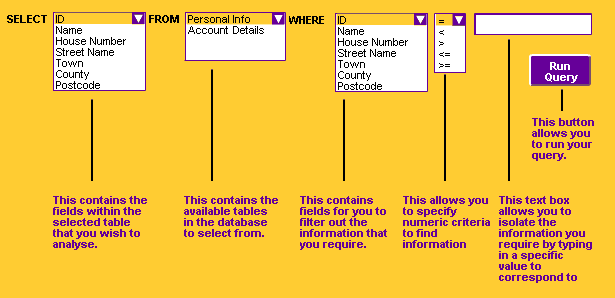
Databases use a language called Structured Query Language to pull information out of tables. The most common command in this language is ’Select’. Structured Query Language, or SQL as it is known, is quite easy to learn. If Chris wanted to list all the DVDs the store owns, he might write something like this: SELECT Title FROM Media WHERE [Media Type]=DVD The SQL keywords are shown in bold. What this means is: Select the Title field from all the records in the Media table where the Media Type field is equal to ’DVD’. 
| The general rule is:
SELECT fieldname FROM tablename WHERE fieldname=field contents. |
This shows you how you might search for information from a database.
There is a lot of information
available online to help you with
putting databases together.
Have a look at this website.
|
If you're studying ICT at Level 2, you don't need to know how to make any databases. You will need to show that you know how to use them.
If you're studying ICT at Level 3, you will only need to show that you can use the wizards to carry out the searches, queries etc. You will need to know what the keywords and functions mean.
Go to the next screen to see how much you remember...
|