FAQsUploading Photos- How many photos can I submit?
- Can the images be manipulated?
- Are there limits on the file size or file types for uploads?
- Can anybody comment on my photos?
- Why can't I see my photos?
- How can I stop people downloading my photos?
- How can I protect my photos?
1:How many photos can I submit?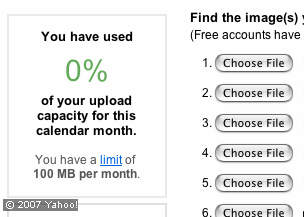 With a free account you can upload up to 100MB of data every month (that’s around 30 images depending on your camera)or how much post-processing you like to do). If you register for a pro account the limit is removed. When you open a new account, it enters a queue for review after you've uploaded 5 public photos. That review takes around 3-4 days. Before that, your photos won't appear in public searches, but would show up if you submitted them to the British Building group. 2. Can the images be manipulated? The images will be resized automatically by Flickr but that’s all. 3:Are there limits on the file size or file types for uploads? Photos must be less than 5MB in size and should be saved as JPEGs, non-animated GIFs and PNGs. (TIFFs and some other file types are OK but they will be converted to and stored in JPEG format). 4:Can anybody comment on my photos?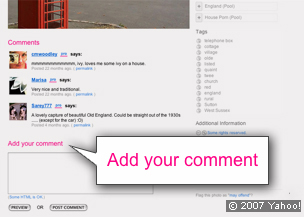 This is a popular part of photo sharing. Comments usually appear under the photo. Most photo sharers really enjoy this, but you don’t have to join in and you do not have to allow other people to comment on your photos. - Your account has an area that allows you to decide whether other people can see your photos, comment on them, or add tags to them.
- If you join the BBC Britain in Pictures group, all group members will be able to add tags or comment on your photo.
5:Why can't I see my photos? When you sign up your new account is marked as 'pending'. This allows your first photos to be reviewed to make sure you aren't posting offensive images or junk that you’ve inadvertently downloaded from the Web. The review process does not begin until you have uploaded at least five public mages and takes around four to five days. Whilst your account is ‘pending’ no one else can see your photos. 6:Can I stop people downloading my photos?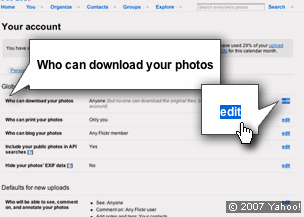 You can decide who can or cannot do this by changing your Flickr account settings which can be found in the drop down menu next to ‘You’ at the top of the Flickr page. 7: How can I protect my photos?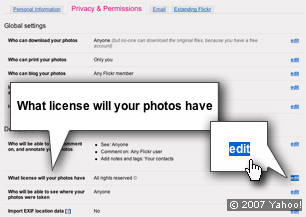 You can reserve all rights or give certain rights away– it’s up to you. To find out more: - Select ‘You’
- Select ‘Your Account’ from the drop down menu
- Select ‘Privacy and Permissions’
|


