FAQsTags- What are tags?
- What are the best tags?
- What happens if I search by tag?
- Can I add tags to other peoples photos?
1.What are tags?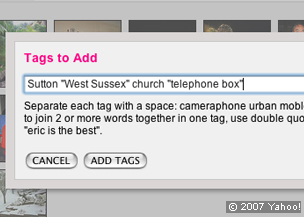 Tags are key words that you can add to a photo. They have two functions: they help describe the photo to make it easier to find; and they help create pools of photos that have something in common. You can use single words or several words together inside "speech marks." You can add as many tags as you like to each photo. 2.What are the best tags?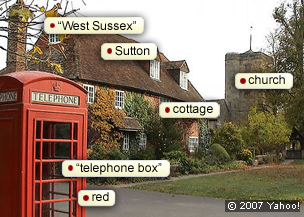 The best tags include the place e.g. "Sutton"”, the region e.g. "West Sussex", descriptive words e.g. "telephone box", cottage, village, church, Norman, rural, Sunday, "stained glass". Note how speech marks are used to keep more than one word in a tag. 3.What happens if I search by tag?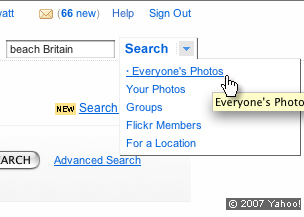 You will see all the photos with the same tag. For example, if you type "stained glass" in the BBC Britain in Pictures Group you will see all the photos in the BBC group pool that have been tagged with "stained glass." However, if you type the same tag into 'Search Everybody's Photos' you will be able to see all the photographs in Flickr with this tag…it could be millions! For example, try typing in 'beach'. You can refine your search by adding more words. For example, try typing in 'beach Britain.' This produces a combined search that reduces the number of photos to a more manageable amount. Just experiment with tags. Tagging is easy to get the hang of and an addictive way to create interesting pools of photos. 4.Can I add tags to other peoples' photos? Yes – but only if the photographer has allowed this in the privacy settings they have chosen or if you are both members of the same group.
|


