FAQsGroups- What is a group?
- How do I join the BBC group?
- How do I add my photo to the BBC Britain in Pictures group
- Will my photo always be in the group?
- Who can see photos in a group?
- Why can't I see my photo in the group?
- How do I leave a group?
1. What is a group? A group is a collection of Flickr members who share photos about a common theme. The Britain in Pictures group share photos of British buildings. 2. How do I join the BBC Britain in Pictures group?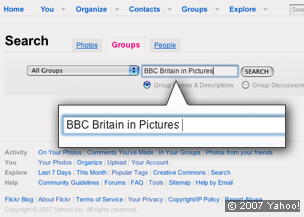 - Select 'Group' from the top of the Flickr page
- Enter BBC Britain in Pictures in the 'Find a group' box
- Select BBC Britain in Pictures group from the menu
- Select 'Join this group' (middle right of the page)
- Confirm you want to join the group
3. How do I add a photo to the BBC Britain in Pictures group?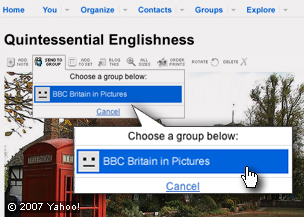 - Select 'You' from the top of the Flickr page
- Select the photo that you want to send to the group
- Check that your tags include the name of the building, its location and anything else that you think helps describe your photo
- Check that the photo is marked 'public'
- Select 'send to group' from the top menu
- Select the BBC Britain in Pictures group (if you are a member of more than one group)
- Add the photo to the group
4.Will my photo always be in the group? Once your photo has been added to the group pool it can only be removed by you or the group administrators. 5.Who can see photos in a group pool? Adding a photo to a group pool allows any group member to view the photo and add notes, tags and comments, regardless of its privacy settings. If you mark your photo as private within a group, only other members of the group will be able to view and tag it. The photo cannot be seen by people who are not members of the group. 6.Why can't I see my photo in the group? You may not have uploaded five photos so your account it still pending - make sure that you have uploaded all five. Similarly, if you have recently uploaded five or more images you may have to wait for a few days for your account to be processed. 7. How do I leave a group group? Go to your Groups page and select the group you'd like to leave. On the right-hand side, underneath the box where you can search group discussions, there's a red link labelled 'Quit (group name)?' Click this and you'll be taken to a page where you can leave the group.
|


