How can we help? We provide a wide selection of audio and video on the BBC Birmingham website. Wherever they occur, you will see a video symbol or a symbol for audio. To watch video or listen to live radio/sound clips you'll need to install the latest free version of RealPlayer onto your computer. Downloading realplayer here
Watching videos Look out for the video symbols across our website to access any of the exciting film content made and submitted by our users. Simply click the text link to watch the video. All video content can be viewed using the BBC Media window or in a stand alone Realplayer window. Changing your video streaming settings 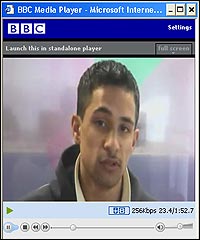 | | Watching video using BBC Media Player |
If you are having problems watching the videos streamed on the BBC Birmingham website at the best quality you can change the settings on your PC by following the simple steps below. Viewing videos using BBC Media player>>> - In the BBC Media selector window that pops up click on settings link at the top of the window.
- In the preferences window select whichever quality option that best suits your PC’s internet connection speed.
|
Viewing videos at a high quality connection using BBC Media player>>> - To ensure your PC views the videos at the best quality depending on your PC's internet speed you may need to change your PC settings.
- Once the video starts to play right click on the picture and select the preferences option in the view menu.
- Change the bandwidth settings to 384kps DSL/cable or over using the drop-down menu.
- Click OK
- Play the video again.
|
Using Realplayer stand alone player option>>>  | | Watching video using standalone player |
- Video content can also be watched in using the Realplayer standalone player.
- Click the video text link to start watching a selected video
- At the top left corner of the BBC Media player window click the link 'launch this in standalone player'.
- A Realplayer standalone window will play the video content
|
Viewing videos at a high quality connection using Realplayer >>> - In the Realplayer window select preferences in the tools menu.
- Change the bandwidth settings to 384kps DSL/cable or over using the drop-down menu.
- Click OK.
- Play the video again.
|
More help, tips, advice, links and answers>>> You can find more help, advice, tips for enjoying the BBC’s website multi-media on the BBC help pages. |