To get RealOne Player for free, follow these instructions:
1. Click on the link below to download realplayer.
2. On the page that comes up you should click on the link of the nearest location to you ( London UK ) Picking the nearest place should make your download quicker.

3. When you've clicked on the link it will bring up a file download box - this will begin saving the program to your computer. Select "Save this program to disk" and then "OK"
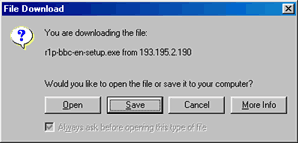 .
.
4. Another box pops up, which lets you choose where to save the program. From the "Save In" menu select "Desktop" (Saving it on the desktop means you'll be able to find it easily).
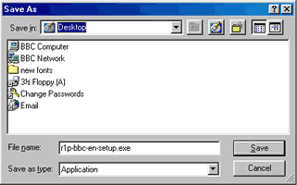
5. Click on save and the RealOne Player will start to download - it may take some time.
6. Once downloading has completed, you need to find where it has saved on your computer ( i.e your desktop ) and then double click on the file. RealPlayer will begin to set up on your computer.
7. From here, follow the instructions that RealPlayer gives you - all you really need to do is skip through the screens by clicking on "Next"
8. Once it's finished installing, RealPlayer will start - from here you can close it down, and then click on the links to listen to audio and watch video - whenever RealPlayer is needed, it will automatically start!
